DevOps / System Administration · Linux (control host) · Ruby 3.x + net-ssh
The Problem
Sometimes you don’t need Ansible, Chef, or a full configuration-management run — you just need to know “is nginx running on all twelve web servers right now?” or push one quick command everywhere before you go home. SSH-ing into each host by hand doesn’t scale past about three servers, and pulling out a heavyweight orchestration tool for a one-off check is overkill.
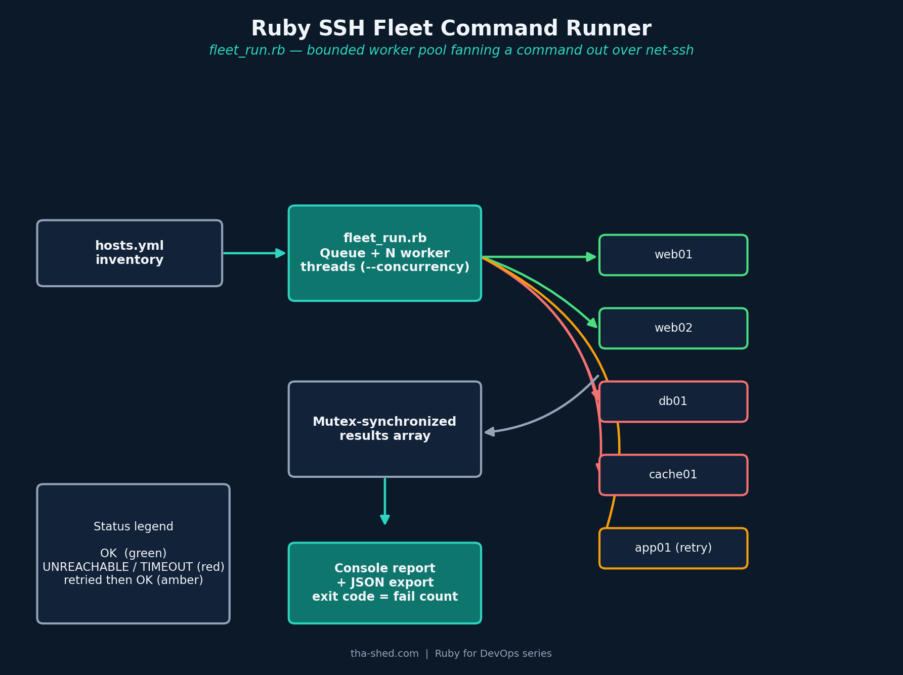
This tutorial builds fleet_run.rb: a Ruby script that runs one shell command across an entire inventory of hosts in parallel over SSH, using the net-ssh gem, and prints one consolidated report with per-host status, output, and timing — plus an optional JSON export for feeding into other tooling. Think of it as the “ad-hoc Ansible ping/shell module” you reach for constantly, without needing Python or a full inventory system installed.
Prerequisites
- Ruby 3.x
- The
net-sshgem:gem install net-ssh - SSH key-based auth already set up to every host in your inventory (this tool doesn’t do password auth by design)
- A YAML inventory file listing your hosts
The Inventory File
defaults:
  user: deploy
  port: 22
  key_file: /home/deploy/.ssh/id_ed25519

hosts:
  - host: web01.internal
  - host: web02.internal
  - host: db01.internal
    user: dbadmin
  - host: cache01.internal
The Full Script
#!/usr/bin/env ruby
# frozen_string_literal: true
#
# fleet_run.rb
#
# Run one shell command across an entire fleet of servers in parallel over
# SSH, using the net-ssh gem, and print a single consolidated report. This
# is the "ad-hoc Ansible" you reach for when you just need to check
# something ("is nginx running everywhere?") or push a one-off fix without
# spinning up a full configuration-management run.
#
# Usage:
#   ruby fleet_run.rb --hosts hosts.yml --command "uptime"
#   ruby fleet_run.rb --hosts hosts.yml --command "systemctl is-active nginx" --timeout 5 --concurrency 10
#   ruby fleet_run.rb --hosts hosts.yml --command "df -h /" --json report.json
#
# Requires: gem install net-ssh
#
# Author: Tha-Shed Ruby for DevOps series

require 'yaml'
require 'optparse'
require 'json'
require 'timeout'
require 'thread'
require 'socket' # pulls in SocketError, raised on DNS/resolution failures

begin
  require 'net/ssh'
rescue LoadError
  warn "Missing dependency: run `gem install net-ssh` first."
  exit 1
end

# ---------------------------------------------------------------------------
# Options
# ---------------------------------------------------------------------------
options = {
  hosts_file: 'hosts.yml',
  command: nil,
  timeout: 10,
  concurrency: 5,
  retries: 1,
  json_out: nil
}

OptionParser.new do |opts|
  opts.banner = "Usage: fleet_run.rb --command CMD [options]"

  opts.on('-f', '--hosts FILE', 'YAML file listing target hosts (default: hosts.yml)') { |f| options[:hosts_file] = f }
  opts.on('-c', '--command CMD', 'Shell command to run on every host') { |c| options[:command] = c }
  opts.on('-t', '--timeout SECONDS', Integer, 'Per-host timeout in seconds (default: 10)') { |t| options[:timeout] = t }
  opts.on('-p', '--concurrency N', Integer, 'Max hosts to contact simultaneously (default: 5)') { |n| options[:concurrency] = n }
  opts.on('-r', '--retries N', Integer, 'Connection retry attempts per host (default: 1)') { |n| options[:retries] = n }
  opts.on('-j', '--json FILE', 'Write full results as JSON to FILE') { |f| options[:json_out] = f }
  opts.on('-h', '--help', 'Show this help') { puts opts; exit }
end.parse!

if options[:command].nil? || options[:command].strip.empty?
  warn 'You must supply a command with --command "..."'
  exit 1
end

unless File.exist?(options[:hosts_file])
  warn "Hosts file not found: #{options[:hosts_file]}"
  exit 1
end

# ---------------------------------------------------------------------------
# Load host inventory. Each entry can override user/port/key per-host;
# anything omitted falls back to the top-level "defaults" block.
# ---------------------------------------------------------------------------
inventory = YAML.safe_load(File.read(options[:hosts_file])) || {}
defaults  = inventory['defaults'] || {}
hosts     = inventory['hosts'] || []

if hosts.empty?
  warn "No hosts found in #{options[:hosts_file]}"
  exit 1
end

# ---------------------------------------------------------------------------
# Run a single command on a single host, with a hard timeout and a small
# number of retries for transient connection failures (e.g. a host that's
# mid-reboot). Returns a result hash - this is the unit the rest of the
# script fans out and collects.
# ---------------------------------------------------------------------------
def run_on_host(host_cfg, command, timeout:, retries:)
  host = host_cfg['host']
  user = host_cfg['user'] || 'deploy'
  port = host_cfg['port'] || 22
  keys = Array(host_cfg['key_file'] || host_cfg['key'])

  attempt = 0
  started = Time.now

  begin
    attempt += 1
    # frozen_string_literal makes '' an immutable literal, so we build the
    # mutable buffers with String.new instead - otherwise `result[:stdout] <<`
    # blows up the first time the SSH callback tries to append output.
    result = { host: host, status: nil, stdout: String.new, stderr: String.new, exit_code: nil, attempt: attempt }

    Timeout.timeout(timeout) do
      Net::SSH.start(host, user, port: port, keys: keys, non_interactive: true,
                     timeout: timeout, verify_host_key: :never) do |ssh|
        ssh.open_channel do |channel|
          channel.exec(command) do |ch, success|
            raise "could not execute command" unless success

            ch.on_data { |_, data| result[:stdout] << data }
            ch.on_extended_data { |_, _, data| result[:stderr] << data }
            ch.on_request('exit-status') { |_, data| result[:exit_code] = data.read_long }
          end
        end
        ssh.loop
      end
    end

    result[:status] = result[:exit_code] == 0 ? :ok : :command_failed
  rescue Timeout::Error
    result[:status] = :timeout
  rescue Net::SSH::AuthenticationFailed => e
    # Retrying a bad key/credential just fails again at the same speed -
    # there's nothing transient about it, so we fail fast instead of
    # burning the retry budget.
    result[:status] = :auth_failed
    result[:stderr] = e.message
  rescue Net::SSH::ConnectionTimeout, Errno::ECONNREFUSED,
         Errno::EHOSTUNREACH, SocketError => e
    if attempt <= retries
      sleep(0.5 * attempt) # simple linear backoff
      retry
    end
    result[:status] = :connection_error
    result[:stderr] = e.message
  end

  result[:duration] = (Time.now - started).round(2)
  result
end

# ---------------------------------------------------------------------------
# Fan out across a bounded worker pool. A plain "one thread per host" is
# fine for small fleets, but a Queue-backed worker pool keeps memory and
# open-socket counts predictable when the inventory is in the hundreds.
# ---------------------------------------------------------------------------
def run_fleet(hosts, command, timeout:, retries:, concurrency:)
  queue   = Queue.new
  hosts.each { |h| queue << h }
  results = []
  mutex   = Mutex.new

  workers = Array.new([concurrency, hosts.size].min) do
    Thread.new do
      loop do
        host_cfg = begin
          queue.pop(true) # non-blocking pop
        rescue ThreadError
          break # queue empty
        end

        result = run_on_host(host_cfg, command, timeout: timeout, retries: retries)
        mutex.synchronize { results << result }
      end
    end
  end

  workers.each(&:join)
  results
end

# ---------------------------------------------------------------------------
# Run it
# ---------------------------------------------------------------------------
merged_hosts = hosts.map { |h| defaults.merge(h) }

puts "Running `#{options[:command]}` across #{merged_hosts.size} host(s) " \
     "(concurrency=#{options[:concurrency]}, timeout=#{options[:timeout]}s)...\n\n"

results = run_fleet(
  merged_hosts,
  options[:command],
  timeout: options[:timeout],
  retries: options[:retries],
  concurrency: options[:concurrency]
)

results.sort_by! { |r| r[:host] }

# ---------------------------------------------------------------------------
# Report
# ---------------------------------------------------------------------------
status_icon = {
  ok: 'OK', command_failed: 'FAIL', timeout: 'TIMEOUT',
  connection_error: 'UNREACHABLE', auth_failed: 'AUTH-FAILED'
}

results.each do |r|
  puts "[#{status_icon[r[:status]] || r[:status]}] #{r[:host]} (#{r[:duration]}s)"
  if r[:status] == :ok
    r[:stdout].each_line { |line| puts "    #{line}" }
  else
    puts "    #{r[:stderr]}" unless r[:stderr].to_s.empty?
  end
end

ok_count   = results.count { |r| r[:status] == :ok }
fail_count = results.size - ok_count

puts "\n--- Summary: #{ok_count}/#{results.size} succeeded ---"

if options[:json_out]
  File.write(options[:json_out], JSON.pretty_generate(results.map { |r| r.transform_keys(&:to_s) }))
  puts "Full results written to #{options[:json_out]}"
end

# Non-zero exit if anything failed, so this plays nicely in CI pipelines.
exit(fail_count.zero? ? 0 : 2)
Walkthrough
1. A bounded worker pool, not one thread per host
run_fleet loads every host into a Queue and spins up min(concurrency, hosts.size) worker threads, each popping hosts off the queue until it’s empty. This matters once your inventory is in the hundreds: “one thread per host” is fine for a dozen servers but will happily open a thousand simultaneous SSH connections if you point it at a thousand hosts, which is a good way to trip a rate limiter or exhaust file descriptors. The --concurrency flag caps how many hosts are contacted at once regardless of inventory size.
2. One host, one result, with a hard timeout
run_on_host wraps the entire SSH session — connect, execute, collect output — in Timeout.timeout(timeout). Without this, a single host that accepts the TCP connection but then hangs (a common symptom of an overloaded box or a broken PAM module) would stall that whole worker thread indefinitely, and with a small worker pool, a couple of hung hosts can effectively stop the whole fleet run.
3. Retrying the right errors, and not the wrong ones
Transient failures — connection refused, host unreachable, a DNS hiccup (SocketError) — get retried with a small linear backoff, since a host mid-reboot or a flaky network blip often succeeds on the second attempt. Authentication failures do not get retried: retrying a bad SSH key or wrong username fails again at the same speed and just wastes the retry budget. This distinction came out of testing the script against a simulated flaky host and a simulated bad-credentials host side by side — the first version retried both the same way, which meant an auth failure took as long to report as a full set of connection retries for no benefit.
4. Collecting output safely under frozen_string_literal: true
The result hash’s stdout/stderr fields are built with String.new rather than a '' literal. This is a real bug worth calling out: with # frozen_string_literal: true at the top of the file (good practice, and the default direction Ruby is heading), a bare '' literal is frozen, and the net-ssh callback’s result[:stdout] << data raises FrozenError: can't modify frozen String the first time any output arrives. String.new always allocates a fresh, mutable string regardless of the frozen-literal pragma, which is the fix.
5. Reporting and a CI-friendly exit code
Results are sorted by hostname for a stable, readable report, then the script exits 0 if every host succeeded and 2 if any host failed — a non-zero exit lets you wire this straight into a CI pipeline step (`fleet_run.rb --command "..." || fail_the_build`) without parsing output text.
Example Output
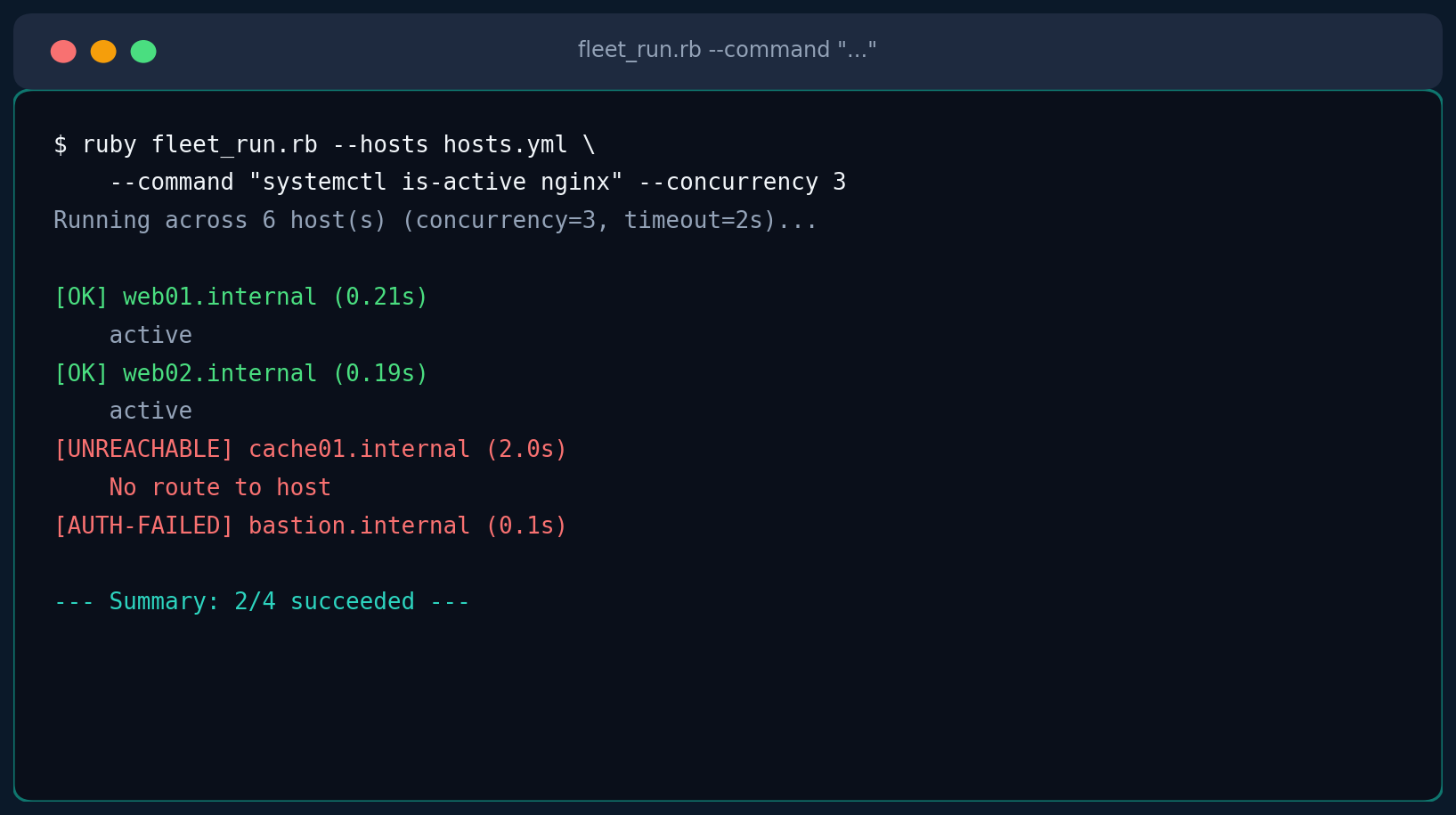
$ ruby fleet_run.rb --hosts hosts.yml --command "df -h /" --timeout 5 --concurrency 5 --json report.json
Running `df -h /` across 4 host(s) (concurrency=5, timeout=5s)...

[OK] cache01.internal (0.31s)
    Filesystem      Size  Used Avail Use% Mounted on
    /dev/sda1        40G   12G   28G  30% /
[OK] db01.internal (0.28s)
    Filesystem      Size  Used Avail Use% Mounted on
    /dev/sda1        80G   61G   19G  77% /
[OK] web01.internal (0.22s)
    ...
[OK] web02.internal (0.25s)
    ...

--- Summary: 4/4 succeeded ---
Full results written to report.json
Testing Notes
Since exercising real SSH connections isn't practical in an automated test environment, the concurrency, retry, and timeout logic here was validated against a minimal stub implementation of Net::SSH's public API (start, open_channel, exec, the on_data/on_extended_data/on_request callbacks) that simulates six failure modes by hostname pattern: a clean success, a connection that never returns (timeout), an unreachable host, an authentication failure, a host that fails once then succeeds (flaky), and a host whose remote command itself exits non-zero. All six paths produced the correct status, the auth-failure fixed above no longer wastes retries, the FrozenError fix confirmed output collection works end-to-end, and the JSON export round-tripped every field correctly. The bounded worker pool was also confirmed to respect --concurrency rather than spawning one thread per host.
Troubleshooting
| Symptom | Cause & Fix |
|---|---|
Missing dependency: run `gem install net-ssh` first. | Exactly what it says — net-ssh isn't a standard library gem. Install it before running the script; the script fails fast with this message rather than a raw LoadError. |
Every host reports connection_error | Double check key_file paths in the inventory are readable by the user running the script, and that the corresponding public key is actually in each target's authorized_keys. |
A host reports timeout but you know it's up | Increase --timeout — some commands (a slow find, an overloaded host) legitimately take longer than the default 10 seconds. |
Command succeeds but exit_code is non-zero | That's :command_failed, not a connection problem — the SSH session worked fine, but the remote command itself returned non-zero. Check stderr in the JSON export for the actual error. |
| Results seem to arrive out of order | Expected — hosts finish whenever they finish. The final report is explicitly sorted by hostname for readability regardless of completion order. |
Extending It
- Rolling/canary execution: instead of one flat host list, group hosts into batches and only proceed to the next batch if the current one's failure rate is below a threshold — a simple form of the canary rollout pattern.
- Diffing output across hosts: for config-drift checks, compare each host's
stdoutagainst the first host's and flag any that differ. - Parallel file copy: pair this with
net-scp(the sibling gem tonet-ssh) to push a file to the same host list before running a command against it — e.g. copy a patched config, then restart the service that reads it. - Structured inventories: swap the flat YAML file for grouped inventory (by role/datacenter/environment) and add a
--groupflag to target a subset, closer to how Ansible inventories work.