Auditing the Windows Registry with Ruby: A win32/registry Compliance Checker
DevOps / System Administration · Windows Server · Ruby 3.x
The problem this solves
Security hardening baselines (CIS benchmarks, internal standards, audit checklists) almost always come down to a list of specific Windows Registry values: is NLA required for RDP, is SMBv1 disabled, is Defender’s real-time protection left on, is AutoRun turned off. Checking these by hand across a fleet of servers with regedit doesn’t scale, and Group Policy compliance reports don’t always tell you what’s actually set on a given box right now. This tutorial builds a small Ruby auditor that reads a list of registry values, compares each against an expected setting, prints a PASS/FAIL report (plus a JSON version for feeding into a dashboard), and can optionally remediate failing values in place with --fix.
Prerequisites
- Ruby 2.7+ for Windows (e.g. via RubyInstaller), tested against Ruby 3.0
- The
win32/registrystandard library, which ships with Windows Ruby installs (it is not available on Linux/macOS Ruby — see the testing note below) - Administrator privileges to read (and, with
--fix, write) the relevantHKEY_LOCAL_MACHINEkeys - Windows Server 2016+ or Windows 10/11
A note on testing this script: win32/registry only exists on Windows, so the real registry access code (WindowsRegistryAccessor) can’t run in a Linux sandbox. As with any Windows-only automation, the fix is to isolate registry access behind a narrow interface (RegistryAccessor) and test everything else — the rule engine, PASS/FAIL evaluation, remediation logic, and reporting — against a FakeRegistryAccessor test double backed by an in-memory hash. That’s what was actually exercised to verify the behavior documented below; only the real Windows accessor itself needs a Windows host to confirm.
How it works
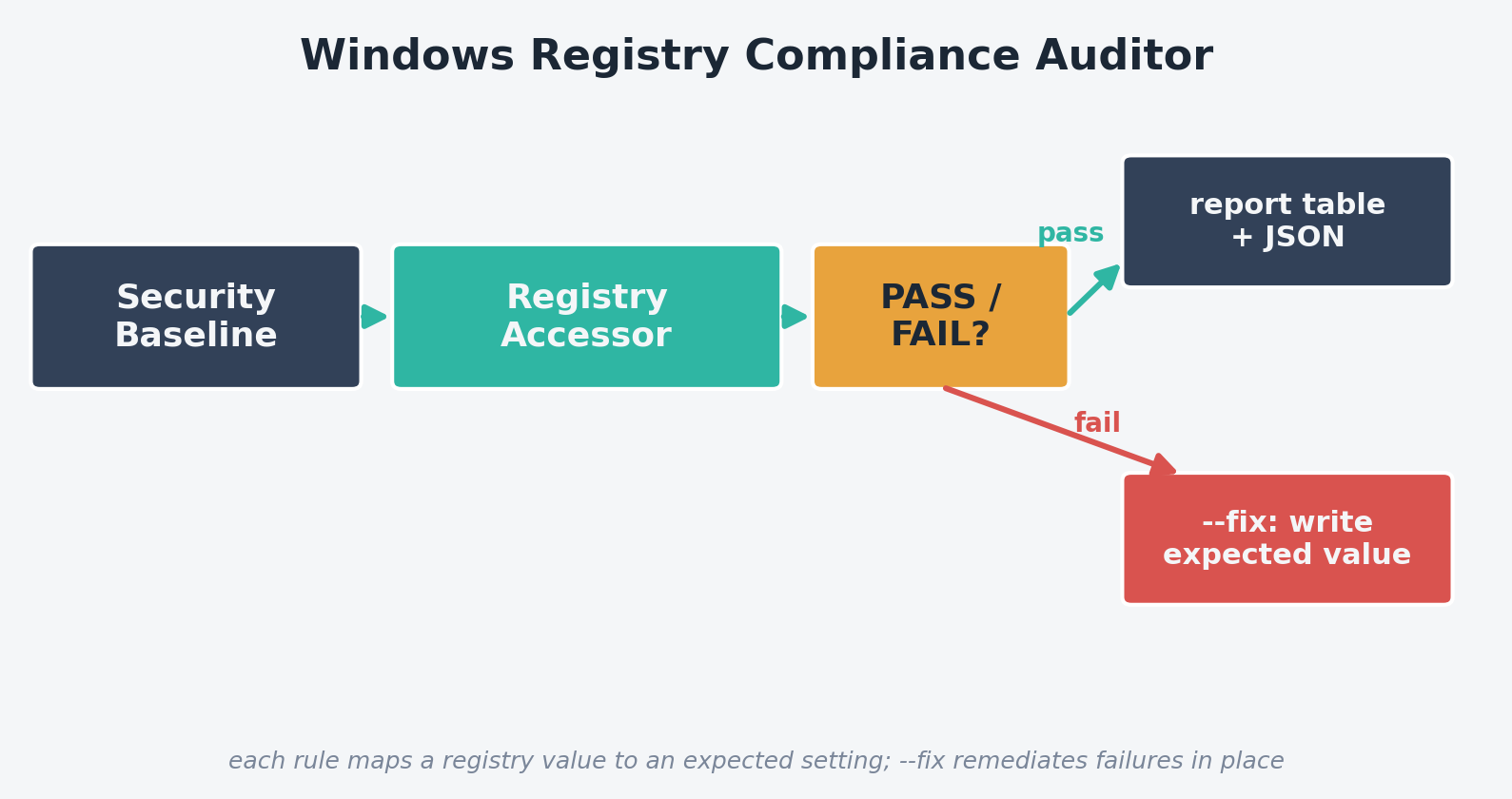
- RegistryRule — declares one baseline check: which hive/key/value to look at, what value is expected, and a severity label
- RegistryAccessor — an abstract interface with
readandwrite, so the rule engine never touches the registry API directly - WindowsRegistryAccessor — the real implementation, backed by
Win32::Registry - ComplianceAuditor — evaluates every rule against an accessor and, on
--fix, writes the expected value for anything that failed and re-checks - ReportPrinter — prints a PASS/FAIL table and can write a JSON report for downstream tooling
The complete code
Save this as registry_audit.rb:
#!/usr/bin/env ruby
# frozen_string_literal: true
#
# registry_audit.rb
#
# Audits a set of Windows Registry values against a small security baseline
# (the kind of checks a CIS benchmark or internal hardening standard asks
# for: RDP Network Level Authentication enabled, SMBv1 disabled, Windows
# Defender not switched off, etc.), reports PASS/FAIL per rule, and can
# optionally remediate failing values with --fix. Solves the "which of our
# 200 servers actually has the hardening settings we think they have"
# problem without needing a full configuration management stack.
#
# Usage (on a Windows host, from an elevated shell):
#   ruby registry_audit.rb
#   ruby registry_audit.rb --fix
#   ruby registry_audit.rb --demo   (runs against an in-memory fake registry, no Windows needed)

require 'optparse'
require 'json'
require 'time'

# --- Abstraction: anything that can read/write a registry value -----------
# Keeping registry access behind a narrow interface is what lets the audit
# rules and reporting logic be exercised without a real Windows host.
class RegistryAccessor
  def read(_hive, _key, _value_name)
    raise NotImplementedError
  end

  def write(_hive, _key, _value_name, _data, _type)
    raise NotImplementedError
  end
end

# --- Real Windows implementation, backed by the win32/registry stdlib -----
class WindowsRegistryAccessor < RegistryAccessor
  HIVE_MAP = {
    'HKLM' => :HKEY_LOCAL_MACHINE,
    'HKCU' => :HKEY_CURRENT_USER
  }.freeze

  def initialize
    require 'win32/registry' # only present on Windows Ruby installs
    @win32_registry = Win32::Registry
  end

  def read(hive, key, value_name)
    hive_const = @win32_registry.const_get(HIVE_MAP.fetch(hive))
    hive_const.open(key) { |reg| reg[value_name] }
  rescue Win32::Registry::Error
    nil # key or value doesn't exist
  end

  def write(hive, key, value_name, data, type)
    hive_const = @win32_registry.const_get(HIVE_MAP.fetch(hive))
    type_const = @win32_registry.const_get(type) # e.g. :REG_DWORD
    hive_const.open(key, Win32::Registry::KEY_SET_VALUE) do |reg|
      reg.write(value_name, type_const, data)
    end
    true
  rescue Win32::Registry::Error => e
    warn "failed to write #{hive}\\#{key}\\#{value_name}: #{e.message}"
    false
  end
end

# --- Cross-platform logic below: rules, evaluation, reporting -------------

# One baseline check: where to look, what value is expected, and a
# human-readable name/description for the report.
RegistryRule = Struct.new(
  :id, :description, :hive, :key, :value_name, :expected, :type, :severity,
  keyword_init: true
)

# The security baseline itself. In a real deployment this would likely be
# loaded from a YAML/JSON file rather than hardcoded, so different teams can
# maintain their own baseline without touching the script - see "Extending
# this script" below.
DEFAULT_BASELINE = [
  RegistryRule.new(
    id: 'rdp_nla_required',
    description: 'RDP requires Network Level Authentication',
    hive: 'HKLM',
    key: 'SYSTEM\\CurrentControlSet\\Control\\Terminal Server\\WinStations\\RDP-Tcp',
    value_name: 'UserAuthentication',
    expected: 1,
    type: :REG_DWORD,
    severity: 'high'
  ),
  RegistryRule.new(
    id: 'smb1_disabled',
    description: 'SMBv1 server protocol is disabled',
    hive: 'HKLM',
    key: 'SYSTEM\\CurrentControlSet\\Services\\LanmanServer\\Parameters',
    value_name: 'SMB1',
    expected: 0,
    type: :REG_DWORD,
    severity: 'critical'
  ),
  RegistryRule.new(
    id: 'defender_realtime_enabled',
    description: 'Windows Defender real-time protection is not disabled',
    hive: 'HKLM',
    key: 'SOFTWARE\\Policies\\Microsoft\\Windows Defender\\Real-Time Protection',
    value_name: 'DisableRealtimeMonitoring',
    expected: 0,
    type: :REG_DWORD,
    severity: 'critical'
  ),
  RegistryRule.new(
    id: 'autorun_disabled',
    description: 'AutoRun is disabled for all drives',
    hive: 'HKLM',
    key: 'SOFTWARE\\Microsoft\\Windows\\CurrentVersion\\Policies\\Explorer',
    value_name: 'NoDriveTypeAutoRun',
    expected: 255,
    type: :REG_DWORD,
    severity: 'medium'
  )
].freeze

# Result of checking a single rule.
CheckResult = Struct.new(:rule, :actual, :passed, keyword_init: true)

# Evaluates the baseline against a RegistryAccessor and can remediate
# failing values.
class ComplianceAuditor
  def initialize(accessor, baseline: DEFAULT_BASELINE)
    @accessor = accessor
    @baseline = baseline
  end

  def audit
    @baseline.map do |rule|
      actual = @accessor.read(rule.hive, rule.key, rule.value_name)
      CheckResult.new(rule: rule, actual: actual, passed: actual == rule.expected)
    end
  end

  # Writes the expected value for every failing rule. Returns the results
  # re-checked after remediation so the caller can confirm it worked.
  def remediate(results)
    results.select { |r| !r.passed }.each do |result|
      rule = result.rule
      @accessor.write(rule.hive, rule.key, rule.value_name, rule.expected, rule.type)
    end
    audit
  end
end

# Prints a PASS/FAIL table and writes a JSON report for machine consumption
# (e.g. feeding into a fleet-wide compliance dashboard).
class ReportPrinter
  def self.print_table(results)
    results.each do |r|
      status = r.passed ? 'PASS' : 'FAIL'
      puts format('[%s] (%s) %-30s expected=%-5s actual=%-5s',
                   status, r.rule.severity, r.rule.id, r.rule.expected.inspect, r.actual.inspect)
    end
    fails = results.count { |r| !r.passed }
    puts "\n#{results.size - fails}/#{results.size} checks passed"
  end

  def self.write_json(results, path)
    payload = {
      generated_at: Time.now.utc.iso8601,
      results: results.map do |r|
        {
          id: r.rule.id,
          description: r.rule.description,
          severity: r.rule.severity,
          expected: r.rule.expected,
          actual: r.actual,
          passed: r.passed
        }
      end
    }
    File.write(path, JSON.pretty_generate(payload))
  end
end

# --- Test double used for local verification & CI (no Windows needed) -----
# Simulates a registry as an in-memory hash keyed by [hive, key, value_name],
# so the rule engine, pass/fail logic, and remediation path can be exercised
# without touching a real Windows registry.
class FakeRegistryAccessor < RegistryAccessor
  def initialize(seed = {})
    @store = seed.dup
  end

  def read(hive, key, value_name)
    @store[[hive, key, value_name]]
  end

  def write(hive, key, value_name, data, _type)
    @store[[hive, key, value_name]] = data
    true
  end
end

if __FILE__ == $PROGRAM_NAME
  options = { fix: false, demo: false, json: nil }

  OptionParser.new do |opts|
    opts.banner = 'Usage: registry_audit.rb [options]'
    opts.on('--fix', 'Remediate failing checks by writing the expected values') { options[:fix] = true }
    opts.on('--demo', 'Run against an in-memory fake registry instead of the real one') { options[:demo] = true }
    opts.on('--json PATH', 'Also write a JSON report to PATH') { |v| options[:json] = v }
  end.parse!

  accessor = if options[:demo]
               # Seed with a mix of compliant and non-compliant values so the
               # demo exercises both the PASS path and the --fix path.
               FakeRegistryAccessor.new(
                 ['HKLM', 'SYSTEM\\CurrentControlSet\\Control\\Terminal Server\\WinStations\\RDP-Tcp', 'UserAuthentication'] => 1,
                 ['HKLM', 'SYSTEM\\CurrentControlSet\\Services\\LanmanServer\\Parameters', 'SMB1'] => 1,
                 ['HKLM', 'SOFTWARE\\Policies\\Microsoft\\Windows Defender\\Real-Time Protection', 'DisableRealtimeMonitoring'] => 0
                 # autorun_disabled intentionally left unset (nil) to show a missing-value failure
               )
             else
               WindowsRegistryAccessor.new
             end

  auditor = ComplianceAuditor.new(accessor)
  results = auditor.audit
  ReportPrinter.print_table(results)

  if options[:fix]
    failing_before = results.count { |r| !r.passed }
    if failing_before.zero?
      puts "\nNothing to fix - all checks already pass."
    else
      puts "\nRemediating #{failing_before} failing check(s)..."
      results = auditor.remediate(results)
      puts "\nAfter remediation:"
      ReportPrinter.print_table(results)
    end
  end

  ReportPrinter.write_json(results, options[:json]) if options[:json]
end
Step-by-step walkthrough
1. Declaring the baseline as data, not code
Each RegistryRule is a plain struct: hive, key path, value name, expected value, registry type, and a severity label. DEFAULT_BASELINE is just an array of these. Keeping the baseline as data (rather than scattering if checks through the script) is what makes it easy to grow — adding a new check is adding one more RegistryRule.new(...) entry, and the rest of the pipeline (audit, report, remediate) handles it automatically.
2. Reading through an abstraction, not Win32::Registry directly
WindowsRegistryAccessor#read opens the appropriate hive and looks up the value, catching Win32::Registry::Error and returning nil for a missing key or value — which is itself a meaningful audit result (a security setting that was never configured at all is exactly as much a finding as one explicitly set wrong).
3. Comparing and reporting
ComplianceAuditor#audit maps every rule to a CheckResult by comparing the actual registry value against the rule’s expected value. ReportPrinter.print_table then renders a fixed-width PASS/FAIL table including each check’s severity, and write_json produces a machine-readable equivalent suitable for feeding into a fleet-wide dashboard that aggregates results across many hosts.
4. Remediating safely, only what’s broken
--fix only touches rules that are currently failing — ComplianceAuditor#remediate filters to results.select { |r| !r.passed } before writing anything, then re-runs the full audit so you see a confirmed after-state, not just an assumption that the write succeeded.
Example output
Since win32/registry only exists on Windows, this script includes a --demo mode that exercises the exact same rule engine and reporting code against FakeRegistryAccessor. Real output from running it:
$ ruby registry_audit.rb --demo
[PASS] (high) rdp_nla_required               expected=1     actual=1
[FAIL] (critical) smb1_disabled                  expected=0     actual=1
[PASS] (critical) defender_realtime_enabled      expected=0     actual=0
[FAIL] (medium) autorun_disabled               expected=255   actual=nil

2/4 checks passed

$ ruby registry_audit.rb --demo --fix --json demo_report.json
[PASS] (high) rdp_nla_required               expected=1     actual=1
[FAIL] (critical) smb1_disabled                  expected=0     actual=1
[PASS] (critical) defender_realtime_enabled      expected=0     actual=0
[FAIL] (medium) autorun_disabled               expected=255   actual=nil

2/4 checks passed

Remediating 2 failing check(s)...

After remediation:
[PASS] (high) rdp_nla_required               expected=1     actual=1
[PASS] (critical) smb1_disabled                  expected=0     actual=0
[PASS] (critical) defender_realtime_enabled      expected=0     actual=0
[PASS] (medium) autorun_disabled               expected=255   actual=255

4/4 checks passed
smb1_disabled starts non-compliant (SMB1 was set to 1, meaning enabled) and autorun_disabled was never configured at all (nil). Both fail the initial audit, both get corrected by --fix, and the re-audit confirms all four checks pass afterward — the exact remediation loop this tool is meant to automate across a fleet.
Running it fleet-wide with Task Scheduler
schtasks /create /tn "RubyRegistryAudit" /tr "ruby.exe C:\scripts\registry_audit.rb --json C:\reports\registry_audit.json" /sc daily /st 06:00 /ru SYSTEMShip the resulting JSON to wherever you centralize compliance data (a shared network path, an internal API, a log aggregator) to build a per-host pass/fail view across your whole environment.
Troubleshooting
| Symptom | Likely cause / fix |
|---|---|
LoadError: cannot load such file -- win32/registry |
You’re running on non-Windows Ruby, or a minimal install missing the standard library. Use the official RubyInstaller package, or run --demo to exercise the logic elsewhere. |
write fails with an access error even as admin |
Some keys require running from an elevated (Run as Administrator) shell even for an admin account — UAC still applies to registry writes under HKLM. |
A check reports FAIL with actual=nil when you expect a value |
Confirm the exact key path and value name with reg query "HKLM\...\ " from an elevated Command Prompt — a missing or misspelled subkey is a very common cause. |
--fix doesn’t seem to persist after reboot |
Check for a Group Policy Object re-applying the old value on refresh — GPO takes precedence and will silently overwrite a manual/scripted registry fix. |
| Different value types than expected (string vs DWORD) | Make sure type: on the RegistryRule matches what the key actually expects (e.g. :REG_DWORD vs :REG_SZ); a type mismatch on write will raise Win32::Registry::Error. |
Extending this script
- Load the baseline from an external YAML/JSON file so security and ops teams can maintain hardening rules without editing Ruby code
- Add remote auditing by connecting to a different machine’s registry hive path (win32/registry supports remote registry access with the right permissions/service running)
- Map each rule to its corresponding CIS Benchmark or STIG identifier in the report for direct audit traceability
- Add a
--baseline-diffmode that compares two JSON reports (e.g. before/after a change) and highlights what changed - Integrate with the Windows Event Log so every
--fixremediation is recorded centrally, not just in the local JSON report