Disk Usage Reporting and Cleanup Automation in Ruby
DevOps / System Administration · Linux · Ruby 3.x
The problem this solves
“The disk is full” is one of the most common pages a sysadmin gets, and answering it usually means SSHing in and running a slow, manual chain of du -sh */, find . -mtime +30, and squinting at the output. This tutorial builds a single-pass Ruby scanner that answers three questions at once: which directories are actually consuming the space, which individual files are the largest, and which files haven’t been touched in a long time and are therefore safe cleanup candidates — with an optional, safety-first cleanup mode that defaults to a dry run.
Prerequisites
- Ruby 2.7+ (tested on Ruby 3.0.2)
- No external gems — only Ruby standard library (
find,fileutils,optparse) - Read access to the directory tree you want to scan; write/delete access only needed if you use
--clean --yes
How it works
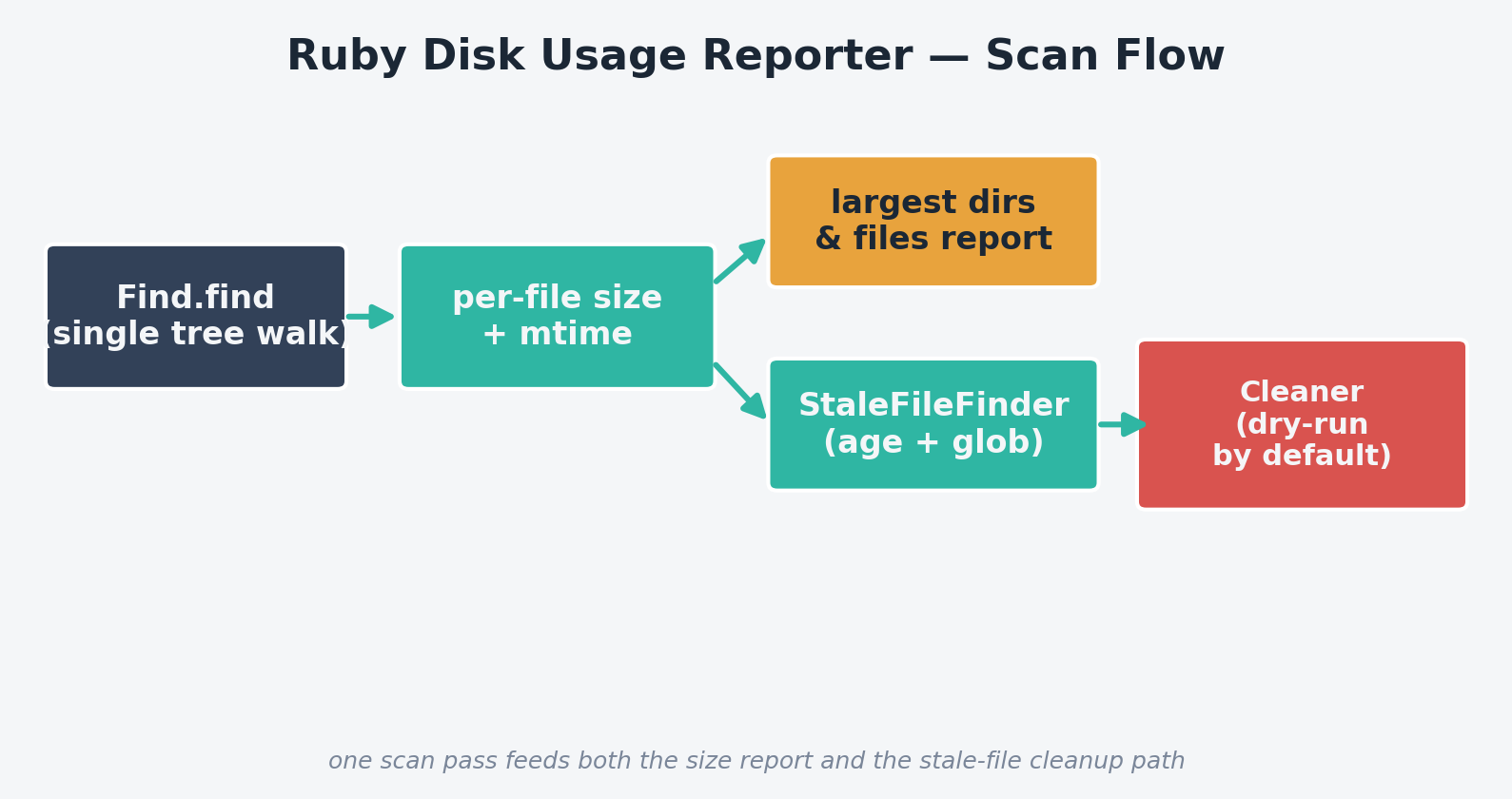
- DiskScanner — walks the tree exactly once with
Find.find, recording each file’s size and modification time, and rolling sizes up into every ancestor directory as it goes - HumanSize — formats raw byte counts the way
du -hdoes (B/KB/MB/GB/TB) - ReportPrinter — renders the largest-directories, largest-files, and stale-files sections from the single scan result
- StaleFileFinder — filters files by age and an optional filename glob (e.g.
*.log) - Cleaner — deletes stale files, defaulting to a dry run unless
--yesis explicitly passed
The complete code
Save this as disk_report.rb:
#!/usr/bin/env ruby
# frozen_string_literal: true
#
# disk_report.rb
#
# Scans a directory tree and reports where disk space is actually going:
# the largest subdirectories, the largest individual files, and files that
# haven't been touched in a long time (prime cleanup candidates). Optionally
# deletes stale files matching a pattern, safely, with a dry-run by default.
#
# Usage:
#   ruby disk_report.rb /var/log
#   ruby disk_report.rb /var/log --top 20
#   ruby disk_report.rb /var/log --stale-days 30 --pattern "*.log"
#   ruby disk_report.rb /var/log --stale-days 30 --pattern "*.gz" --clean --yes

require 'optparse'
require 'find'
require 'fileutils'

# Walks a directory tree once, collecting per-file size/mtime and rolling
# those up into per-directory totals. A single Find.find pass keeps this
# fast even on large trees, instead of re-scanning per report section.
class DiskScanner
  FileRecord = Struct.new(:path, :size, :mtime, keyword_init: true)

  def initialize(root)
    @root = File.expand_path(root)
  end

  # Returns [files, dir_sizes] where files is an array of FileRecord and
  # dir_sizes is a Hash of directory path => cumulative size in bytes.
  def scan
    files = []
    dir_sizes = Hash.new(0)

    Find.find(@root) do |path|
      if File.symlink?(path)
        Find.prune # never follow symlinks - avoids double-counting and loops
        next
      end

      if File.directory?(path)
        next
      end

      begin
        stat = File.stat(path)
      rescue Errno::ENOENT, Errno::EACCES
        next # file vanished mid-scan or isn't readable - skip, don't crash
      end

      files << FileRecord.new(path: path, size: stat.size, mtime: stat.mtime)
      attribute_to_ancestors(dir_sizes, path, stat.size)
    end

    [files, dir_sizes]
  end

  private

  # Adds this file's size to every ancestor directory up to (and including)
  # the scan root, so "largest directories" reflects true recursive totals.
  def attribute_to_ancestors(dir_sizes, path, size)
    dir = File.dirname(path)
    loop do
      dir_sizes[dir] += size
      break if dir == @root || dir == '/' || dir == '.'

      parent = File.dirname(dir)
      break if parent == dir

      dir = parent
    end
  end
end

# Formats byte counts the way a human reads a `du -h` report.
module HumanSize
  UNITS = %w[B KB MB GB TB].freeze

  def self.format(bytes)
    size = bytes.to_f
    UNITS.each_with_index do |unit, i|
      return sprintf('%.1f %s', size, unit) if size < 1024 || i == UNITS.size - 1

      size /= 1024
    end
  end
end

# Renders the largest-directories / largest-files / stale-files sections.
class ReportPrinter
  def initialize(files, dir_sizes, top:)
    @files = files
    @dir_sizes = dir_sizes
    @top = top
  end

  def print_summary(root)
    total = @files.sum(&:size)
    puts "Disk usage report for #{root}"
    puts "Total: #{HumanSize.format(total)} across #{@files.size} files\n\n"
  end

  def print_largest_dirs
    puts "Top #{@top} largest directories:"
    @dir_sizes.sort_by { |_dir, size| -size }.first(@top).each do |dir, size|
      puts "  #{HumanSize.format(size).rjust(10)}  #{dir}"
    end
    puts
  end

  def print_largest_files
    puts "Top #{@top} largest files:"
    @files.sort_by { |f| -f.size }.first(@top).each do |f|
      puts "  #{HumanSize.format(f.size).rjust(10)}  #{f.path}"
    end
    puts
  end

  def print_stale(stale_files)
    return if stale_files.empty?

    puts "Files not modified in the last #{stale_files.first[:days]} days:"
    stale_files.each do |entry|
      f = entry[:file]
      puts "  #{HumanSize.format(f.size).rjust(10)}  #{f.mtime.strftime('%Y-%m-%d')}  #{f.path}"
    end
    puts
  end
end

# Finds files matching a glob-style pattern that haven't been modified in
# at least stale_days days.
class StaleFileFinder
  def initialize(files, stale_days:, pattern: '*')
    @files = files
    @stale_days = stale_days
    @pattern = pattern
    @cutoff = Time.now - (stale_days * 24 * 60 * 60)
  end

  def find
    @files.select { |f| f.mtime < @cutoff && File.fnmatch(@pattern, File.basename(f.path)) }
          .map { |f| { file: f, days: @stale_days } }
  end
end

# Deletes a set of files, refusing to do so unless explicitly confirmed,
# and reports how much space was reclaimed.
class Cleaner
  def initialize(stale_entries, dry_run: true)
    @stale_entries = stale_entries
    @dry_run = dry_run
  end

  def run
    reclaimed = 0
    @stale_entries.each do |entry|
      f = entry[:file]
      if @dry_run
        puts "[dry-run] would delete #{f.path} (#{HumanSize.format(f.size)})"
      else
        begin
          FileUtils.rm_f(f.path)
          puts "deleted #{f.path} (#{HumanSize.format(f.size)})"
        rescue Errno::EACCES => e
          warn "could not delete #{f.path}: #{e.message}"
          next
        end
      end
      reclaimed += f.size
    end
    puts "\n#{@dry_run ? 'Would reclaim' : 'Reclaimed'}: #{HumanSize.format(reclaimed)}"
  end
end

if __FILE__ == $PROGRAM_NAME
  options = { top: 10, stale_days: nil, pattern: '*', clean: false, yes: false }

  OptionParser.new do |opts|
    opts.banner = 'Usage: disk_report.rb ROOT_DIR [options]'
    opts.on('--top N', Integer, 'How many largest dirs/files to show (default 10)') { |v| options[:top] = v }
    opts.on('--stale-days N', Integer, 'Flag files not modified in N days') { |v| options[:stale_days] = v }
    opts.on('--pattern GLOB', 'Filename glob for staleness/cleanup, e.g. "*.log" (default *)') { |v| options[:pattern] = v }
    opts.on('--clean', 'Delete stale files matching --pattern (requires --stale-days)') { options[:clean] = true }
    opts.on('--yes', 'Actually perform deletion instead of a dry-run') { options[:yes] = true }
  end.parse!

  root = ARGV[0]
  if root.nil? || !Dir.exist?(root)
    warn 'Error: please provide a valid directory to scan.'
    exit 1
  end

  files, dir_sizes = DiskScanner.new(root).scan
  printer = ReportPrinter.new(files, dir_sizes, top: options[:top])
  printer.print_summary(root)
  printer.print_largest_dirs
  printer.print_largest_files

  if options[:stale_days]
    stale = StaleFileFinder.new(files, stale_days: options[:stale_days], pattern: options[:pattern]).find
    printer.print_stale(stale)

    if options[:clean]
      Cleaner.new(stale, dry_run: !options[:yes]).run
    end
  end
end
Step-by-step walkthrough
1. One scan, not three
DiskScanner#scan uses Find.find to walk the tree exactly once, recording a FileRecord (path, size, mtime) for every file and simultaneously accumulating that size into every ancestor directory via attribute_to_ancestors. This single pass is what feeds the largest-directories report, the largest-files report, and the stale-file search — there’s no need to re-walk the filesystem for each section, which matters a lot on trees with hundreds of thousands of files.
2. Handling the edge cases that crash naive scanners
Two defensive touches keep this reliable on real production filesystems: symlinks are explicitly skipped with Find.prune (following them risks double-counting shared space or looping forever on a circular symlink), and a rescue Errno::ENOENT, Errno::EACCES around File.stat means a file that disappears mid-scan or that the running user can’t read is silently skipped rather than crashing the whole report.
3. Reading the report
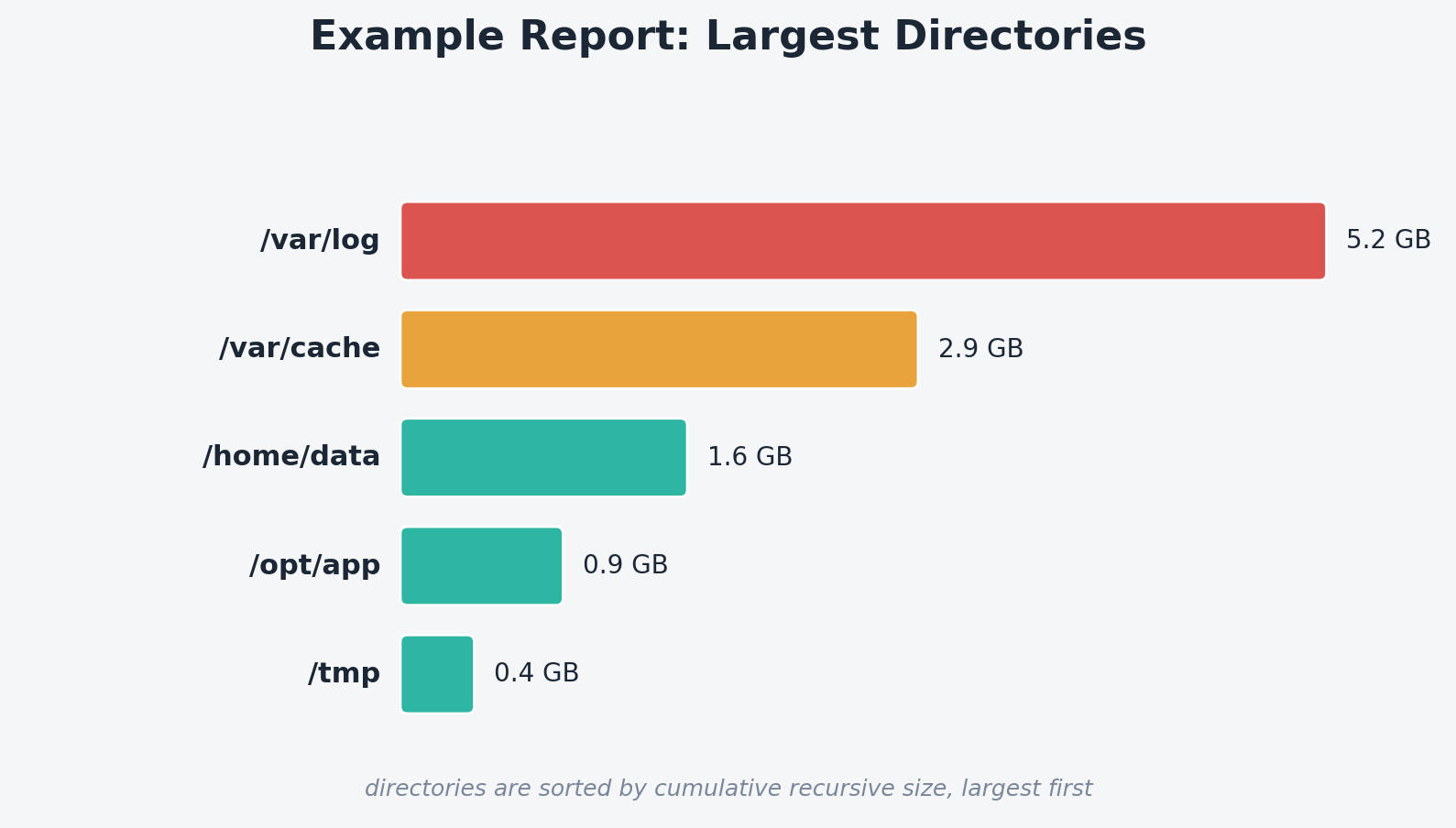
The “largest directories” section is sorted by cumulative recursive size, largest first — exactly the “where did my disk go” answer du -sh * | sort -rh gives you, but computed in one pass alongside the file-level and staleness data.
4. Cleanup that defaults to safe
StaleFileFinder filters by both age (--stale-days) and an optional filename glob (--pattern "*.log"), so you can target exactly the file types you mean to clean up. Cleaner then defaults to dry_run: true — you have to pass --yes explicitly to actually delete anything, and every deletion (real or simulated) reports the space it reclaims.
Example output
Real output from running against a test directory containing a mix of recent and old files:
$ ruby disk_report.rb disktest --top 5
Disk usage report for disktest
Total: 5.2 MB across 5 files

Top 5 largest directories:
      5.2 MB  disktest
      2.9 MB  disktest/data
      1.6 MB  disktest/logs
    781.2 KB  disktest/cache

Top 5 largest files:
      2.9 MB  disktest/data/dataset.csv
      1.1 MB  disktest/logs/error.log
    781.2 KB  disktest/cache/old_cache.tmp
    488.3 KB  disktest/logs/app.log
     200.0 B  disktest/data/small.txt

$ ruby disk_report.rb disktest --stale-days 30 --pattern "*.tmp" --clean
...
Files not modified in the last 30 days:
    781.2 KB  2026-05-04  disktest/cache/old_cache.tmp

[dry-run] would delete disktest/cache/old_cache.tmp (781.2 KB)

Would reclaim: 781.2 KB

$ ruby disk_report.rb disktest --stale-days 30 --pattern "*.tmp" --clean --yes
...
deleted disktest/cache/old_cache.tmp (781.2 KB)

Reclaimed: 781.2 KB
This is real output captured while testing the script: the dry run and the real run agree exactly on what would be affected, and the file is confirmed gone from the directory afterward.
Scheduling it with cron
# Weekly report emailed to ops (redirect stdout, pipe to mail)
0 6 * * 1 /usr/bin/ruby /opt/scripts/disk_report.rb /var/log --top 15 | mail -s "Weekly disk report" ops@example.com

# Nightly cleanup of month-old rotated logs, actually deleting
30 3 * * * /usr/bin/ruby /opt/scripts/disk_report.rb /var/log --stale-days 30 --pattern "*.gz" --clean --yes >> /var/log/disk_cleanup.log 2>&1
Pair the second line with the cron job manager from a companion tutorial to add/update it safely with validation and automatic backups instead of hand-editing crontabs.
Troubleshooting
| Symptom | Likely cause / fix |
|---|---|
Report undercounts total disk usage vs. df |
This tool sums file sizes, not allocated blocks; very large numbers of small files can consume more disk than their summed size due to filesystem block size. Compare against du, not df, for a fair comparison. |
| Scan is slow on huge trees | Point it at a narrower subtree, or add a --max-depth option that stops Find.find early with Find.prune past a given depth. |
| Permission errors flood the output | They shouldn’t — Errno::EACCES is caught and the file is silently skipped. If you’re seeing raw exceptions, confirm you’re on the version of the script above and haven’t removed the rescue clause. |
--clean without --yes deletes nothing |
That’s intentional — it’s a dry run by default. Add --yes once you’ve reviewed the dry-run output. |
| Stale-file search matches nothing you expect | Remember --pattern matches the filename only (via File.fnmatch), not the full path — use a pattern like "*.log", not "/var/log/*.log". |
Extending this script
- Add a
--jsonoutput mode so results can feed a dashboard or monitoring system instead of a human-readable report - Track disk usage snapshots over time (e.g. append to a CSV each run) to graph growth trends per directory
- Add a
--min-sizefilter so the stale-file cleanup only targets files above a size threshold, ignoring tiny files not worth the risk - Support multiple root directories in one invocation for a fleet-wide-style report across several mount points
- Send an alert (reusing the webhook pattern from a log-watching companion script) when total usage under a root crosses a threshold