Building a Ruby Cron Job Manager: Parse, Validate, and Safely Update Crontabs
DevOps / System Administration · Linux · Ruby 3.x
The problem this solves
Every team that manages more than a couple of servers eventually accumulates crontabs nobody fully understands: a mix of hand-edited entries from different engineers, no consistent formatting, and no record of which script added which line or why. Editing a crontab by hand with crontab -e is also just risky — there’s no built-in validation, no backup, and a typo in a schedule field either silently never fires or fires far more often than intended. This tutorial builds a small Ruby tool that manages crontab entries the way infrastructure-as-code manages servers: every entry it creates is tagged with a stable identifier, every schedule is validated before it’s written, and every write is preceded by an automatic backup — so cron_manager.rb can be safely called from deployment scripts without a human ever needing to run crontab -e.
Prerequisites
- Ruby 2.7+ (tested on Ruby 3.0.2)
- No external gems — only Ruby standard library (
optparse,open3,fileutils) - The
crontabcommand available if you want to manage the real system crontab (optional — the tool works equally well against a plain crontab-format file)
How it works
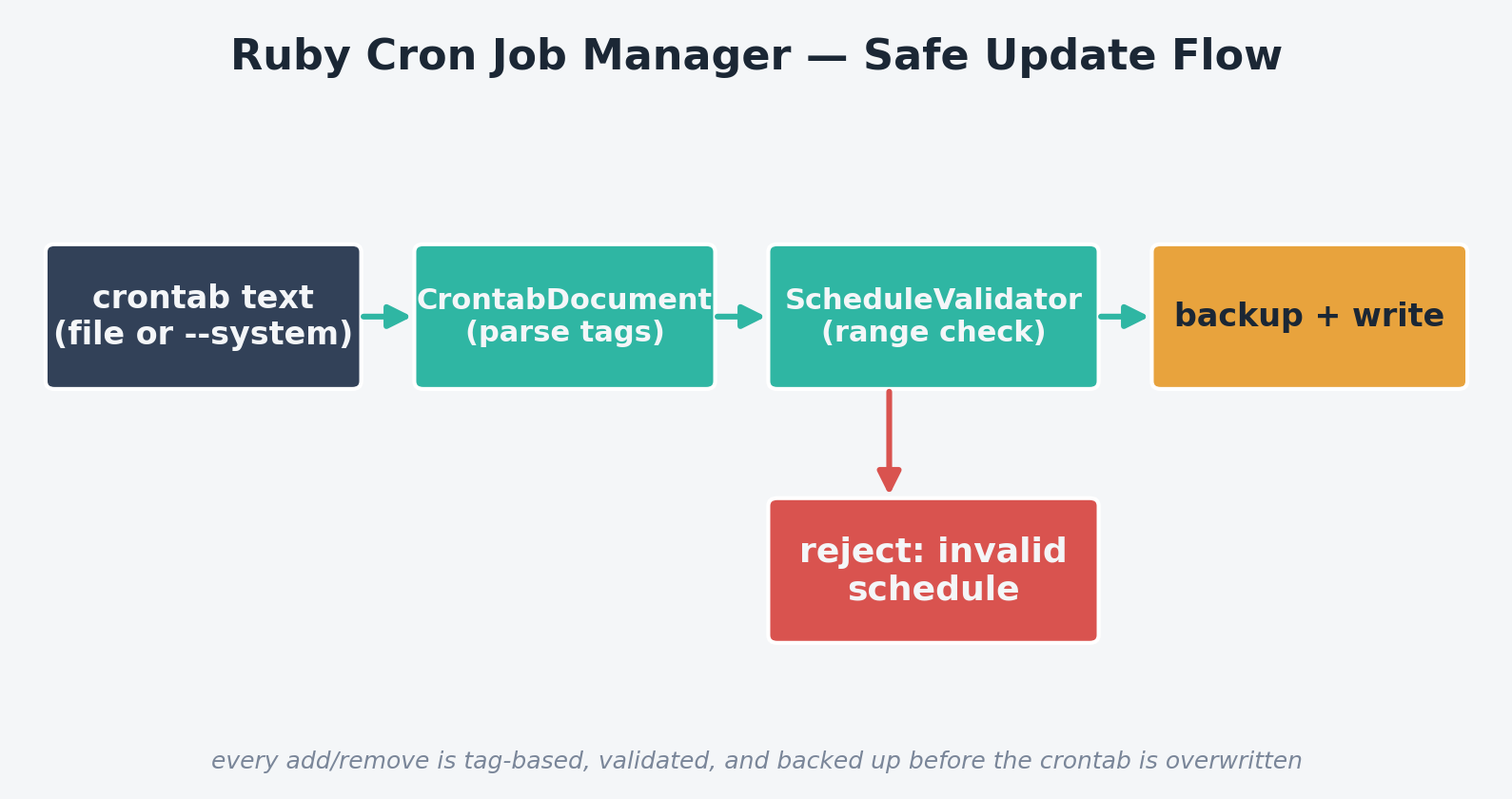
- CrontabSource — reads/writes either a plain file or the real per-user crontab via the
crontabcommand, and takes a timestamped backup before every write - CrontabDocument — parses crontab text into managed entries, identified by a
atop # cron_manager:<tag>comment placed directly above the job line - CronScheduleValidator — checks that a 5-field schedule has the right number of fields and that every value (including comma lists, ranges, and
*/Nsteps) falls within its valid range - CronManagerCLI — the
list/validate/add/removecommand-line interface tying it together
The complete code
Save this as cron_manager.rb:
#!/usr/bin/env ruby
# frozen_string_literal: true
#
# cron_manager.rb
#
# A safe, scriptable way to manage crontab entries from Ruby: list, validate,
# add, and remove jobs identified by a stable comment tag, with automatic
# backups before every write and dry-run support. Solves the "which script
# edited my crontab and why does line 14 look wrong" problem that comes from
# hand-editing crontabs with `crontab -e` across a fleet of servers.
#
# Usage:
#   ruby cron_manager.rb list --file mycrontab
#   ruby cron_manager.rb validate --file mycrontab
#   ruby cron_manager.rb add --file mycrontab --tag nightly_backup \
#        --schedule "15 2 * * *" --command "/opt/scripts/ruby_backup.rb"
#   ruby cron_manager.rb remove --file mycrontab --tag nightly_backup
#   ruby cron_manager.rb add ... --system   # operate on the real user crontab via `crontab`

require 'optparse'
require 'open3'
require 'time'
require 'fileutils'

# A single parsed cron line, tracking whether it's a managed entry (has our
# tag comment above it), a plain job, a comment, or blank.
CronEntry = Struct.new(:raw, :tag, :schedule, :command, keyword_init: true)

# Validates the 5-field schedule portion of a cron expression. This is not a
# full cron grammar implementation, but it catches the mistakes that most
# commonly break real crontabs: wrong field count and out-of-range values.
class CronScheduleValidator
  FIELD_RANGES = [(0..59), (0..23), (1..31), (1..12), (0..7)].freeze
  FIELD_NAMES = %w[minute hour day_of_month month day_of_week].freeze

  def self.validate(schedule)
    fields = schedule.strip.split(/\s+/)
    return ["expected 5 fields, got #{fields.size} (#{schedule.inspect})"] if fields.size != 5

    errors = []
    fields.each_with_index do |field, i|
      errors.concat(validate_field(field, i))
    end
    errors
  end

  def self.validate_field(field, index)
    return [] if field == '*'

    range = FIELD_RANGES[index]
    name = FIELD_NAMES[index]
    errors = []

    # Handle */N step syntax, comma lists, and simple ranges like 1-5.
    field.split(',').each do |part|
      part = part.sub(%r{^\*/}, '')
      part.split('-').each do |bound|
        next if bound.empty?
        n = Integer(bound, exception: false)
        if n.nil?
          errors << "#{name}: #{bound.inspect} is not a number"
        elsif !range.cover?(n)
          errors << "#{name}: #{n} is outside valid range #{range}"
        end
      end
    end
    errors
  end
end

# Reads and writes crontab-format text, either from a plain file or via the
# `crontab` command for the current user's real system crontab.
class CrontabSource
  def initialize(file: nil, system: false)
    raise ArgumentError, 'provide either file: or system: true' if file.nil? && !system

    @file = file
    @system = system
  end

  def read
    if @system
      out, _err, status = Open3.capture3('crontab', '-l')
      status.success? ? out : ''
    else
      File.exist?(@file) ? File.read(@file) : ''
    end
  end

  def write(content)
    backup!
    if @system
      IO.popen(['crontab', '-'], 'w') { |io| io.write(content) }
    else
      File.write(@file, content)
    end
  end

  private

  # Every write is preceded by a timestamped backup copy so a bad edit is
  # always one `cp` away from being undone.
  def backup!
    return unless @file && File.exist?(@file)

    backup_dir = File.join(File.dirname(@file), '.cron_manager_backups')
    FileUtils.mkdir_p(backup_dir)
    stamp = Time.now.utc.strftime('%Y%m%dT%H%M%SZ')
    FileUtils.cp(@file, File.join(backup_dir, "#{File.basename(@file)}.#{stamp}.bak"))
  end
end

# Parses managed entries out of raw crontab text. A managed entry looks like:
#   # cron_manager:nightly_backup
#   15 2 * * * /opt/scripts/ruby_backup.rb
TAG_COMMENT = /^# cron_manager:(\S+)\s*$/.freeze

class CrontabDocument
  def initialize(text)
    @lines = text.split("\n")
  end

  # Returns all managed entries as CronEntry structs.
  def managed_entries
    entries = []
    @lines.each_with_index do |line, i|
      m = TAG_COMMENT.match(line)
      next unless m

      job_line = @lines[i + 1]
      next unless job_line

      schedule, command = split_job_line(job_line)
      entries << CronEntry.new(raw: job_line, tag: m[1], schedule: schedule, command: command)
    end
    entries
  end

  def add_or_replace(tag, schedule, command)
    remove(tag) # replacing an existing tag keeps the file idempotent
    @lines << "# cron_manager:#{tag}"
    @lines << "#{schedule} #{command}"
    self
  end

  def remove(tag)
    out = []
    skip_next = false
    @lines.each do |line|
      if skip_next
        skip_next = false
        next
      end
      if TAG_COMMENT.match(line)&.then { |m| m[1] == tag }
        skip_next = true # also drop the job line right after the tag comment
        next
      end
      out << line
    end
    @lines = out
    self
  end

  def to_s
    @lines.join("\n") + "\n"
  end

  private

  def split_job_line(line)
    fields = line.strip.split(/\s+/)
    [fields.first(5).join(' '), fields.drop(5).join(' ')]
  end
end

# Ties everything together for the CLI.
class CronManagerCLI
  def initialize(argv)
    @options = { file: nil, system: false }
    @command = argv.shift
    parse!(argv)
    @source = CrontabSource.new(file: @options[:file], system: @options[:system])
  end

  def run
    case @command
    when 'list' then list
    when 'validate' then validate
    when 'add' then add
    when 'remove' then remove
    else
      warn "Unknown command: #{@command.inspect}. Use list, validate, add, or remove."
      exit 1
    end
  end

  private

  def parse!(argv)
    OptionParser.new do |opts|
      opts.on('--file PATH', 'Crontab-format file to operate on') { |v| @options[:file] = v }
      opts.on('--system', 'Operate on the real crontab for the current user via `crontab`') { @options[:system] = true }
      opts.on('--tag TAG', 'Stable identifier for a managed job') { |v| @options[:tag] = v }
      opts.on('--schedule EXPR', 'Cron schedule, e.g. "15 2 * * *"') { |v| @options[:schedule] = v }
      opts.on('--command CMD', 'Command line to run') { |v| @options[:command] = v }
      opts.on('--dry-run', 'Print what would change without writing') { @options[:dry_run] = true }
    end.parse!(argv)
  end

  def document
    CrontabDocument.new(@source.read)
  end

  def list
    entries = document.managed_entries
    if entries.empty?
      puts 'No managed cron_manager entries found.'
      return
    end
    entries.each { |e| puts "#{e.tag.ljust(20)} #{e.schedule.ljust(14)} #{e.command}" }
  end

  def validate
    errors_found = false
    document.managed_entries.each do |e|
      errors = CronScheduleValidator.validate(e.schedule)
      if errors.empty?
        puts "OK    #{e.tag}: #{e.schedule}"
      else
        errors_found = true
        puts "ERROR #{e.tag}: #{e.schedule}"
        errors.each { |msg| puts "        - #{msg}" }
      end
    end
    exit(1) if errors_found
  end

  def add
    require_options!(:tag, :schedule, :command)
    errors = CronScheduleValidator.validate(@options[:schedule])
    unless errors.empty?
      warn "Refusing to add invalid schedule #{@options[:schedule].inspect}:"
      errors.each { |e| warn "  - #{e}" }
      exit 1
    end

    doc = document.add_or_replace(@options[:tag], @options[:schedule], @options[:command])
    commit(doc, "add/update #{@options[:tag]}")
  end

  def remove
    require_options!(:tag)
    doc = document.remove(@options[:tag])
    commit(doc, "remove #{@options[:tag]}")
  end

  def commit(doc, description)
    if @options[:dry_run]
      puts "[dry-run] would #{description}. Resulting crontab:\n#{doc}"
      return
    end
    @source.write(doc.to_s)
    puts "Applied: #{description}"
  end

  def require_options!(*keys)
    missing = keys.select { |k| @options[k].nil? }
    return if missing.empty?

    warn "Missing required option(s): #{missing.map { |k| "--#{k}" }.join(', ')}"
    exit 1
  end
end

CronManagerCLI.new(ARGV).run if __FILE__ == $PROGRAM_NAME
Step-by-step walkthrough
1. Tagging entries instead of matching on raw text
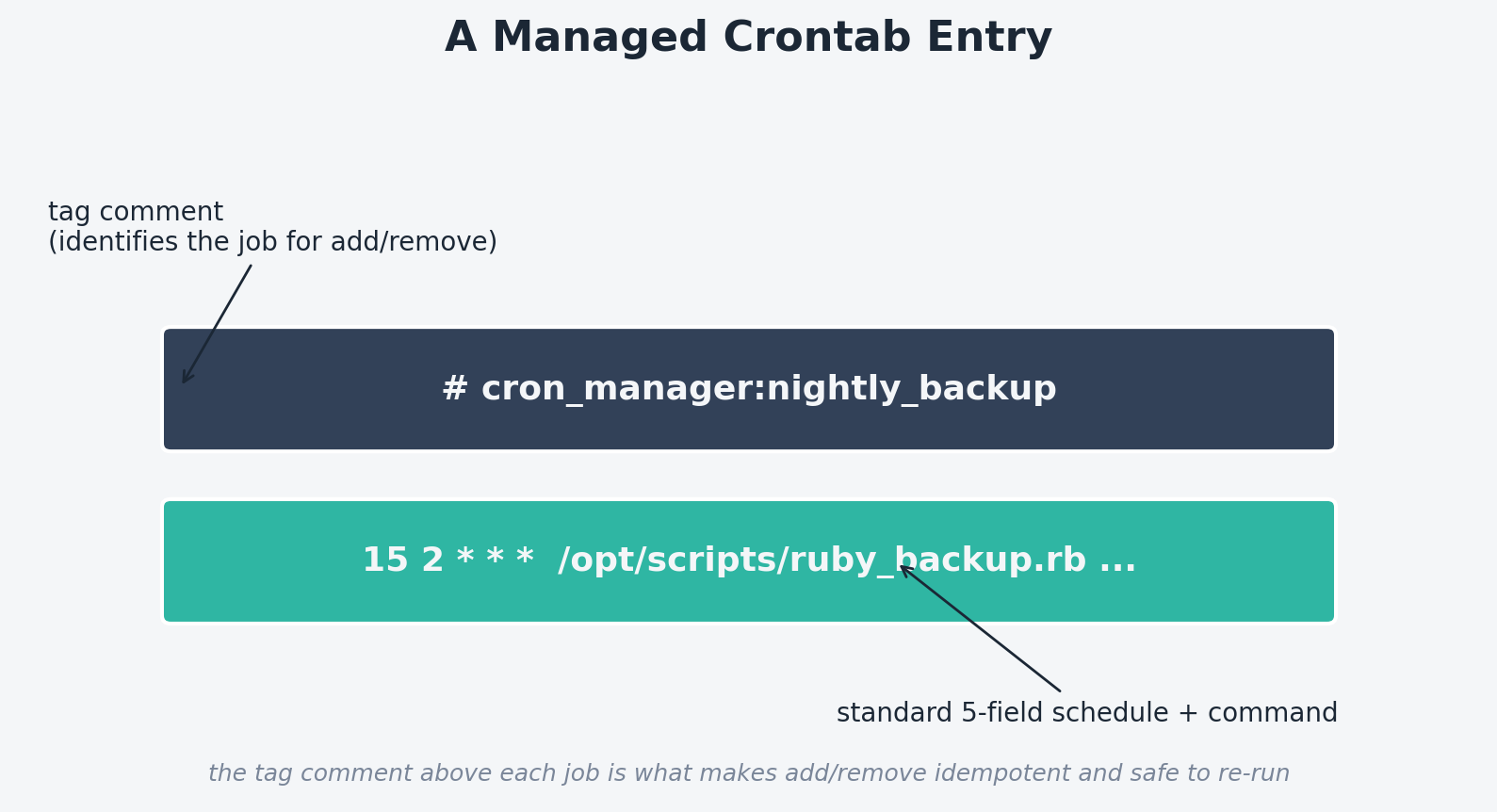
Every entry the tool creates is preceded by a comment like # cron_manager:nightly_backup. CrontabDocument#managed_entries scans for that comment pattern and treats the line immediately below it as the job. This is what makes add idempotent (calling it twice with the same tag replaces the old entry instead of duplicating it) and makes remove precise (it deletes exactly the tagged block, leaving unrelated hand-written cron lines completely untouched).
2. Validating before writing, not after
CronScheduleValidator splits each of the 5 fields and checks values against their valid ranges (minutes 0–59, hours 0–23, and so on), handling comma lists, ranges, and */N step syntax. add calls this before touching the crontab at all — an invalid schedule like "99 2 * * *" is rejected outright rather than silently written and left to fail (or misfire) later.
3. A backup for every write, automatically
CrontabSource#backup! runs before any write to a file-backed crontab, copying the current contents into a .cron_manager_backups/ directory with a UTC timestamp in the filename. There’s no flag to opt out of this — the cost is one small file per write, and the benefit is that a bad automated change is always trivially recoverable.
4. File-based by default, real crontab when you’re ready
Every command accepts either --file PATH (recommended for testing and CI) or --system, which shells out to crontab -l / crontab - to operate on the real crontab for whichever user runs the script. Developing and testing against a plain file first, then switching to --system in production, avoids ever debugging cron logic against your live schedule.
Example output
Real output from running the tool against a test crontab file during development:
$ ruby cron_manager.rb add --file mycrontab --tag nightly_backup \
    --schedule "15 2 * * *" --command "/opt/scripts/ruby_backup.rb --source /etc/myapp --dest /var/backups/myapp"
Applied: add/update nightly_backup

$ ruby cron_manager.rb add --file mycrontab --tag log_watch \
    --schedule "99 2 * * *" --command "/opt/scripts/log_watcher.rb /var/log/nginx/access.log"
Refusing to add invalid schedule "99 2 * * *":
  - minute: 99 is outside valid range 0..59

$ ruby cron_manager.rb list --file mycrontab
nightly_backup       15 2 * * *     /opt/scripts/ruby_backup.rb --source /etc/myapp --dest /var/backups/myapp

$ ruby cron_manager.rb add --file mycrontab --tag log_watch \
    --schedule "*/5 * * * *" --command "/opt/scripts/log_watcher.rb /var/log/nginx/access.log"
Applied: add/update log_watch

$ ruby cron_manager.rb validate --file mycrontab
OK    nightly_backup: 15 2 * * *
OK    log_watch: */5 * * * *

$ ruby cron_manager.rb remove --file mycrontab --tag nightly_backup --dry-run
[dry-run] would remove nightly_backup. Resulting crontab:
# existing unrelated job
0 4 * * * /usr/bin/some_other_script.sh
# cron_manager:log_watch
*/5 * * * * /opt/scripts/log_watcher.rb /var/log/nginx/access.log
Notice the invalid schedule was rejected before anything was written, an unrelated hand-written cron line (0 4 * * * /usr/bin/some_other_script.sh) survived every operation untouched, and the dry-run preview matched exactly what a real remove produced.
Wiring it into a deployment script
# in your deploy script, after copying ruby_backup.rb into place:
ruby /opt/scripts/cron_manager.rb add --system \
  --tag nightly_backup \
  --schedule "15 2 * * *" \
  --command "/opt/scripts/ruby_backup.rb --source /etc/myapp --dest /var/backups/myapp --keep 14"
Because add is idempotent by tag, this line is safe to run on every deploy — it will either create the job or update it in place if the schedule/command changed, with zero risk of duplicate entries piling up over time.
Troubleshooting
| Symptom | Likely cause / fix |
|---|---|
list shows nothing even though the crontab has entries |
Only entries preceded by a # cron_manager:<tag> comment are “managed” and shown; hand-written cron lines are intentionally left alone and invisible to this tool. |
--system writes appear to do nothing |
Confirm the user running the script actually has crontab permissions (check /etc/cron.allow / /etc/cron.deny), and that crontab -l works manually first. |
| Validator rejects a schedule you’re sure is valid | Check for extra whitespace or a 6th field (some cron variants support a seconds field, which this validator doesn’t) — it strictly expects 5 space-separated fields. |
| Backups directory grows unbounded | Add your own retention sweep over .cron_manager_backups/ (the RetentionPolicy pattern from a companion backup-automation script applies directly here). |
remove didn’t remove anything |
Double check the exact --tag spelling with list first — tags are matched exactly, case-sensitively. |
Extending this script
- Load job definitions from a YAML file so a whole fleet’s cron schedule can be declared and applied in one
--syncpass instead of oneaddper job - Add a
diffcommand that shows exactly what would change (add/remove/modify) without writing, for use in a CI dry-run step - Validate that referenced command paths actually exist and are executable before allowing an
add - Support day-of-week and month name aliases (
MON,JAN) in the validator, matching what real cron daemons accept - Add a
--prune-backups-older-than Nflag toCrontabSourceto cap backup retention automatically