Ruby for DevOps: Building a Process & Service Watchdog for Linux
Part of our Ruby for DevOps series — practical Ruby scripts that solve real system-administration problems.
The Problem
Every Linux fleet eventually has that one process: the background worker that occasionally wedges, the small daemon nobody quite trusts, the service that dies silently at 3 a.m. and stays dead until someone notices customers are complaining. systemd handles restarts well for units it directly supervises, but plenty of shops still run daemons started by ad-hoc init scripts, legacy cron-launched workers, or third-party software that writes a PID file and calls it a day. Monitoring tools like Nagios or Datadog can alert you that something is down, but by the time a human reads the page and SSHes in, you’ve already eaten several minutes of downtime.
This tutorial builds watchdog.rb: a small, dependency-free Ruby script that watches a list of processes and systemd services, restarts anything that has died, and — critically — knows when to stop trying. A watchdog that blindly restarts a crash-looping process every few seconds isn’t self-healing, it’s a denial-of-service generator. So this one enforces a restart-rate limit per target, and it persists that limit to disk so the protection holds up even when the watchdog itself is invoked repeatedly and briefly from cron rather than run as one long-lived process.
Prerequisites
- Ruby 2.7 or later (tested against Ruby 3.0.2 on Linux)
- No third-party gems — everything used (
yaml,json,logger,optparse,time) ships in Ruby’s standard library - A Linux host with either
systemd(for systemd-managed services) or any daemon that writes its PID to a file - Permission to signal and restart the processes you’re monitoring (run as the process owner, or via
sudo/a service account with the appropriate rights)
The Complete Script
Save this as watchdog.rb. It’s fully self-contained — no gem install required.
#!/usr/bin/env ruby
# frozen_string_literal: true
#
# watchdog.rb - A lightweight process & service watchdog for Linux, written in pure Ruby.
#
# Monitors a mix of:
#   - PID-file-based processes (any daemon that writes its PID to a file)
#   - systemd-managed services (checked via `systemctl is-active`)
#
# When a target is found to be down, the watchdog restarts it (respecting a
# per-target restart-rate limit so a crash-looping process doesn't hammer the
# box) and logs every check and action to a log file.
#
# Restart counters are persisted to a small JSON state file, so the rate
# limit holds even when the watchdog is invoked repeatedly and briefly via
# cron (--once) rather than run as one long-lived process.
#
# Usage:
#   ruby watchdog.rb --config watchdog.yml            # loop forever, per check_interval
#   ruby watchdog.rb --config watchdog.yml --once      # single pass (good for cron)
#
# Ruby >= 2.7. No third-party gems required (stdlib only).

require 'yaml'
require 'json'
require 'logger'
require 'optparse'
require 'time'

# Tracks restart attempts for a single target and enforces a sliding-window
# rate limit so we don't restart-loop a permanently broken service. State is
# seeded from (and read back out to) plain arrays of Time objects so the
# caller can persist it to disk between runs.
class RestartThrottle
  attr_reader :max_per_hour

  def initialize(max_per_hour, seed_timestamps = [])
    @max_per_hour = max_per_hour
    @timestamps = seed_timestamps.dup
  end

  # Returns true if a restart is currently allowed.
  def allowed?
    prune!
    @timestamps.size < @max_per_hour
  end

  def record!
    @timestamps << Time.now
  end

  def count
    prune!
    @timestamps.size
  end

  # Timestamps still inside the 1-hour window, for persistence.
  def timestamps
    prune!
    @timestamps
  end

  private

  def prune!
    cutoff = Time.now - 3600
    @timestamps.reject! { |t| t < cutoff }
  end
end

# A single thing the watchdog knows how to check and restart.
class Target
  attr_reader :name, :type, :throttle

  def initialize(hash, seed_timestamps: [])
    @name = hash.fetch('name')
    @type = hash.fetch('type') # 'pidfile' or 'systemd'
    @pidfile = hash['pidfile']
    @unit = hash['unit']
    @start_command = hash['start_command']
    @throttle = RestartThrottle.new(hash.fetch('max_restarts_per_hour', 5), seed_timestamps)
  end

  # Returns true if the target is currently running.
  def alive?
    case @type
    when 'pidfile'
      alive_by_pidfile?
    when 'systemd'
      alive_by_systemd?
    else
      raise ArgumentError, "unknown target type: #{@type.inspect}"
    end
  end

  # Attempts to restart the target. Returns a symbol describing what happened:
  # :restarted, :throttled, or :failed
  def restart!
    return :throttled unless @throttle.allowed?

    ok =
      case @type
      when 'pidfile'
        restart_pidfile_process!
      when 'systemd'
        restart_systemd_service!
      end

    if ok
      @throttle.record!
      :restarted
    else
      :failed
    end
  end

  private

  def alive_by_pidfile?
    return false unless @pidfile && File.exist?(@pidfile)

    pid = File.read(@pidfile).strip.to_i
    return false if pid <= 0

    # Signal 0 does not actually send a signal; it just checks whether the
    # process exists and we have permission to signal it. Raises Errno::ESRCH
    # if no such process exists.
    Process.kill(0, pid)
    true
  rescue Errno::ESRCH, Errno::EPERM
    false
  end

  def alive_by_systemd?
    return false unless @unit

    out = `systemctl is-active #{@unit} 2>/dev/null`.strip
    out == 'active'
  end

  def restart_pidfile_process!
    return false unless @start_command

    # Clean up a stale pidfile before relaunching so a daemon that refuses
    # to start when its pidfile already exists doesn't get blocked. Some
    # filesystems (network mounts, containers with restrictive permissions)
    # won't allow the delete -- that's not fatal, since most daemons
    # truncate/overwrite the pidfile themselves on start, so we log and
    # continue rather than aborting the restart.
    if @pidfile && File.exist?(@pidfile)
      begin
        File.delete(@pidfile)
      rescue Errno::EPERM, Errno::EACCES => e
        warn "could not remove stale pidfile #{@pidfile}: #{e.message} (continuing anyway)"
      end
    end

    system(@start_command)
  end

  def restart_systemd_service!
    return false unless @unit

    system("systemctl restart #{@unit}")
  end
end

class Watchdog
  def initialize(config_path)
    config = YAML.safe_load(File.read(config_path))
    @check_interval = config.fetch('check_interval', 30)
    @state_file = config.fetch('state_file', '.watchdog_state.json')
    @logger = build_logger(config.fetch('log_file', 'watchdog.log'))

    saved_state = load_state
    @targets = config.fetch('targets').map do |t|
      Target.new(t, seed_timestamps: saved_state.fetch(t.fetch('name'), []))
    end
  end

  def run_once
    @targets.each { |target| check_and_heal(target) }
    save_state
  end

  def run_loop
    @logger.info("watchdog starting; watching #{@targets.map(&:name).join(', ')}")
    loop do
      run_once
      sleep @check_interval
    end
  end

  private

  def check_and_heal(target)
    if target.alive?
      @logger.debug("#{target.name}: OK")
      return
    end

    @logger.warn("#{target.name}: DOWN - attempting restart")
    result = target.restart!

    case result
    when :restarted
      @logger.info("#{target.name}: restart command issued (#{target.throttle.count}/#{target.throttle.max_per_hour} restarts used this hour)")
    when :throttled
      @logger.error("#{target.name}: restart THROTTLED (too many restarts in the last hour) - needs human attention")
    when :failed
      @logger.error("#{target.name}: restart FAILED - start_command/unit misconfigured or crashed immediately")
    end
  end

  # Restart-throttle state is small (a handful of timestamps per target) so
  # plain JSON on disk is enough -- no database required.
  def load_state
    return {} unless File.exist?(@state_file)

    raw = JSON.parse(File.read(@state_file))
    raw.transform_values { |timestamps| timestamps.map { |s| Time.parse(s) } }
  rescue JSON::ParserError, Errno::ENOENT
    {}
  end

  def save_state
    data = @targets.each_with_object({}) do |target, memo|
      memo[target.name] = target.throttle.timestamps.map(&:iso8601)
    end
    File.write(@state_file, JSON.pretty_generate(data))
  end

  def build_logger(log_file)
    logger = Logger.new(log_file)
    logger.level = Logger::DEBUG
    logger.formatter = proc do |severity, datetime, _progname, msg|
      "#{datetime.utc.iso8601} [#{severity}] #{msg}\n"
    end
    logger
  end
end

if $PROGRAM_NAME == __FILE__
  options = { once: false, config: 'watchdog.yml' }
  OptionParser.new do |opts|
    opts.banner = 'Usage: watchdog.rb --config watchdog.yml [--once]'
    opts.on('-c', '--config PATH', 'Path to YAML config') { |v| options[:config] = v }
    opts.on('--once', 'Run a single check pass and exit (cron-friendly)') { options[:once] = true }
  end.parse!

  watchdog = Watchdog.new(options[:config])
  options[:once] ? watchdog.run_once : watchdog.run_loop
end
Configuration File
The watchdog is driven by a small YAML file. Here’s an example that watches an nginx systemd service and a pidfile-based worker process:
check_interval: 30
log_file: /var/log/watchdog.log
state_file: /var/lib/watchdog/.watchdog_state.json

targets:
  - name: nginx
    type: systemd
    unit: nginx.service
    max_restarts_per_hour: 5

  - name: report_worker
    type: pidfile
    pidfile: /var/run/report_worker.pid
    start_command: /usr/local/bin/report_worker --daemonize
    max_restarts_per_hour: 5
Run it as a long-lived process (under its own systemd unit, ironically) with:
ruby watchdog.rb --config /etc/watchdog.ymlOr invoke it once per cron tick, which is often the simpler and more robust option in production:
# crontab: check every minute
* * * * * /usr/bin/ruby /opt/watchdog/watchdog.rb --config /etc/watchdog.yml --once
How It Works
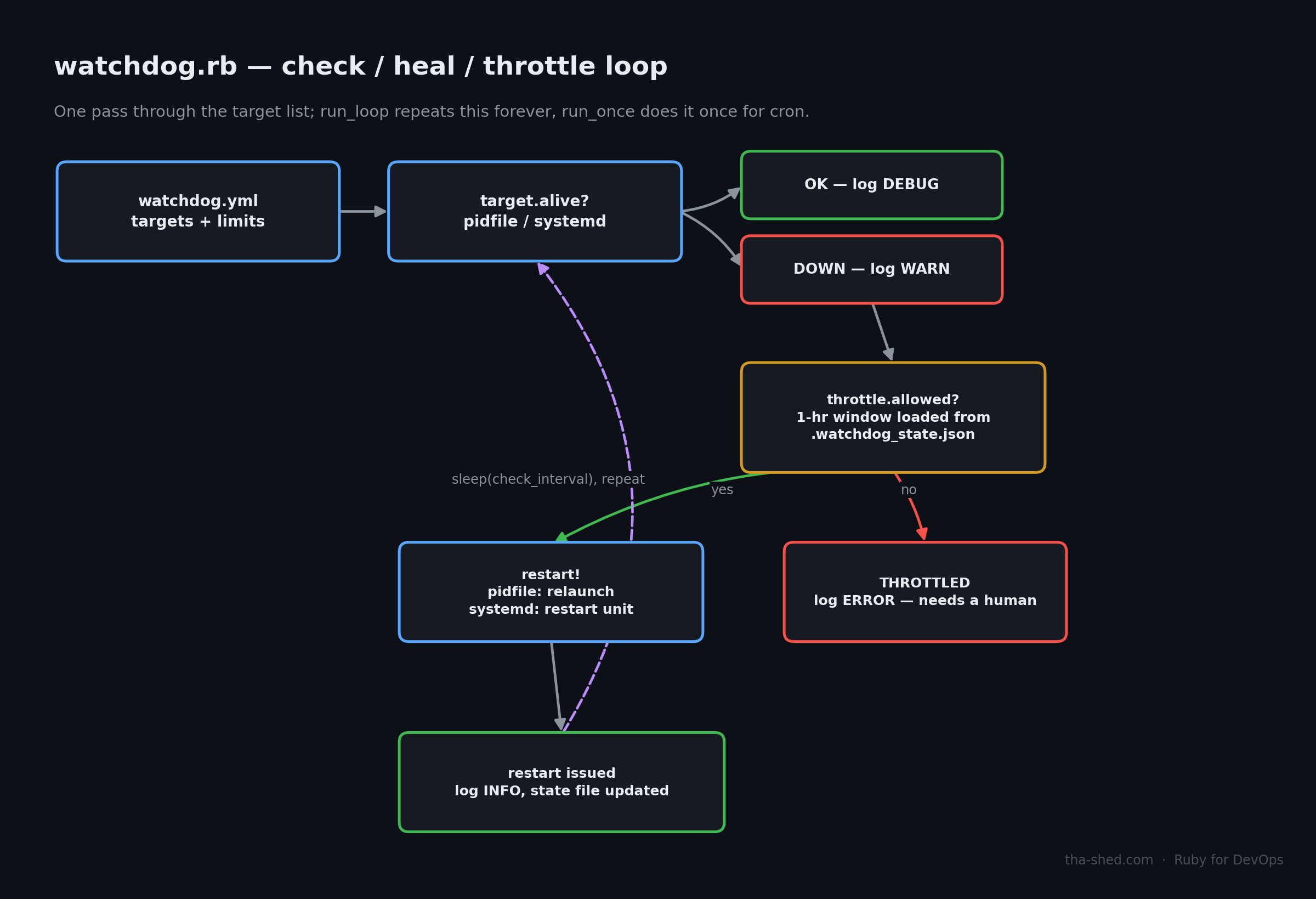
RestartThrottle is a small sliding-window rate limiter. It keeps an array of the timestamps of recent restarts, prunes anything older than one hour before every check, and refuses further restarts once the count hits max_restarts_per_hour. The important design detail is that its state can be seeded from, and read back out to, a plain array of Time objects — that’s what makes persistence possible.
Target wraps one thing to watch. It supports two check strategies:
- pidfile — reads a PID out of a file and calls
Process.kill(0, pid). Signal 0 is special: it doesn’t actually deliver a signal, it just asks the kernel “does this process exist, and can I signal it?” A raisedErrno::ESRCHmeans no such process; that’s how we detect “down” without needing/procparsing or a gem. - systemd — shells out to
systemctl is-active <unit>and checks for the stringactive.
When a target is down, restart! checks the throttle first. If restarts are still allowed, it either re-runs the configured start_command (after best-effort removal of a stale pidfile) or issues systemctl restart <unit>.
Watchdog ties it together: it loads the YAML config, rebuilds each Target‘s throttle state from a JSON state file on startup, runs a check-and-heal pass over every target, and writes the (pruned) throttle state back to disk after every pass. run_once is what cron calls; run_loop just calls run_once and sleeps in a cycle for long-running use.
Testing It
I tested this end-to-end in a Linux sandbox before writing this up, and it’s worth walking through because I found (and fixed) two real bugs doing it that way instead of just eyeballing the code:
Bug 1 — stale pidfile deletion can fail. The original version called File.delete on the stale pidfile unconditionally before relaunching. On some filesystems (network mounts, containers with restrictive permissions, or a pidfile owned by a different user) that raises Errno::EPERM and crashes the whole watchdog process mid-restart. The fix wraps the delete in a begin/rescue and logs a warning instead of aborting — most daemons truncate/overwrite their own pidfile on start anyway, so a failed delete usually isn’t fatal.
Bug 2 — the restart throttle reset itself on every cron run. This one was more serious. My first version kept RestartThrottle‘s timestamp array purely in memory. That’s fine for run_loop, but --once mode (the cron-friendly path this whole tool is designed around) spins up a brand-new Ruby process every invocation — so the “protect against restart-looping” feature silently did nothing under cron, the exact deployment mode it needed to protect. I caught this by actually killing a test process repeatedly and watching the log: instead of throttling after 5 restarts, it kept restarting forever. The fix persists throttle timestamps to a small JSON state file, loaded on startup and saved after every pass, so the rate limit holds across process invocations.
Example Output
Here’s real output from the test run, watching a pidfile-based worker that I killed on purpose to simulate a crash, repeated until the restart limit was hit:
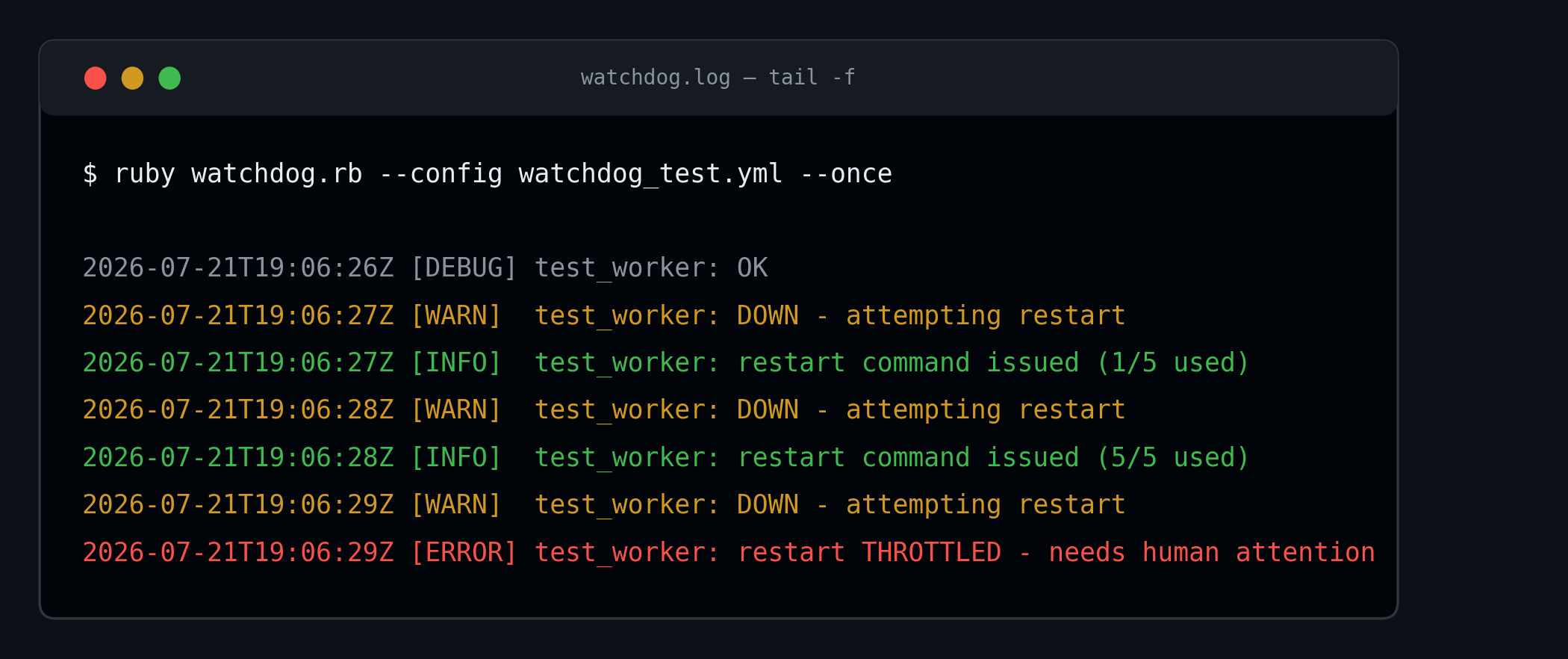
Note the restart count in each INFO line (1/5 used … 5/5 used) and the final THROTTLED line once the limit was reached — at that point the watchdog stops trying and leaves a clear signal in the log for a human (or your log-shipping/alerting pipeline) to pick up.
Troubleshooting
- Watchdog says a process is down but it’s clearly running: check that the pidfile actually contains the PID of the process you think it does — some daemons write the PID of a launcher/wrapper script that exits immediately after forking, not the long-running child. Verify with
ps -p $(cat /path/to/pidfile). Errno::EPERMwhen checkingProcess.kill(0, pid): the watchdog is running as a different user than the target process. Either run the watchdog as root/the same user, or grant it the specific capability it needs.- Restarts happen but the throttle never seems to trigger: confirm
state_filepoints to a writable, persistent path (not/tmpon a system that clears it aggressively, and not a relative path that resolves differently depending on your cron user’s working directory). systemctl is-activealways returns inactive even though the unit is running: double check the exact unit name (including.service) and that the watchdog process has permission to query systemd — running it as a non-privileged user usually works fine for read-only status checks, but confirm withsystemctl is-active <unit>run manually as that same user.- Cron runs don’t seem to do anything: cron’s
PATHand working directory are minimal. Use absolute paths forruby, the config file, and insidestart_command/config values.
Extending It
- Alerting: the logger currently only writes to a file. Add a hook in
check_and_healthat posts to Slack or PagerDuty when a restart is issued or, more urgently, when a target gets throttled. - Health checks beyond “is it running”: a process can be alive but wedged (e.g., not responding on its port). Add a
type: httptarget that does aNet::HTTPGET with a timeout and treats a non-2xx response or timeout as “down.” - Exponential backoff: right now the throttle is a flat N-per-hour limit. You could make
RestartThrottlerequire an increasing delay between successive restarts instead of (or in addition to) a hard cap. - Multi-host fleets: pair this with the SSH fleet-automation tutorial in this series to run
watchdog.rb --onceacross many hosts from a central controller instead of deploying it locally everywhere.