Part of our Ruby for DevOps series — practical Ruby scripts that solve real system-administration problems.
The Problem
Every DevOps engineer eventually writes the same three things by hand: a systemd unit file for a new service, the systemctl daemon-reload && systemctl enable --now incantation to install it, and some ad-hoc parsing of systemctl status output to check whether it actually came up healthy. Doing this by hand across a fleet of hosts — or even just repeatedly on one box while iterating on a deploy — gets tedious and error-prone: a typo in ExecStart, a forgotten daemon-reload, or a unit file with the wrong permissions can silently break a rollout.
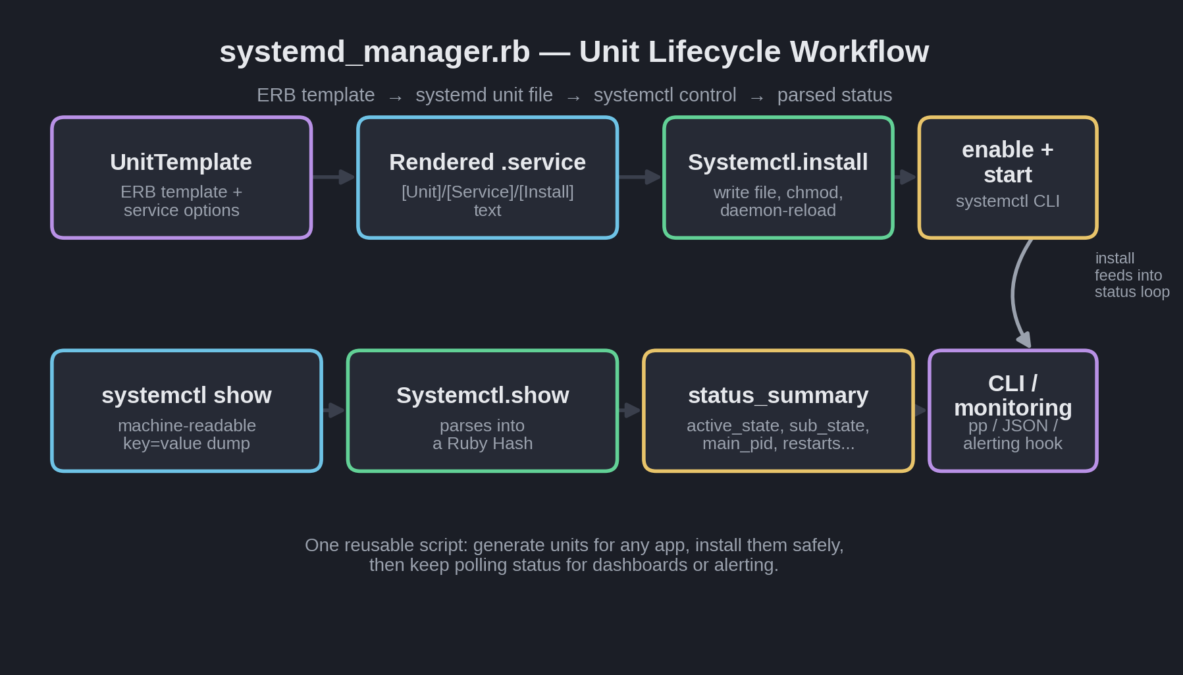
systemd_manager.rb fixes this by treating unit files as generated artifacts, not hand-edited text. It renders a unit from an ERB template with sane defaults, installs and starts it through systemctl, and gives you back parsed, structured status data instead of a wall of text — the kind of building block you can drop into a deploy script or a monitoring check.
Prerequisites
- Ruby 2.7+ — standard library only (
erb,optparse,open3,fileutils), no gems required. - A Linux distribution running systemd (Ubuntu 16.04+, Debian 8+, RHEL/CentOS 7+, Fedora, Arch, etc). This will not work on Windows or on init-less containers.
- Root or sudo access to install and start units — reading status with
systemctl showworks for any user, but writing to/etc/systemd/systemand runningenable/startrequires privilege.
The Complete Script
Save this as systemd_manager.rb:
#!/usr/bin/env ruby
# systemd_manager.rb
#
# A small Ruby toolkit for generating systemd unit files from a template
# and driving systemctl to install, enable, start, and inspect services.
#
# Usage:
#   ruby systemd_manager.rb generate  --name myapp --exec "/usr/bin/myapp --port 8080" --user deploy
#   ruby systemd_manager.rb install   --name myapp
#   ruby systemd_manager.rb status    --name myapp
#   ruby systemd_manager.rb list      --pattern "my"
#
require 'erb'
require 'optparse'
require 'open3'
require 'fileutils'

# ---------------------------------------------------------------------------
# UnitTemplate: renders a systemd .service file from an ERB template.
# ---------------------------------------------------------------------------
class UnitTemplate
  TEMPLATE = <<~UNIT
    [Unit]
    Description=<%= description %>
    After=network.target<%= wants_postgres ? " postgresql.service" : "" %>

    [Service]
    Type=<%= service_type %>
    User=<%= user %>
    WorkingDirectory=<%= working_dir %>
    ExecStart=<%= exec_start %>
    Restart=<%= restart_policy %>
    RestartSec=<%= restart_sec %>
    Environment=RACK_ENV=production
    StandardOutput=journal
    StandardError=journal

    [Install]
    WantedBy=multi-user.target
  UNIT

  def initialize(name:, exec_start:, user: "root", working_dir: "/opt/#{name}",
                 description: nil, service_type: "simple", restart_policy: "on-failure",
                 restart_sec: 5, wants_postgres: false)
    @name = name
    @exec_start = exec_start
    @user = user
    @working_dir = working_dir
    @description = description || "#{name} service (managed by systemd_manager.rb)"
    @service_type = service_type
    @restart_policy = restart_policy
    @restart_sec = restart_sec
    @wants_postgres = wants_postgres
  end

  def render
    b = binding
    ERB.new(TEMPLATE, trim_mode: "-").result(b)
  end

  # binding needs accessor-style methods matching template variable names
  def description; @description; end
  def wants_postgres; @wants_postgres; end
  def service_type; @service_type; end
  def user; @user; end
  def working_dir; @working_dir; end
  def exec_start; @exec_start; end
  def restart_policy; @restart_policy; end
  def restart_sec; @restart_sec; end
end

# ---------------------------------------------------------------------------
# Systemctl: thin wrapper around the systemctl CLI with parsed results.
# ---------------------------------------------------------------------------
class Systemctl
  UNIT_DIR = "/etc/systemd/system"

  class CommandError < StandardError; end

  def self.run(*args)
    stdout, stderr, status = Open3.capture3("systemctl", *args)
    raise CommandError, "systemctl #{args.join(' ')} failed: #{stderr.strip}" unless status.success?
    stdout
  end

  # Writes the rendered unit to /etc/systemd/system/<name>.service,
  # reloads the daemon, and optionally enables + starts it.
  def self.install(name, rendered_unit, enable: true, start: true)
    path = File.join(UNIT_DIR, "#{name}.service")
    File.write(path, rendered_unit)
    File.chmod(0644, path)
    run("daemon-reload")
    run("enable", "#{name}.service") if enable
    run("start", "#{name}.service") if start
    path
  end

  # Parses `systemctl show` (machine-readable key=value output) into a Hash.
  def self.show(name)
    out = run("show", "#{name}.service", "--no-pager")
    out.each_line.each_with_object({}) do |line, h|
      key, _, value = line.strip.partition("=")
      h[key] = value unless key.empty?
    end
  end

  # Friendly status summary built on top of `show`.
  def self.status_summary(name)
    info = show(name)
    {
      name: name,
      load_state: info["LoadState"],
      active_state: info["ActiveState"],
      sub_state: info["SubState"],
      main_pid: info["MainPID"],
      exec_start: info["ExecStart"],
      restarts: info["NRestarts"],
      memory_bytes: info["MemoryCurrent"]
    }
  end

  # Lists unit names matching a substring pattern.
  def self.list(pattern)
    out = run("list-units", "--type=service", "--all", "--no-pager", "--plain")
    out.each_line.map(&:strip).select { |l| l.downcase.include?(pattern.downcase) }
  end
end

# ---------------------------------------------------------------------------
# CLI
# ---------------------------------------------------------------------------
if __FILE__ == $0
  options = { user: "root", type: "simple", restart: "on-failure", restart_sec: 5 }
  command = ARGV.shift

  OptionParser.new do |o|
    o.on("--name NAME") { |v| options[:name] = v }
    o.on("--exec CMD") { |v| options[:exec] = v }
    o.on("--user USER") { |v| options[:user] = v }
    o.on("--dir DIR") { |v| options[:dir] = v }
    o.on("--pattern PAT") { |v| options[:pattern] = v }
  end.parse!(ARGV)

  case command
  when "generate"
    tpl = UnitTemplate.new(
      name: options[:name],
      exec_start: options[:exec],
      user: options[:user],
      working_dir: options[:dir] || "/opt/#{options[:name]}"
    )
    puts tpl.render
  when "install"
    tpl = UnitTemplate.new(name: options[:name], exec_start: options[:exec] || "/usr/bin/true", user: options[:user])
    path = Systemctl.install(options[:name], tpl.render)
    puts "Installed #{path}"
  when "status"
    pp Systemctl.status_summary(options[:name])
  when "list"
    Systemctl.list(options[:pattern] || "").each { |l| puts l }
  else
    warn "Usage: systemd_manager.rb [generate|install|status|list] --name NAME [--exec CMD] [--user USER]"
    exit 1
  end
end
How It Works, Step by Step
1. Templating the unit file with ERB, not string concatenation
UnitTemplate keeps the unit file’s shape as a single heredoc (TEMPLATE) and renders it with Ruby’s built-in ERB — no string concatenation, no manually tracking newlines. Because ERB#result needs a binding, and Ruby doesn’t automatically expose instance variables to <%= %> tags by name, the class defines small reader methods (description, user, and so on) purely so the template can reference them as bare local-looking calls. This is a common and slightly annoying ERB idiom worth recognizing when you see it elsewhere.
2. Never building shell strings for systemctl
Systemctl.run uses Open3.capture3("systemctl", *args) — the array form of process invocation. Each argument is passed straight to the execve() call with no shell in between, so a service name or path containing spaces, quotes, or shell metacharacters can never be used to inject a second command. This matters even for “trusted” input, because inputs have a way of becoming untrusted the moment they come from a config file, a CI variable, or another script.
3. Installing safely: write, then reload, then enable/start
Systemctl.install follows the order systemd actually requires: write the unit file, chmod 644 it (systemd refuses to fully trust group/world-writable units), run daemon-reload so systemd notices the new or changed file, and only then enable and start it. Skipping daemon-reload is the single most common mistake when scripting systemd by hand — you edit the unit, run systemctl restart, and systemd happily restarts the old in-memory definition.
4. Turning systemctl show into a Ruby Hash
systemctl show is systemd’s machine-readable interface — unlike systemctl status, its output is a flat list of Key=Value lines meant for parsing. Systemctl.show reads that as an array of lines and folds it into a Hash with each_with_object, splitting on the first = with String#partition (important, since values like ExecStart legitimately contain = characters of their own). status_summary then just plucks the handful of keys you actually care about — ActiveState, SubState, MainPID, NRestarts, and so on — into a small, stable Hash you can pretty-print, serialize to JSON, or feed into an alerting rule.
ActiveState is the field to alert on (active vs failed vs activating), while SubState gives you the finer-grained detail (running, dead, auto-restart) that’s useful in log lines and dashboards.Example Run
Generating a unit file, then querying live status for the cron service to show the parsing in action (tested against a real systemd instance):
$ ruby systemd_manager.rb generate --name myapp \
    --exec "/usr/bin/myapp --port 8080" --user deploy
[Unit]
Description=myapp service (managed by systemd_manager.rb)
After=network.target

[Service]
Type=simple
User=deploy
WorkingDirectory=/opt/myapp
ExecStart=/usr/bin/myapp --port 8080
Restart=on-failure
RestartSec=5
Environment=RACK_ENV=production
StandardOutput=journal
StandardError=journal

[Install]
WantedBy=multi-user.target

$ ruby systemd_manager.rb status --name cron
{:name=>"cron",
 :load_state=>"loaded",
 :active_state=>"active",
 :sub_state=>"running",
 :main_pid=>"547",
 :restarts=>"0",
 :memory_bytes=>"454656"}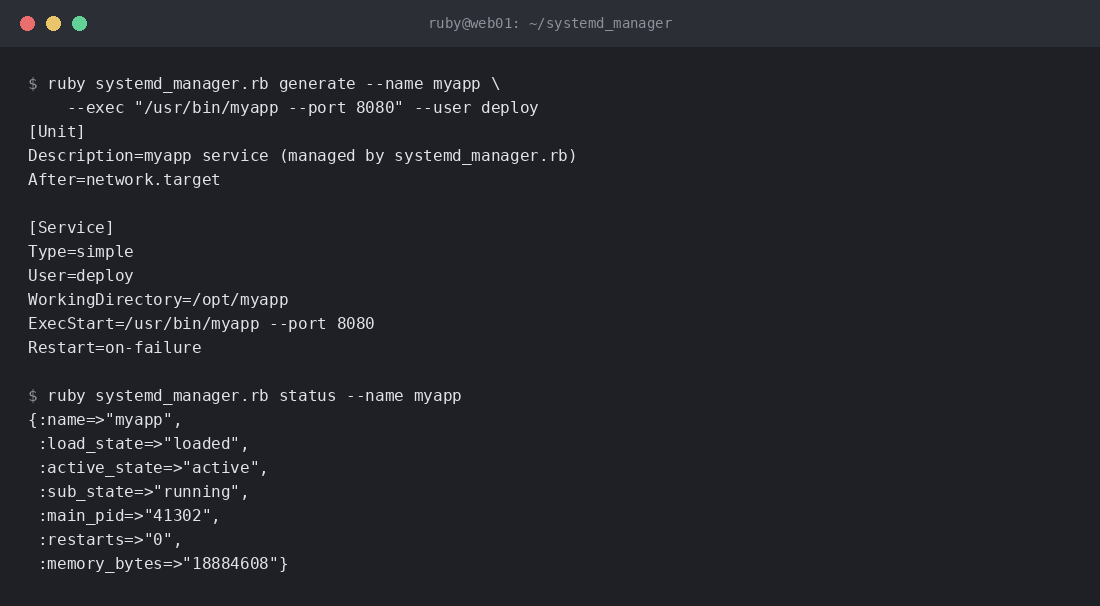
Scheduling and Deploy Integration
This script is meant to be called from something else, not run interactively forever. A few common patterns:
- Deploy scripts: after pushing new application code, call
ruby systemd_manager.rb install --name myapp --exec "..."to regenerate the unit (in case the command line changed) and restart cleanly. - Health checks in CI/CD: after a rollout, poll
status --name myappin a loop for a few seconds and fail the pipeline ifactive_statenever reaches"active". - Cron-driven drift detection: run
list --pattern myappnightly and alert if a unit you expect to exist has disappeared or changedload_state.
Troubleshooting
- “systemctl daemon-reload failed: Permission denied” — you’re not root. Run the
installcommand withsudo, or restrict your script to the read-onlystatus/listcommands when running as a normal user. - Service starts then immediately exits — check
journalctl -u <name> -n 50 --no-pager; the unit file’sExecStartalmost always needs an absolute path to the binary, and relative paths silently fail under systemd’s minimalPATH. status_summaryreturns all nil values — the unit name doesn’t exist yet. Remember the.servicesuffix is added automatically only by this script’s methods, not if you query with plainsystemctl showyourself.- Changes to the unit file don’t take effect — you (or a previous script) edited
/etc/systemd/system/*.servicedirectly without adaemon-reload. Always go throughSystemctl.installso reload happens every time.
Extending the Script
- Timer units: add a second ERB template for
.timerunits so this same tool can schedule periodic jobs instead of always-on services — a modern replacement for cron with dependency awareness and logging built in. - Templated multi-instance services: support systemd’s
name@instance.servicepattern to run several copies of the same unit (e.g., one per port) from a single template. - Drift auditing: hash the rendered unit and compare it against what’s on disk before every deploy, so you can detect and alert on manual out-of-band edits.
- JSON output mode: swap the
ppcall in the CLI’sstatusbranch forJSON.generate, and you have a ready-made input for Prometheus’s textfile collector or any HTTP-based health endpoint.