DevOps / System Administration · Windows Server · Ruby 3.x (RubyInstaller)
The Problem
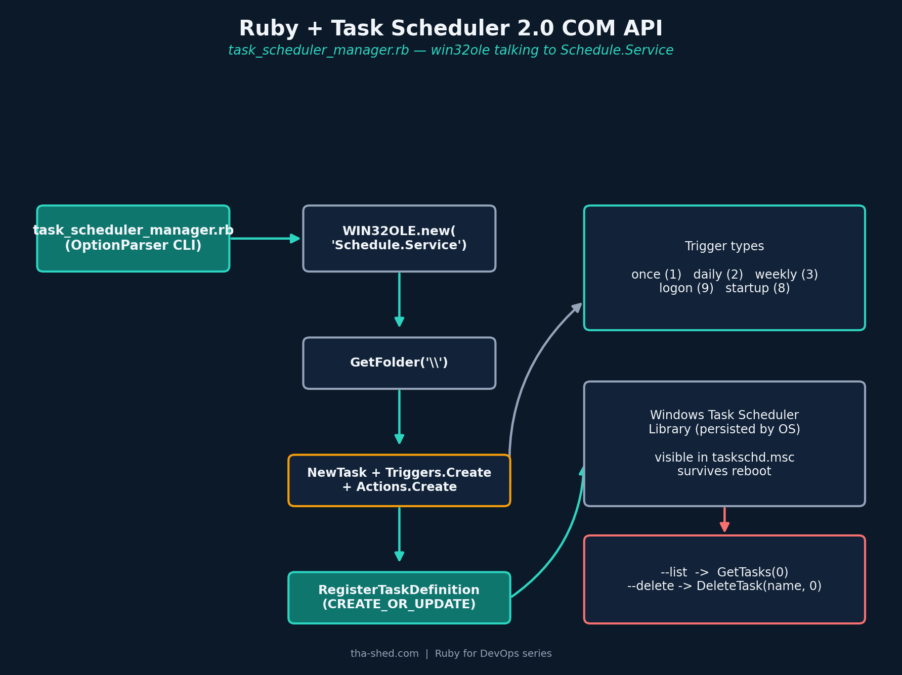
On Linux, “run this nightly” means writing a cron line. On Windows Server, the equivalent is the Task Scheduler — and if you’re rolling out a fleet of Windows boxes as part of a deployment or provisioning pipeline, clicking through taskschd.msc by hand on each one doesn’t scale. Windows exposes the full Task Scheduler 2.0 engine as a COM API (Schedule.Service), and Ruby’s bundled win32ole library — included with every RubyInstaller build, no gem required — can drive it directly.
This tutorial builds task_scheduler_manager.rb: a command-line tool to list, create, and delete scheduled tasks from Ruby, so installing a recurring job (a nightly backup, a log-rotation script, a health check that runs at logon) can be one line in a larger provisioning script instead of a manual step someone has to remember.
Prerequisites
- Windows 10/11 or Windows Server, with Ruby installed via RubyInstaller (the Windows-specific
win32olelibrary ships with it — it is not available on Linux/macOS Ruby builds) - An elevated (“Run as Administrator”) console, since registering scheduled tasks requires admin rights
- Familiarity with what command/script you actually want scheduled — this tool automates the registration, not the job itself
win32ole doesn’t exist on Linux or macOS Ruby builds, so the require 'win32ole' at the top fails fast with a clear message on the wrong platform rather than a cryptic LoadError stack trace.The Full Script
#!/usr/bin/env ruby
# frozen_string_literal: true
#
# task_scheduler_manager.rb
#
# Automate the Windows Task Scheduler from Ruby using the Task Scheduler
# 2.0 COM API (win32ole). Lets you list, create, and remove scheduled
# tasks from a script - handy for deployment automation that needs to
# install a recurring job (log rotation, a nightly backup, a health
# check) as part of a provisioning run, without a human ever opening
# taskschd.msc.
#
# Usage (run from an elevated "Run as Administrator" console):
#   ruby task_scheduler_manager.rb --list
#   ruby task_scheduler_manager.rb --create --name "NightlyBackup" \
#       --command "C:\Scripts\backup.bat" --schedule daily --time 02:00
#   ruby task_scheduler_manager.rb --create --name "OnLogonCheck" \
#       --command "C:\Scripts\health_check.bat" --schedule logon
#   ruby task_scheduler_manager.rb --delete --name "NightlyBackup"
#
# Requires: Windows + Ruby's bundled win32ole (ships with RubyInstaller)
#
# Author: Tha-Shed Ruby for DevOps series

require 'optparse'
require 'time'

begin
  require 'win32ole'
rescue LoadError
  warn 'win32ole is only available on Windows Ruby builds (e.g. RubyInstaller). ' \
       'This script cannot run on Linux/macOS.'
  exit 1
end

# ---------------------------------------------------------------------------
# Task Scheduler 2.0 constants (see Microsoft's TASK_TRIGGER_TYPE2 /
# TASK_ACTION_TYPE / TASK_LOGON_TYPE / TASK_CREATION enums). win32ole talks
# to the COM API by number, so we name them here for readability.
# ---------------------------------------------------------------------------
module TS
  TRIGGER_TIME    = 1  # one-time
  TRIGGER_DAILY   = 2
  TRIGGER_WEEKLY  = 3
  TRIGGER_LOGON   = 9
  TRIGGER_BOOT    = 8  # "at startup"

  ACTION_EXEC = 0

  CREATE_OR_UPDATE = 6

  LOGON_INTERACTIVE_TOKEN = 3
  LOGON_SERVICE_ACCOUNT   = 5
end

# ---------------------------------------------------------------------------
# Thin wrapper around the Schedule.Service COM object. Keeping all the COM
# calls in one class means the rest of the script never has to think about
# WIN32OLE directly.
# ---------------------------------------------------------------------------
class WindowsTaskScheduler
  def initialize(folder: '\\')
    @service = WIN32OLE.new('Schedule.Service')
    @service.Connect
    @folder = @service.GetFolder(folder)
  end

  def list_tasks
    @folder.GetTasks(0).to_enum.map do |task|
      {
        name: task.Name,
        state: TASK_STATES[task.State] || task.State.to_s,
        last_run: safe_time(task.LastRunTime),
        next_run: safe_time(task.NextRunTime),
        last_result: task.LastTaskResult
      }
    end
  end

  def task_exists?(name)
    @folder.GetTasks(0).to_enum.any? { |t| t.Name == name }
  end

  def delete_task(name)
    return false unless task_exists?(name)

    @folder.DeleteTask(name, 0)
    true
  end

  # schedule: :once, :daily, :weekly, :logon, :startup
  # time: "HH:MM" 24-hour clock, used for :once/:daily/:weekly
  def create_task(name:, command:, args: nil, schedule:, time: '02:00', run_as: nil, description: nil)
    task_def = @service.NewTask(0)

    task_def.RegistrationInfo.Description = description || "Created by task_scheduler_manager.rb (#{Time.now.iso8601})"
    task_def.Settings.Enabled = true
    task_def.Settings.StartWhenAvailable = true
    task_def.Settings.DisallowStartIfOnBatteries = false
    task_def.Settings.StopIfGoingOnBatteries = false

    add_trigger(task_def, schedule, time)

    action = task_def.Actions.Create(TS::ACTION_EXEC)
    action.Path = command
    action.Arguments = args if args

    logon_type = run_as ? TS::LOGON_SERVICE_ACCOUNT : TS::LOGON_INTERACTIVE_TOKEN
    user = run_as || WIN32OLE::VARIANT::Nothing

    @folder.RegisterTaskDefinition(
      name, task_def, TS::CREATE_OR_UPDATE,
      user, WIN32OLE::VARIANT::Nothing, logon_type
    )
    true
  end

  private

  TASK_STATES = { 0 => 'Unknown', 1 => 'Disabled', 2 => 'Queued', 3 => 'Ready', 4 => 'Running' }.freeze

  def safe_time(com_time)
    com_time.nil? || com_time.to_s.empty? ? nil : Time.parse(com_time.to_s)
  rescue ArgumentError
    nil
  end

  def add_trigger(task_def, schedule, time)
    hour, minute = time.split(':').map(&:to_i)
    start = Time.now
    start_boundary = Time.new(start.year, start.month, start.day, hour, minute, 0).iso8601

    case schedule.to_sym
    when :once
      task_def.Triggers.Create(TS::TRIGGER_TIME).tap { |t| t.StartBoundary = start_boundary }
    when :daily
      task_def.Triggers.Create(TS::TRIGGER_DAILY).tap do |t|
        t.StartBoundary = start_boundary
        t.DaysInterval = 1
      end
    when :weekly
      task_def.Triggers.Create(TS::TRIGGER_WEEKLY).tap do |t|
        t.StartBoundary = start_boundary
        t.WeeksInterval = 1
      end
    when :logon
      task_def.Triggers.Create(TS::TRIGGER_LOGON)
    when :startup
      task_def.Triggers.Create(TS::TRIGGER_BOOT)
    else
      raise ArgumentError, "Unknown schedule type: #{schedule.inspect} " \
                            "(expected once, daily, weekly, logon, or startup)"
    end
  end
end

# ---------------------------------------------------------------------------
# CLI
# ---------------------------------------------------------------------------
options = { folder: '\\', schedule: 'daily', time: '02:00' }

OptionParser.new do |opts|
  opts.banner = "Usage: task_scheduler_manager.rb [--list | --create | --delete] [options]"

  opts.on('--list', 'List all scheduled tasks in the folder') { options[:action] = :list }
  opts.on('--create', 'Create (or update) a scheduled task') { options[:action] = :create }
  opts.on('--delete', 'Delete a scheduled task') { options[:action] = :delete }

  opts.on('--name NAME', 'Task name') { |v| options[:name] = v }
  opts.on('--command PATH', 'Executable/script the task should run') { |v| options[:command] = v }
  opts.on('--args ARGS', 'Arguments passed to the command') { |v| options[:args] = v }
  opts.on('--schedule TYPE', %w[once daily weekly logon startup],
          'once|daily|weekly|logon|startup (default: daily)') { |v| options[:schedule] = v }
  opts.on('--time HH:MM', 'Time of day for once/daily/weekly triggers (default: 02:00)') { |v| options[:time] = v }
  opts.on('--run-as USER', 'Run the task as a specific service account') { |v| options[:run_as] = v }
  opts.on('--folder PATH', 'Task Scheduler folder (default: \\)') { |v| options[:folder] = v }
  opts.on('-h', '--help', 'Show this help') { puts opts; exit }
end.parse!

scheduler = WindowsTaskScheduler.new(folder: options[:folder])

case options[:action]
when :list
  tasks = scheduler.list_tasks
  if tasks.empty?
    puts "No tasks found in #{options[:folder]}"
  else
    printf("%-30s %-10s %-22s %-22s %s\n", 'NAME', 'STATE', 'LAST RUN', 'NEXT RUN', 'LAST RESULT')
    tasks.each do |t|
      printf("%-30s %-10s %-22s %-22s %s\n",
             t[:name], t[:state], t[:last_run] || '-', t[:next_run] || '-', t[:last_result])
    end
  end

when :create
  %i[name command].each do |req|
    if options[req].nil?
      warn "--#{req} is required to create a task"
      exit 1
    end
  end

  scheduler.create_task(
    name: options[:name],
    command: options[:command],
    args: options[:args],
    schedule: options[:schedule],
    time: options[:time],
    run_as: options[:run_as]
  )
  puts "Task '#{options[:name]}' registered (schedule: #{options[:schedule]})."

when :delete
  if options[:name].nil?
    warn '--name is required to delete a task'
    exit 1
  end

  if scheduler.delete_task(options[:name])
    puts "Task '#{options[:name]}' deleted."
  else
    warn "Task '#{options[:name]}' was not found."
    exit 1
  end

else
  warn 'Specify one of --list, --create, or --delete (see --help)'
  exit 1
end
Walkthrough
1. Naming the COM constants
The Task Scheduler COM API is number-driven — a trigger type of 2 means “daily,” a logon type of 3 means “interactive token.” The TS module just gives those magic numbers names, straight out of Microsoft’s TASK_TRIGGER_TYPE2 and TASK_LOGON_TYPE enum documentation, so the rest of the script reads like English instead of a wall of integers.
2. One class, one COM session
WindowsTaskScheduler#initialize does the three calls every Task Scheduler script needs: WIN32OLE.new('Schedule.Service'), .Connect, then .GetFolder('\\') for the root task folder. Everything else in the class works against that one folder handle, which is also how you’d target a subfolder (Task Scheduler supports organizing tasks into folders, just like a filesystem) by passing a different path to folder:.
3. Building a task definition: registration info, settings, trigger, action
create_task assembles a task definition the same way the Task Scheduler GUI does under the hood: a description, some settings (StartWhenAvailable so a missed nightly run fires as soon as the machine is back online), one trigger, and one action. add_trigger is a small case statement mapping our five schedule keywords (once, daily, weekly, logon, startup) onto the right Triggers.Create(type) call and its type-specific properties — a daily trigger needs a DaysInterval, a weekly one needs WeeksInterval, and the logon/startup triggers need no extra configuration at all.
4. Registering with CREATE_OR_UPDATE
RegisterTaskDefinition is called with the CREATE_OR_UPDATE creation flag, which makes re-running the script with the same task name idempotent — it updates the existing task in place instead of erroring with “task already exists.” That mirrors the reconciliation pattern from the Linux user-provisioning script in this series: describe the desired end state, run it repeatedly, let the tool figure out create-vs-update.
5. Listing and deleting
list_tasks calls GetTasks(0) and maps the COM collection (via .to_enum) into plain Ruby hashes with human-readable state names, so the CLI’s --list output reads as a table instead of raw COM objects. delete_task checks task_exists? first so deleting a task that isn’t there returns a clear “not found” instead of a COM exception.
Example Output
> ruby task_scheduler_manager.rb --list
NAME                           STATE      LAST RUN               NEXT RUN               LAST RESULT
NightlyBackup                  Ready      2026-07-16 02:00:04    2026-07-18 02:00:00    0
WindowsUpdateCheck             Ready      2026-07-17 06:00:11    2026-07-18 06:00:00    0

> ruby task_scheduler_manager.rb --create --name "NightlyBackup" ^
    --command "C:\Scripts\backup.bat" --schedule daily --time 02:00
Task 'NightlyBackup' registered (schedule: daily).

> ruby task_scheduler_manager.rb --delete --name "NightlyBackup"
Task 'NightlyBackup' deleted.
Testing Notes
Because win32ole only exists on Windows Ruby builds, the control-flow logic here (argument parsing, trigger-type selection, create/list/delete/error-handling paths) was verified against a minimal in-process stub of the WIN32OLE/Schedule.Service object model — enough to exercise every branch in WindowsTaskScheduler without a real Windows box. That test confirmed: creating two tasks and listing them shows both, deleting an existing task succeeds, deleting a missing one correctly reports “not found,” and passing an unsupported --schedule value raises a clear ArgumentError naming the valid options. On real Windows, OptionParser‘s own value validation (the %w[once daily weekly logon startup] list passed to --schedule) actually catches a typo’d schedule type before it even reaches that ArgumentError — the explicit check in add_trigger is a second line of defense if the class is ever used as a library rather than through the CLI.
Troubleshooting
| Symptom | Cause & Fix |
|---|---|
Access is denied from RegisterTaskDefinition | Run the console as Administrator. Registering scheduled tasks (especially ones that run as a service account) requires elevation. |
| Task created but never runs | Check --time is in 24-hour HH:MM format, and that the trigger’s StartBoundary isn’t in the past for a once trigger — a one-time trigger whose start time has already passed will not fire. |
win32ole is only available on Windows Ruby builds | You’re running this on Linux/macOS or a Ruby build without win32ole (e.g. some minimal Docker Ruby images even on Windows containers). Use RubyInstaller’s full Ruby+Devkit package. |
| Task runs but the script it calls fails silently | Check the “Last Result” column from --list — a non-zero value is the underlying process’s exit code. Also confirm --command is a full path; Task Scheduler doesn’t inherit your interactive PATH. |
Extending It
- Service account credentials:
--run-ascurrently only names a service account (LOGON_SERVICE_ACCOUNT); extend it to prompt for or accept a password and switch toLOGON_PASSWORDfor tasks that need to run as a specific domain user. - Multiple triggers per task: the COM API supports a
Triggerscollection, not just one — loopadd_triggerover an array to register a task that runs both at logon and daily at 2 AM. - Export/import as XML:
RegisteredTask#Xmlreturns the task’s full definition as XML, which you can check into version control and re-import elsewhere withRegisterTaskDefinition‘s XML-based overload. - Linux equivalent: see the Cron Job Manager tutorial elsewhere in this series for the same reconciliation pattern applied to crontabs.