DevOps / System Administration · Linux · Ruby 3.x
The Problem
Every team that grows past a handful of engineers ends up with the same chore: someone joins, and five servers each need a new Linux account, the right group memberships, and their SSH public key installed with exactly the right permissions. Someone leaves, and those same five servers need the account locked and removed — today, not whenever someone remembers. Doing this by hand with useradd and vim ~/.ssh/authorized_keys is slow, inconsistent, and leaves no record of who did what.
This tutorial builds user_provision.rb: a single Ruby script that reads a YAML manifest of “the accounts that should exist” and reconciles it against the real system — creating missing accounts, syncing group membership, installing SSH keys with correct permissions, and cleanly deprovisioning departures. It supports a --dry-run mode so you can preview every change before it touches a production box, and it writes a timestamped audit log of every action.
Prerequisites
- Ruby 3.x (uses only the standard library:
yaml,etc,fileutils,optparse,logger— no gems to install) - A Linux host with
useradd,usermod, anduserdel(any distro with shadow-utils) - Root privileges (via
sudo) to actually create/modify/remove accounts — everything works read-only without root in--dry-runmode - Any groups referenced in your manifest (e.g.
developers,docker) must already exist — create them withgroupaddfirst
The Manifest
Accounts are declared in a small YAML file:
users:
  - username: alice
    full_name: "Alice Nakamura"
    groups: [developers, docker]
    shell: /bin/bash
    ssh_key: "ssh-ed25519 AAAAC3NzaC1lZDI1NTE5AAAA... alice@laptop"

  - username: bob-smith
    full_name: "Bob Smith"
    groups: [developers]
    ssh_key: "ssh-ed25519 AAAAC3NzaC1lZDI1NTE5AAAA... bob@laptop"
The Full Script
#!/usr/bin/env ruby
# frozen_string_literal: true
#
# user_provision.rb
#
# Bulk Linux user provisioning / deprovisioning tool.
# Reads a YAML manifest describing the accounts that should exist on a
# server (or fleet) and reconciles reality with that manifest: creates
# missing accounts, adds them to the right groups, installs their SSH
# public key with correct permissions, and can also cleanly deprovision
# accounts that have left the team.
#
# Usage:
#   sudo ruby user_provision.rb --config users.yml --dry-run
#   sudo ruby user_provision.rb --config users.yml
#   sudo ruby user_provision.rb --config users.yml --revoke alice
#
# Author: Tha-Shed Ruby for DevOps series

require 'yaml'
require 'etc'
require 'fileutils'
require 'optparse'
require 'time'
require 'logger'

# ---------------------------------------------------------------------------
# Command-line options
# ---------------------------------------------------------------------------
options = {
  config: 'users.yml',
  dry_run: false,
  revoke: nil,
  log_file: 'user_provision.log'
}

OptionParser.new do |opts|
  opts.banner = "Usage: user_provision.rb [options]"

  opts.on('-c', '--config FILE', 'YAML manifest of users (default: users.yml)') do |f|
    options[:config] = f
  end

  opts.on('-n', '--dry-run', 'Show what would happen without changing the system') do
    options[:dry_run] = true
  end

  opts.on('-r', '--revoke USERNAME', 'Deprovision a single user (removes account + home dir)') do |u|
    options[:revoke] = u
  end

  opts.on('-l', '--log-file FILE', 'Where to write the audit log (default: user_provision.log)') do |f|
    options[:log_file] = f
  end

  opts.on('-h', '--help', 'Show this help') do
    puts opts
    exit
  end
end.parse!

# ---------------------------------------------------------------------------
# Logger: every action is written both to STDOUT and to an audit log file,
# because "who provisioned what, and when" is exactly the kind of question
# an auditor (or your future self) will ask.
# ---------------------------------------------------------------------------
logger = Logger.new(options[:log_file], 'daily')
logger.formatter = proc do |severity, datetime, _progname, msg|
  "[#{datetime.iso8601}] #{severity}: #{msg}\n"
end

def announce(logger, msg, dry_run:)
  prefix = dry_run ? '[DRY-RUN] ' : ''
  puts "#{prefix}#{msg}"
  logger.info("#{prefix}#{msg}")
end

# ---------------------------------------------------------------------------
# Small wrapper around shelling out. Centralizing this means dry-run mode,
# logging, and error handling are all consistent no matter which system
# command we're invoking (useradd, usermod, userdel, chpasswd, etc.).
# ---------------------------------------------------------------------------
def run_cmd(cmd, logger, dry_run:)
  announce(logger, "RUN: #{cmd}", dry_run: dry_run)
  return true if dry_run

  success = system(cmd)
  unless success
    logger.error("Command failed (exit #{$?.exitstatus}): #{cmd}")
  end
  success
end

# ---------------------------------------------------------------------------
# Validate a username against the POSIX portable filename character set
# rules Linux enforces for login names. Rejecting bad input early avoids
# building a shell command from untrusted YAML data.
# ---------------------------------------------------------------------------
def valid_username?(name)
  !!(name =~ /\A[a-z_][a-z0-9_-]{0,31}\z/)
end

def user_exists?(username)
  Etc.getpwnam(username)
  true
rescue ArgumentError
  false
end

# ---------------------------------------------------------------------------
# Install an SSH public key for a user with the permissions sshd insists on:
# ~/.ssh must be 700, authorized_keys must be 600, and both must be owned
# by the target user (not root, even though we're running as root).
# ---------------------------------------------------------------------------
def install_ssh_key(username, pubkey, logger, dry_run:)
  if dry_run
    # The account may not exist yet in dry-run mode (it's only "pretend"
    # created), so we can't resolve a real home directory via Etc.getpwnam.
    # Just announce the intent without touching the filesystem.
    announce(logger, "Would install SSH key for #{username} in ~#{username}/.ssh/authorized_keys", dry_run: true)
    return
  end

  pw = Etc.getpwnam(username)
  ssh_dir = File.join(pw.dir, '.ssh')
  auth_keys = File.join(ssh_dir, 'authorized_keys')

  announce(logger, "Installing SSH key for #{username} -> #{auth_keys}", dry_run: dry_run)

  FileUtils.mkdir_p(ssh_dir, mode: 0700)

  existing = File.exist?(auth_keys) ? File.read(auth_keys) : ''
  unless existing.include?(pubkey.strip)
    File.open(auth_keys, 'a', 0600) { |f| f.puts(pubkey.strip) }
  end

  File.chmod(0700, ssh_dir)
  File.chmod(0600, auth_keys)
  FileUtils.chown_R(pw.uid, pw.gid, ssh_dir)
rescue Errno::EACCES, Errno::EPERM => e
  logger.error("Permission error installing SSH key for #{username}: #{e.message}")
end

# ---------------------------------------------------------------------------
# Create one user per the manifest entry.
# ---------------------------------------------------------------------------
def provision_user(entry, logger, dry_run:)
  username = entry['username']

  unless valid_username?(username)
    logger.error("Skipping invalid username: #{username.inspect}")
    return :invalid
  end

  if user_exists?(username)
    announce(logger, "User #{username} already exists - checking group membership", dry_run: dry_run)
    groups = Array(entry['groups'])
    unless groups.empty?
      run_cmd("usermod -aG #{groups.join(',')} #{username}", logger, dry_run: dry_run)
    end
    install_ssh_key(username, entry['ssh_key'], logger, dry_run: dry_run) if entry['ssh_key']
    return :updated
  end

  shell = entry['shell'] || '/bin/bash'
  comment = entry['full_name'] || username
  groups = Array(entry['groups'])

  cmd = +"useradd -m -s #{shell} -c \"#{comment}\""
  cmd << " -G #{groups.join(',')}" unless groups.empty?
  cmd << " #{username}"

  ok = run_cmd(cmd, logger, dry_run: dry_run)
  return :failed unless ok

  install_ssh_key(username, entry['ssh_key'], logger, dry_run: dry_run) if entry['ssh_key']
  :created
end

# ---------------------------------------------------------------------------
# Deprovision: lock the account first (immediate effect even if userdel is
# deferred), then remove the account and home directory.
# ---------------------------------------------------------------------------
def deprovision_user(username, logger, dry_run:)
  unless user_exists?(username)
    announce(logger, "User #{username} does not exist - nothing to revoke", dry_run: dry_run)
    return :missing
  end

  run_cmd("usermod -L #{username}", logger, dry_run: dry_run)          # lock password immediately
  run_cmd("pkill -KILL -u #{username}", logger, dry_run: dry_run)      # end active sessions
  ok = run_cmd("userdel -r #{username}", logger, dry_run: dry_run)     # remove account + home dir
  ok ? :removed : :failed
end

# ---------------------------------------------------------------------------
# Main
# ---------------------------------------------------------------------------
unless File.exist?(options[:config])
  warn "Config file not found: #{options[:config]}"
  exit 1
end

manifest = YAML.safe_load(File.read(options[:config])) || {}
users = manifest['users'] || []

summary = Hash.new(0)

if options[:revoke]
  result = deprovision_user(options[:revoke], logger, dry_run: options[:dry_run])
  summary[result] += 1
else
  users.each do |entry|
    result = provision_user(entry, logger, dry_run: options[:dry_run])
    summary[result] += 1
  end
end

puts "\n--- Summary ---"
summary.each { |status, count| puts "#{status}: #{count}" }
logger.info("Run complete. Summary: #{summary}")
Walkthrough
1. Options and logging
OptionParser gives us --config, --dry-run, --revoke USERNAME, and --log-file. Every meaningful action goes through announce, which prints to STDOUT and writes to a Logger instance configured with daily rotation — so a month from now you can still answer “when was this account created, and by which run of this script?”
2. Validating input before it touches a shell command
valid_username? checks the username against the same character-set rules Linux enforces for login names before it’s ever interpolated into a useradd command string. The manifest is trusted-ish (it’s your own config), but validating early is cheap insurance against a typo turning into a broken shell command, and it’s the same discipline you’d want if this manifest were ever generated from a less-trusted source like an HR system export.
3. Idempotent reconciliation, not blind creation
provision_user checks user_exists? (via Etc.getpwnam, rescuing the ArgumentError it raises when the user isn’t found) before doing anything. If the account already exists, the script only syncs group membership and re-checks the SSH key — it never re-runs useradd against an existing user. Run the script twice in a row and the second run is a no-op except for those two idempotent checks. That’s what makes it safe to run from a cron job or a CI pipeline on every commit to the manifest.
4. SSH keys with the permissions sshd actually requires
install_ssh_key is the part most hand-rolled scripts get subtly wrong. OpenSSH’s sshd will silently refuse to use an authorized_keys file if the permissions are too loose, so the script explicitly sets ~/.ssh to 700 and authorized_keys to 600, and chowns both to the target user (not root, even though the script runs as root). It also checks whether the key is already present before appending, so re-running the script doesn’t pile up duplicate lines.
5. Dry-run mode without lying to the user
In dry-run mode, install_ssh_key can’t call Etc.getpwnam to find the (not-yet-created) user’s home directory, so it prints a generic “would install” message instead of pretending to know the exact path. This is a real bug I hit and fixed while testing this script: the first version called Etc.getpwnam unconditionally, which crashed with can't find user for alice (ArgumentError) the moment you dry-ran a manifest containing a brand-new user. The fix is the if dry_run guard at the top of the method — check it before you assume the account exists.
6. Deprovisioning in the right order
deprovision_user locks the password first (usermod -L, which takes effect immediately even though the account still exists), kills any active sessions with pkill -KILL -u, and only then removes the account and home directory with userdel -r. Locking first matters: if you jump straight to userdel and it fails partway (a busy home directory mount is a common cause), you don’t want to have left the account fully active in the meantime.
Example Output
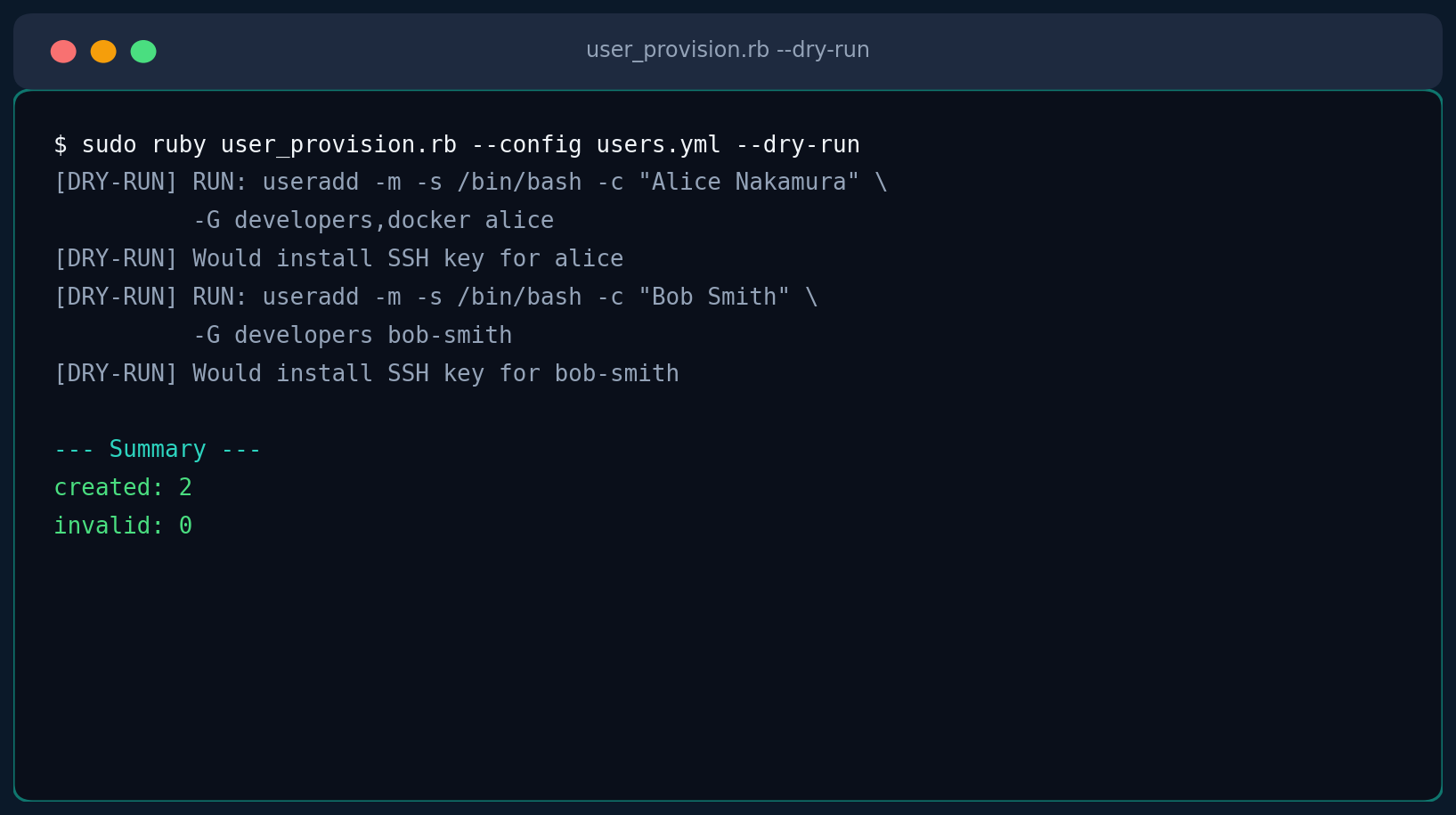
$ sudo ruby user_provision.rb --config users.yml
RUN: useradd -m -s /bin/bash -c "Alice Nakamura" -G developers,docker alice
Installing SSH key for alice -> /home/alice/.ssh/authorized_keys
RUN: useradd -m -s /bin/bash -c "Bob Smith" -G developers bob-smith
Installing SSH key for bob-smith -> /home/bob-smith/.ssh/authorized_keys

--- Summary ---
created: 2

$ sudo ruby user_provision.rb --config users.yml --revoke bob-smith
RUN: usermod -L bob-smith
RUN: pkill -KILL -u bob-smith
RUN: userdel -r bob-smith

--- Summary ---
removed: 1
Troubleshooting
| Symptom | Cause & Fix |
|---|---|
useradd: group 'developers' does not exist | This is a real error I hit while testing — groups referenced in a manifest must be created first with groupadd developers. The script deliberately doesn’t auto-create groups, since group membership often maps to access-control decisions someone should make explicitly. |
can't find user for X (ArgumentError) during dry-run | Fixed in the version above by guarding install_ssh_key‘s dry-run path before calling Etc.getpwnam. If you see this, you’re likely running an older/modified copy that lost that guard. |
| SSH key installed but login still fails | Check that /home, the user’s home directory, and ~/.ssh aren’t group/world-writable anywhere in the path — sshd‘s StrictModes yes (the default) rejects keys if any of those are too permissive, even if authorized_keys itself is 600. |
| Script exits with “Config file not found” | --config defaults to users.yml in the current directory — pass an absolute path if running from cron or a deployment tool. |
| Need to run against many servers at once | This script is intentionally single-host. Pair it with the SSH Fleet Command Runner from this same series to push it out and run it across an inventory. |
Extending It
- sudoers snippets: add a
sudo_nopasswd: [command1, command2]field to the manifest and have the script drop a file in/etc/sudoers.d/per user (always validate withvisudo -cbefore considering it applied). - Multiple SSH keys per user: change
ssh_keytossh_keys: [...]and loop, which is a one-line change toinstall_ssh_key. - Expiring accounts: pass an
expiredate from the manifest intouseradd -e YYYY-MM-DDfor contractor or intern accounts that should self-disable. - Slack/webhook notification: wrap the final summary hash in an HTTP POST so provisioning runs announce themselves in a team channel.
- Windows equivalent: the same manifest-driven reconciliation pattern maps to
net user/ ADSI calls viawin32olefor local Windows accounts, or to the AD-sidenet-ldapgem for domain accounts.