Part of our Ruby for DevOps series — practical Ruby scripts that solve real system-administration problems.
The Problem
Windows Firewall rules accumulate. Every installer, every “just open this port to get it working” support ticket, every VPN client and every dev tool adds a rule, and years later nobody remembers which ones are still needed, let alone which ones are dangerously permissive. netsh advfirewall firewall show rule name=all verbose will dump every single rule — but as raw, human-formatted text meant for a person to scroll through, not for automation to reason about. Finding “every enabled inbound Allow rule open to any remote address” by eye across a few hundred rules is slow and error-prone.
This script wraps netsh, parses its verbose text output into structured Ruby hashes, flags the classic overly-permissive finding automatically, and can export a full audit trail to CSV for a compliance review — or, carefully, create a new narrowly-scoped rule.
Prerequisites
- Ruby 2.7+ for Windows (e.g. via RubyInstaller) — tested against Ruby 3.0 syntax
- Windows 7 / Server 2008 R2 or newer (anything with
netsh advfirewall, which has shipped since Vista/Server 2008) - No gems required — only
optparse,open3, andcsvfrom the standard library - An elevated (Administrator) shell is required to add rules; reading/auditing existing rules generally does not require elevation
A note on testing: netsh is Windows-only, so the command-execution path (WindowsFirewall.fetch_raw_rules) can only be exercised on a real Windows host. The parsing logic that does the actual work, however, is pure text processing — it takes a string and returns an array of hashes — so it can be fully unit-tested on any OS by feeding it a captured sample of real netsh output. That’s exactly how this script’s core logic was verified below before ever touching Windows.
The Code
#!/usr/bin/env ruby
# frozen_string_literal: true
#
# firewall_audit.rb
#
# Audits Windows Firewall rules by shelling out to `netsh advfirewall` and
# parsing its verbose text output into structured Ruby objects. Flags
# inbound "Allow" rules that are enabled and open to any remote address --
# the classic overly-permissive-firewall-rule finding. Can also add a new
# rule (with --dry-run by default, since this is a change-making action).
#
# No gems required -- pure Ruby + netsh.exe (built into Windows).
#
# Usage (run on Windows, typically from an elevated shell):
#   ruby firewall_audit.rb                        # audit all rules
#   ruby firewall_audit.rb --csv report.csv        # audit + export CSV
#   ruby firewall_audit.rb --add-rule "Allow App" --port 8080 --protocol TCP
#   ruby firewall_audit.rb --add-rule "Allow App" --port 8080 --apply   # actually create it
#
# The parsing logic (WindowsFirewall.parse) is pure text processing and is
# unit-tested in this tutorial against a captured sample of real
# `netsh advfirewall firewall show rule name=all verbose` output, so you can
# verify it on any OS before ever touching a Windows box.

require 'optparse'
require 'open3'
require 'csv'

module WindowsFirewall
  module_function

  # Runs `netsh advfirewall firewall show rule name=all verbose` and returns
  # the raw stdout. Only works on Windows -- raises on other platforms so
  # callers get a clear error instead of a confusing Errno::ENOENT.
  def fetch_raw_rules
    unless windows?
      raise 'netsh is only available on Windows. Use WindowsFirewall.parse ' \
            'directly with captured text on other platforms.'
    end

    stdout, stderr, status = Open3.capture3('netsh', 'advfirewall', 'firewall',
                                             'show', 'rule', 'name=all', 'verbose')
    raise "netsh failed: #{stderr}" unless status.success?

    stdout
  end

  def windows?
    RbConfig::CONFIG['host_os'] =~ /mswin|mingw|cygwin/
  end

  # Parses the verbose `netsh advfirewall firewall show rule` text format
  # into an array of rule hashes. Each rule block looks like:
  #
  #   Rule Name:                           Allow RDP
  #   ----------------------------------------------------------------------
  #   Enabled:                              Yes
  #   Direction:                            In
  #   Profiles:                             Domain,Private,Public
  #   LocalIP:                              Any
  #   RemoteIP:                             Any
  #   Protocol:                             TCP
  #   LocalPort:                            3389
  #   RemotePort:                           Any
  #   Edge traversal:                       No
  #   Action:                               Allow
  #
  def parse(raw_text)
    rules = []
    current = nil

    raw_text.each_line do |line|
      line = line.rstrip
      next if line.strip.empty?
      next if line.start_with?('----') # separator under "Rule Name:"

      if line.start_with?('Rule Name:')
        rules << current if current
        current = { 'Rule Name' => line.split(':', 2)[1].to_s.strip }
        next
      end

      next unless current

      key, value = line.split(':', 2)
      next unless key && value

      current[key.strip] = value.strip
    end

    rules << current if current
    rules
  end

  # A rule is "risky" if it's an enabled inbound Allow rule with no
  # restriction on the remote address -- i.e. open to the whole internet.
  def risky?(rule)
    rule['Enabled'] == 'Yes' &&
      rule['Direction'] == 'In' &&
      rule['Action'] == 'Allow' &&
      %w[Any 0.0.0.0/0].include?(rule['RemoteIP'])
  end

  # Builds the argv for `netsh advfirewall firewall add rule ...`. Returned
  # as an array (not a shell string) so callers can pass it straight to
  # Open3/system without worrying about shell-quoting the rule name.
  def build_add_rule_command(name:, port:, protocol: 'TCP', direction: 'in', action: 'allow')
    [
      'netsh', 'advfirewall', 'firewall', 'add', 'rule',
      "name=#{name}",
      "dir=#{direction}",
      "action=#{action}",
      "protocol=#{protocol}",
      "localport=#{port}"
    ]
  end
end

# ---------------------------------------------------------------------------
# CLI
# ---------------------------------------------------------------------------
def print_report(rules)
  puts "Parsed #{rules.length} firewall rule(s)."
  puts '-' * 78

  risky = rules.select { |r| WindowsFirewall.risky?(r) }

  rules.each do |r|
    flag = WindowsFirewall.risky?(r) ? '  <-- RISKY (any remote, allow, enabled)' : ''
    printf("%-30s %-10s %-6s %-8s %-6s%s\n",
           r['Rule Name'], r['Direction'], r['Action'], r['Protocol'], r['Enabled'], flag)
  end

  puts '-' * 78
  puts "#{risky.length} risky rule(s) found." + (risky.empty? ? ' Nice.' : '')
  risky
end

def write_csv(rules, path)
  headers = %w[Rule\ Name Enabled Direction Profiles RemoteIP Protocol LocalPort Action]
  CSV.open(path, 'w') do |csv|
    csv << headers
    rules.each { |r| csv << headers.map { |h| r[h] } }
  end
  puts "Wrote #{rules.length} rows to #{path}"
end

def main
  options = { csv: nil, add_rule: nil, port: nil, protocol: 'TCP', apply: false }

  OptionParser.new do |opts|
    opts.banner = 'Usage: firewall_audit.rb [options]'

    opts.on('--csv PATH', 'Export the full parsed rule set to a CSV file') { |v| options[:csv] = v }
    opts.on('--add-rule NAME', 'Create a new inbound allow rule with this name') { |v| options[:add_rule] = v }
    opts.on('--port PORT', 'Local port for --add-rule') { |v| options[:port] = v }
    opts.on('--protocol PROTO', 'Protocol for --add-rule (default TCP)') { |v| options[:protocol] = v }
    opts.on('--apply', 'Actually run the add-rule command (default is dry-run/print only)') { options[:apply] = true }
    opts.on('-h', '--help') { puts opts; exit }
  end.parse!

  if options[:add_rule]
    cmd = WindowsFirewall.build_add_rule_command(
      name: options[:add_rule], port: options[:port], protocol: options[:protocol]
    )
    if options[:apply]
      raise 'Refusing to --apply on a non-Windows host' unless WindowsFirewall.windows?

      puts "Running: #{cmd.join(' ')}"
      system(*cmd)
    else
      puts "[dry-run] would run: #{cmd.join(' ')}"
      puts '(pass --apply to actually create the rule)'
    end
    return
  end

  raw = WindowsFirewall.fetch_raw_rules
  rules = WindowsFirewall.parse(raw)
  risky = print_report(rules)
  write_csv(rules, options[:csv]) if options[:csv]
  exit(risky.empty? ? 0 : 2) # non-zero exit lets CI/monitoring treat risky findings as a failure
end

main if __FILE__ == $PROGRAM_NAME
Step-by-Step Walkthrough
1. Getting the raw data
WindowsFirewall.fetch_raw_rules shells out via Open3.capture3 (rather than backticks or system) specifically because it gives you stdout, stderr, and the process status as three separate values — if netsh fails, you get its actual error message instead of silently parsing empty output. A windows? guard checks RbConfig::CONFIG['host_os'] and raises a clear error on other platforms rather than letting Open3 fail with a confusing “command not found.”
2. Parsing netsh’s verbose format
Verbose netsh advfirewall firewall show rule output is a series of blocks, each starting with a Rule Name: line, followed by a dashed separator, followed by Key: Value lines, with blank lines between rules:
Rule Name:                           Allow RDP
----------------------------------------------------------------------
Enabled:                              Yes
Direction:                            In
Profiles:                             Domain,Private,Public
RemoteIP:                             Any
Protocol:                             TCP
LocalPort:                            3389
Action:                               Allow
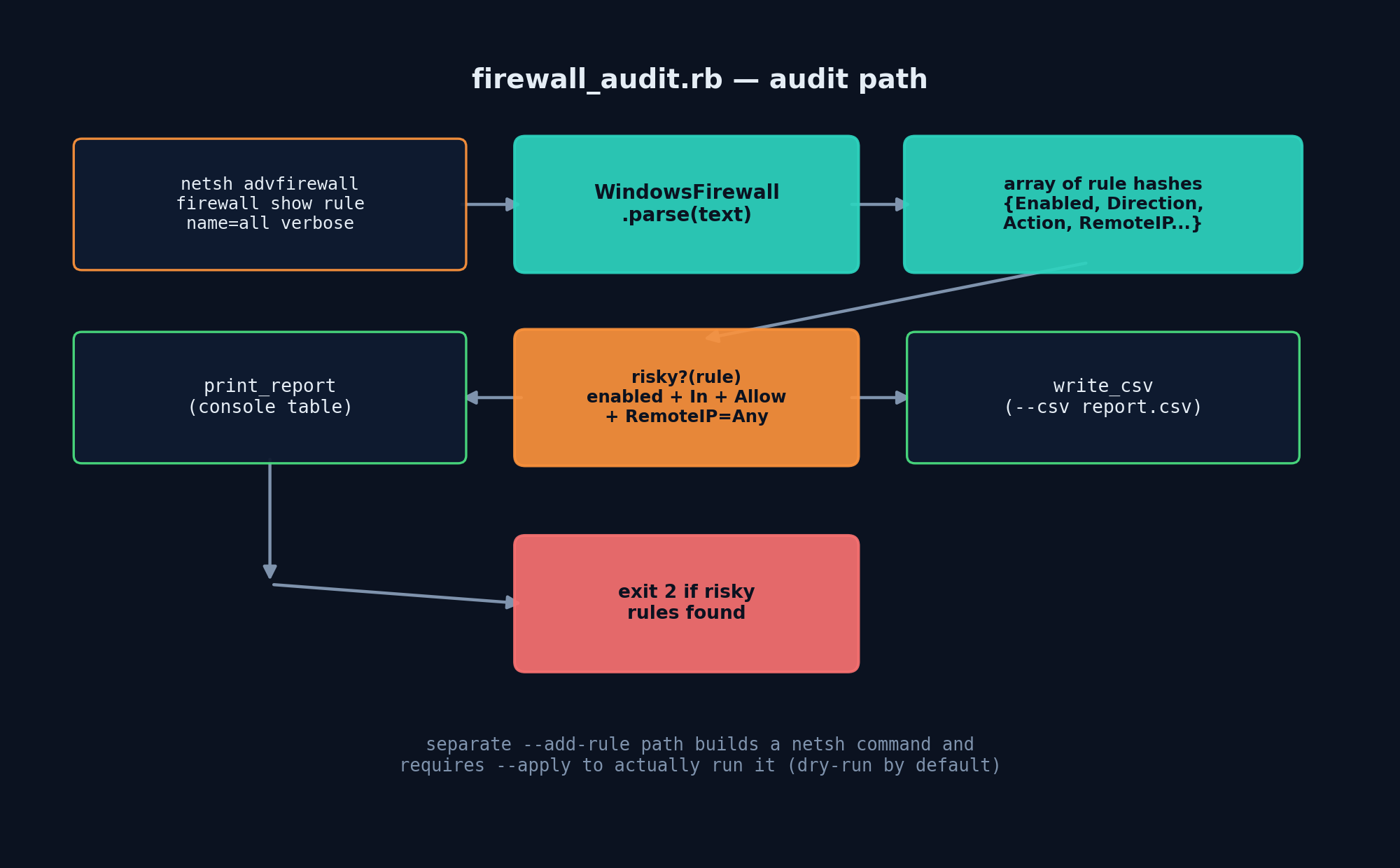
WindowsFirewall.parse walks the text line by line. Blank lines and the dashed separator are skipped. A line starting with Rule Name: pushes the previous rule hash (if any) onto the results array and starts a new one. Every other non-blank line is split on the first colon into a key and value, both stripped of surrounding whitespace, and stored in the current rule’s hash. This produces one hash per rule with keys like "Enabled", "Direction", "RemoteIP", and "Action" — exactly the fields needed to reason about risk.
3. Defining “risky”
WindowsFirewall.risky? flags a rule when all four are true: it’s Enabled, its Direction is In (inbound), its Action is Allow, and its RemoteIP is Any (or the equivalent CIDR 0.0.0.0/0). That combination means: traffic from literally anywhere on the internet is allowed in on whatever port the rule opens. A rule allowing inbound traffic but scoped to RemoteIP: 10.0.0.0/8 is not flagged — restricting the source range is exactly the mitigation you want to see, so the check specifically looks for its absence.
4. Reporting and exporting
print_report prints an aligned table to the console with a <-- RISKY marker on flagged rows, and returns just the risky subset. write_csv takes the full rule list and writes every parsed field to a CSV file for a paper trail — handy for a quarterly security review, a SOC 2 audit, or simply diffing against last month’s export to see what changed. The CLI’s exit code is 2 when risky rules are found and 0 otherwise, which makes it easy to wire into a scheduled task or CI job that should fail loudly when a dangerous rule shows up.
5. Adding a rule — safely, by default
build_add_rule_command constructs the netsh advfirewall firewall add rule ... argument list as an actual Ruby array, not a single interpolated shell string — that array gets handed straight to system(*cmd), which bypasses the shell entirely and avoids injection risk from a rule name containing spaces or special characters. Because creating firewall rules is a change-making action, --add-rule defaults to printing the command it would run and doing nothing else; you must pass --apply explicitly to execute it, and the script refuses to --apply on any non-Windows host as an extra safety rail.
Verifying the Logic (Cross-Platform)
A realistic sample of netsh verbose output — four rules, including one intentionally risky “Allow RDP from anywhere,” one blocked rule, one allow-rule correctly scoped to an internal subnet, and one disabled legacy rule — was fed straight into WindowsFirewall.parse and print_report:
$ ruby -e '
require "./firewall_audit.rb"
rules = WindowsFirewall.parse(File.read("sample_netsh_output.txt"))
print_report(rules)
'
Parsed 4 firewall rule(s).
------------------------------------------------------------------------------
Allow RDP                     In         Allow  TCP      Yes     <-- RISKY (any remote, allow, enabled)
Block Telnet                  In         Block  TCP      Yes
Allow Internal Admin          In         Allow  TCP      Yes
Disabled Legacy Rule          In         Allow  TCP      No
------------------------------------------------------------------------------
1 risky rule(s) found.
Exactly one rule was flagged, and it was the correct one: enabled, inbound, allow, open to any remote address. The scoped-to-10.0.0.0/8 rule and the disabled rule were both correctly left unflagged. The dry-run path for --add-rule was also verified without touching a real firewall:
$ ruby firewall_audit.rb --add-rule "Allow App" --port 8080 --protocol TCP
[dry-run] would run: netsh advfirewall firewall add rule name=Allow App dir=in action=allow protocol=TCP localport=8080
(pass --apply to actually create the rule)
And attempting --apply on this (non-Windows) sandbox correctly refused with "Refusing to --apply on a non-Windows host" rather than attempting to run a command that doesn’t exist here.
Example Output (on Windows)
C:\> ruby firewall_audit.rb --csv audit.csv
Parsed 187 firewall rule(s).
------------------------------------------------------------------------------
Core Networking - DNS (UDP-Out)      Out        Allow  UDP      Yes
File and Printer Sharing (SMB-In)    In         Allow  TCP      Yes     <-- RISKY (any remote, allow, enabled)
Remote Desktop - User Mode (TCP-In)  In         Allow  TCP      Yes     <-- RISKY (any remote, allow, enabled)
...
------------------------------------------------------------------------------
2 risky rule(s) found.
Wrote 187 rows to audit.csv
Troubleshooting
- “netsh is only available on Windows” — you’re running the live-audit path on macOS/Linux; that’s expected. Use
WindowsFirewall.parsedirectly with a captured text file to test parsing logic cross-platform. - Empty rule list on a real Windows box — verify the shell isn’t redirecting/mangling output; run the raw
netsh advfirewall firewall show rule name=all verbosecommand directly first to confirm it produces the expected format (locale/language settings can occasionally change field labels — see below). - Some fields show up as
nil— non-English Windows installs may localize field names (e.g.Aktiviert:instead ofEnabled:); the parser matches on the literal English labels, so on a localized system you’d need to adjust the key names inrisky?accordingly. - “Access is denied” when adding a rule — run the shell as Administrator; modifying firewall rules requires elevation even though reading them typically doesn’t.
- CSV opens with garbled characters in Excel — write the file with a UTF-8 BOM (
"\xEF\xBB\xBF"prefix) if you need it to open cleanly by default in Excel on Windows.
Extending This Script
- Outbound rule review: add a check for overly-broad outbound Allow rules too — useful for catching data-exfiltration-friendly misconfigurations, not just inbound exposure.
- Port-range awareness: flag rules that open large port ranges (e.g.
1-65535) even when scoped to a specific remote IP, since a compromised internal host could still exploit an overly broad range. - Diff against a baseline: save each audit’s CSV and diff consecutive runs to alert only on newly risky rules, rather than re-reporting the same accepted exceptions every time.
- Group Policy awareness: cross-reference rules against ones defined by GPO (
netsh advfirewall firewall show rule name=allincludes aGroupingfield) to distinguish centrally-managed rules from local ad hoc ones. - Wire into a scheduled task: since the CLI exits non-zero when risky rules are found, hook it into Windows Task Scheduler with an action that emails or pages on failure.