Part of our Ruby for DevOps series — practical Ruby scripts that solve real system-administration problems.
The Problem
Every long-running service writes logs, and every log file left unmanaged eventually fills the disk. The standard Linux answer is logrotate, configured via files in /etc/logrotate.d/ — but that requires root, a package you may not be able to install (locked-down containers, restricted shared hosting, a Ruby app bundled as a self-contained deploy artifact), or coordination with a config file that lives outside your application’s control. Sometimes you just want log rotation to be a property of the application itself: call one method, and the current log never grows past a size you choose, with old generations compressed and eventually deleted automatically.
This script is a small, dependency-free log rotator you can run from cron, a systemd timer, or call directly from inside a running Ruby process before writing a new log line.
Prerequisites
- Ruby 2.7+ (tested on Ruby 3.0.2)
- Linux or any POSIX-like OS (uses standard file operations; the gzip step is pure Ruby via the built-in
zliblibrary, no externalgzipbinary needed) - No gems required —
optparse,zlib, andfileutilsare all in Ruby’s standard library
The Code
#!/usr/bin/env ruby
# frozen_string_literal: true
#
# log_rotate.rb
#
# A minimal, dependency-free log rotation tool -- a lightweight alternative
# to the system `logrotate` for cases where you don't have root, don't want
# to touch /etc/logrotate.d, or need rotation logic embedded directly in a
# Ruby application/deployment script.
#
# Behavior:
#   * Rotates a log file when it exceeds --max-size bytes.
#   * Keeps --keep old generations (app.log.1.gz, app.log.2.gz, ...).
#   * Compresses rotated files with gzip (via Ruby's Zlib -- no external gem).
#   * Truncates (not deletes) the live file in place so open file handles
#     held by a running process stay valid -- the same trick logrotate's
#     `copytruncate` uses.
#   * Prunes generations beyond --keep.
#
# Usage:
#   ruby log_rotate.rb --file /var/log/myapp/app.log --max-size 10485760 --keep 5
#   ruby log_rotate.rb --file app.log --max-size 1024 --keep 3 --dry-run
#
# Typical use: run from cron every few minutes, or call LogRotator.rotate!
# directly from inside a long-running Ruby service before each write batch.

require 'optparse'
require 'zlib'
require 'fileutils'

# ---------------------------------------------------------------------------
# Options
# ---------------------------------------------------------------------------
options = {
  file: nil,
  max_size: 10 * 1024 * 1024, # 10 MB
  keep: 5,
  dry_run: false
}

OptionParser.new do |opts|
  opts.banner = 'Usage: log_rotate.rb --file PATH [options]'

  opts.on('-f', '--file PATH', 'Log file to monitor and rotate (required)') do |v|
    options[:file] = v
  end

  opts.on('-s', '--max-size BYTES', Integer, 'Rotate when file exceeds this many bytes (default 10MB)') do |v|
    options[:max_size] = v
  end

  opts.on('-k', '--keep N', Integer, 'Number of rotated generations to keep (default 5)') do |v|
    options[:keep] = v
  end

  opts.on('--dry-run', 'Print what would happen without touching any files') do
    options[:dry_run] = true
  end

  opts.on('-h', '--help', 'Show this help') do
    puts opts
    exit
  end
end.parse!

if options[:file].nil?
  warn 'Error: --file is required'
  exit 1
end

# ---------------------------------------------------------------------------
# LogRotator: the reusable core, independent of the CLI options parsing above
# ---------------------------------------------------------------------------
module LogRotator
  module_function

  # Returns true if `path` is at or over `max_size` bytes.
  def needs_rotation?(path, max_size)
    return false unless File.exist?(path)

    File.size(path) >= max_size
  end

  # Compress `src` into `dest` (gzip) using Ruby's built-in Zlib -- no gems.
  def gzip_file(src, dest)
    File.open(src, 'rb') do |input|
      Zlib::GzipWriter.open(dest) do |gz|
        gz.mtime = File.mtime(src).to_i
        gz.orig_name = File.basename(src)
        IO.copy_stream(input, gz)
      end
    end
  end

  # Shift existing rotated generations up by one:
  #   app.log.2.gz -> app.log.3.gz
  #   app.log.1.gz -> app.log.2.gz
  # then any generation number greater than `keep` is deleted.
  def shift_generations(base_path, keep, dry_run: false)
    # Walk from oldest kept generation down to 1 so we don't clobber files
    # while shifting (must go in descending order).
    (keep - 1).downto(1) do |n|
      src = "#{base_path}.#{n}.gz"
      dst = "#{base_path}.#{n + 1}.gz"
      next unless File.exist?(src)

      if dry_run
        puts "  [dry-run] would move #{src} -> #{dst}"
      else
        FileUtils.mv(src, dst, force: true)
      end
    end

    # Anything beyond `keep` generations gets pruned.
    Dir.glob("#{base_path}.*.gz").each do |path|
      match = path.match(/\.(\d+)\.gz\z/)
      next unless match

      gen = match[1].to_i
      next if gen <= keep

      if dry_run
        puts "  [dry-run] would delete old generation #{path}"
      else
        FileUtils.rm_f(path)
      end
    end
  end

  # Full rotation: shift old generations, compress the current file into
  # generation 1, then truncate the live file (copytruncate semantics).
  def rotate!(path, keep:, dry_run: false)
    unless File.exist?(path)
      puts "#{path}: does not exist, nothing to rotate"
      return false
    end

    shift_generations(path, keep, dry_run: dry_run)

    gen1 = "#{path}.1.gz"
    if dry_run
      puts "  [dry-run] would compress #{path} -> #{gen1}"
      puts "  [dry-run] would truncate #{path} to 0 bytes"
      return true
    end

    gzip_file(path, gen1)

    # copytruncate: reopen in write mode and truncate to zero instead of
    # deleting+recreating, so any process with the file already open (e.g.
    # via a File/Logger instance) keeps writing to the same inode.
    File.open(path, 'w') { |f| f.truncate(0) }

    true
  end
end

# ---------------------------------------------------------------------------
# CLI entry point
# ---------------------------------------------------------------------------
def main(options)
  path = options[:file]
  size = File.exist?(path) ? File.size(path) : 0

  puts "Checking #{path} (#{size} bytes, threshold #{options[:max_size]} bytes)"

  unless LogRotator.needs_rotation?(path, options[:max_size])
    puts 'No rotation needed.'
    return
  end

  puts "Rotating #{path} (keeping #{options[:keep]} generations)#{options[:dry_run] ? ' [DRY RUN]' : ''}..."
  LogRotator.rotate!(path, keep: options[:keep], dry_run: options[:dry_run])
  puts 'Done.'
end

main(options) if __FILE__ == $PROGRAM_NAME
Step-by-Step Walkthrough
1. Deciding when to rotate
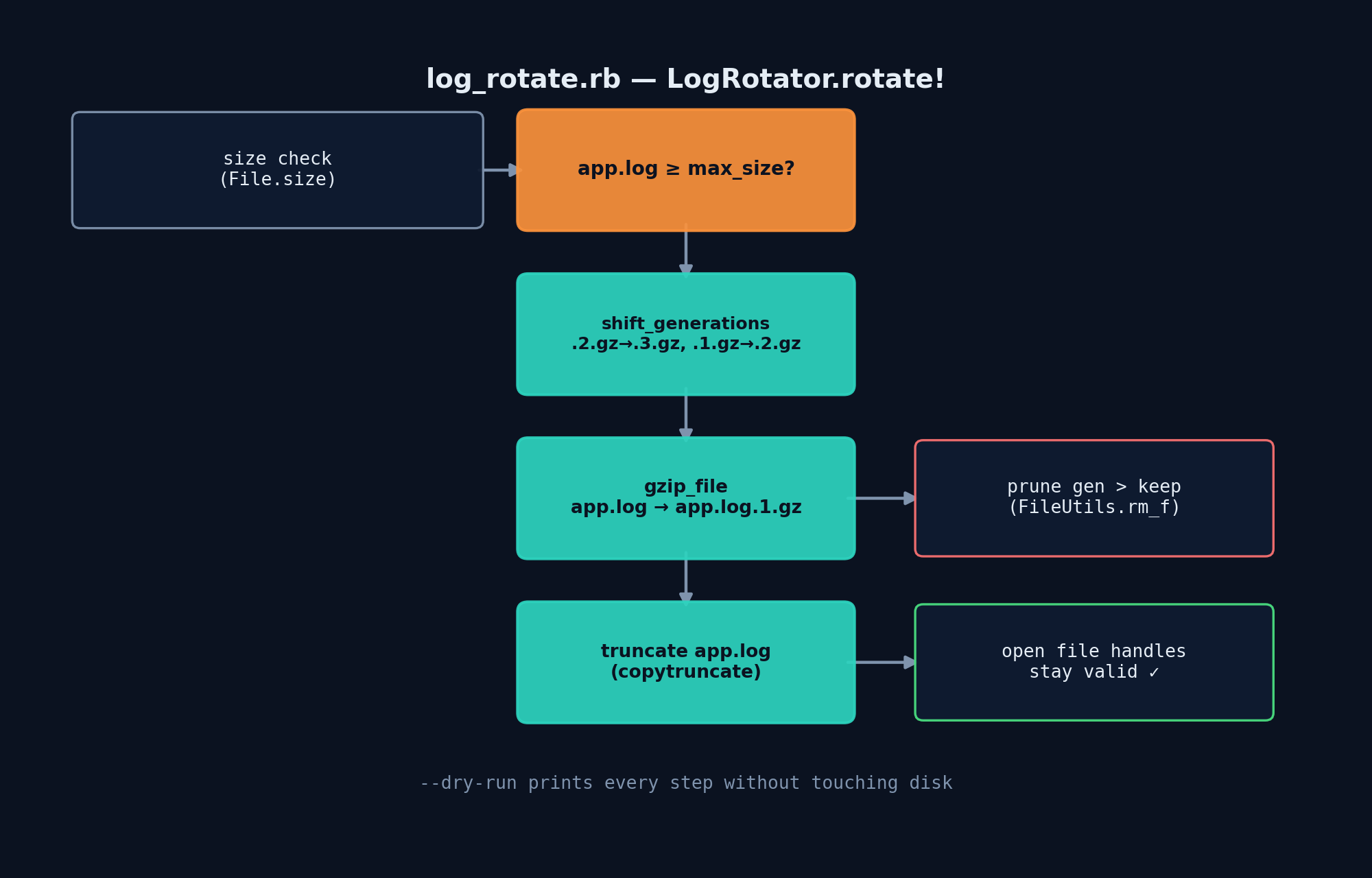
LogRotator.needs_rotation? is deliberately trivial: does the file exist, and is it at or above max_size bytes? Keeping this check separate from the rotation logic means you can call it cheaply and often (e.g. before every log write) without paying the cost of the actual rotation unless it’s needed.
2. Shifting old generations out of the way
shift_generations renames app.log.2.gz → app.log.3.gz, then app.log.1.gz → app.log.2.gz, walking downward from keep - 1 to 1. The direction matters: if you walked upward (1, then 2, then 3) you’d overwrite app.log.2.gz with the freshly-renamed app.log.1.gz before ever reading the original app.log.2.gz, silently losing a generation. Walking downward guarantees each rename’s destination is empty before it happens. After shifting, anything found beyond the keep limit (matched with a /\.(\d+)\.gz\z/ regex against the filename) is deleted.
3. Compressing and truncating — not deleting and recreating
rotate! compresses the live file straight into app.log.1.gz using Zlib::GzipWriter, then instead of deleting the original and creating a fresh one, it reopens the same path in write mode and calls truncate(0). This is the same trick logrotate‘s copytruncate option uses: if your application (or another process) already has the log file open for writing, deleting the file out from under it would leave that process writing into an orphaned inode that no directory entry points to — the disk space never gets freed until the process restarts, and you’d never see the new log lines by tailing the filename. Truncating in place keeps the same inode, so any open file handle keeps working correctly.
4. The CLI wrapper
The bottom third of the script is just argument parsing and wiring: check whether rotation is needed, print what’s about to happen, and call LogRotator.rotate!. The --dry-run flag threads all the way down into shift_generations and rotate! so you can see exactly what a run would do — which files would move where, what would be deleted — without touching disk. Always run with --dry-run first against a real log directory before trusting it in cron.
Example Output
Tested end-to-end: create an oversized log file, rotate it three times with --keep 3, and confirm generations shift correctly and the oldest is pruned.
$ ruby log_rotate.rb --file /tmp/logtest/app.log --max-size 1024 --keep 3 --dry-run
Checking /tmp/logtest/app.log (2001 bytes, threshold 1024 bytes)
Rotating /tmp/logtest/app.log (keeping 3 generations) [DRY RUN]...
  [dry-run] would compress /tmp/logtest/app.log -> /tmp/logtest/app.log.1.gz
  [dry-run] would truncate /tmp/logtest/app.log to 0 bytes
Done.

$ ruby log_rotate.rb --file /tmp/logtest/app.log --max-size 1024 --keep 3
Checking /tmp/logtest/app.log (2001 bytes, threshold 1024 bytes)
Rotating /tmp/logtest/app.log (keeping 3 generations)...
Done.

$ ls -la /tmp/logtest
-rw-r--r-- 1 user user    0 Jul 20 11:45 app.log
-rw-r--r-- 1 user user   44 Jul 20 11:45 app.log.1.gz

# ... after 3 more rotations with --keep 3 ...
$ ls -la /tmp/logtest
-rw-r--r-- 1 user user    0 Jul 20 11:45 app.log
-rw-r--r-- 1 user user   44 Jul 20 11:45 app.log.1.gz   # newest
-rw-r--r-- 1 user user   44 Jul 20 11:45 app.log.2.gz
-rw-r--r-- 1 user user   44 Jul 20 11:45 app.log.3.gz   # oldest kept -- app.log.4.gz was pruned
After a fourth rotation, app.log.1.gz always holds the newest rotated content and anything that would become app.log.4.gz is deleted — verified directly by decompressing generation 1 and generation 3 and checking their contents matched the most-recent and oldest-kept writes, respectively.
Troubleshooting
- “does not exist, nothing to rotate” — the
--filepath is wrong, or the log hasn’t been created yet by your application; this is treated as a no-op rather than an error since it’s a normal state for a freshly deployed service. - Rotated
.gzfiles appear but the live file never shrinks — check that nothing else has an exclusive lock on the file; on Linux this is rare, but confirm withlsof app.log. - Permission denied on truncate — the process running the rotator needs write access to both the log file and its containing directory (for the rename operations during generation shifting).
- Old generations never get pruned — verify your
--keepvalue; a common mistake is assuming--keep 3means “3 total copies including the live file” when it actually means 3 compressed generations plus the live file (4 total).
Extending This Script
- Age-based rotation: add a
--max-ageoption and rotate on “file is older than N days” in addition to size, usingFile.mtime. - Rotate a whole directory of logs matching a glob pattern in one run, rather than one file per invocation.
- Emit a rotation event (webhook, metrics counter) so you can track rotation frequency over time — a sudden increase often means a bug is spamming your logs.
- Integrate directly into a
Logger: callLogRotator.rotate!from a customLoggersubclass’swritemethod so rotation happens transparently as part of normal logging, no cron needed. - Verify the gzip output after writing by re-opening it with
Zlib::GzipReaderand checking it decompresses cleanly, guarding against a rotation that produces a corrupt archive.