
Every sysadmin has been burned at least once by a config directory, a small database, or an application state folder that wasn’t backed up when it should have been. This tutorial builds a Ruby script that creates timestamped, verified tar.gz backups of any directory and automatically enforces a retention policy — keeping the newest N archives and deleting the rest — so your backup disk never fills up unattended. Wire it into cron or a systemd timer and you have self-managing backups with zero ongoing maintenance.
The problem this solves
Manual backups get forgotten. Backup scripts that never clean up old archives quietly fill a disk until something else fails. This script solves both problems at once: it shells out to the battle-tested tar utility (so archives are fully standard and restorable with tools everyone already knows), verifies every archive it creates with a checksum and an integrity listing, and then rotates out old backups so disk usage stays bounded no matter how long the script has been running unattended.
Prerequisites
- Ruby 2.7 or newer (tested on Ruby 3.0). No gems required.
- The
tarcommand available on your system — present by default on essentially every Linux distribution and macOS. (On Windows, use WSL or a distribution of GNU tar such as the one bundled with Git for Windows.) - Write access to both the source directory you want backed up and the destination directory for archives.
How it works
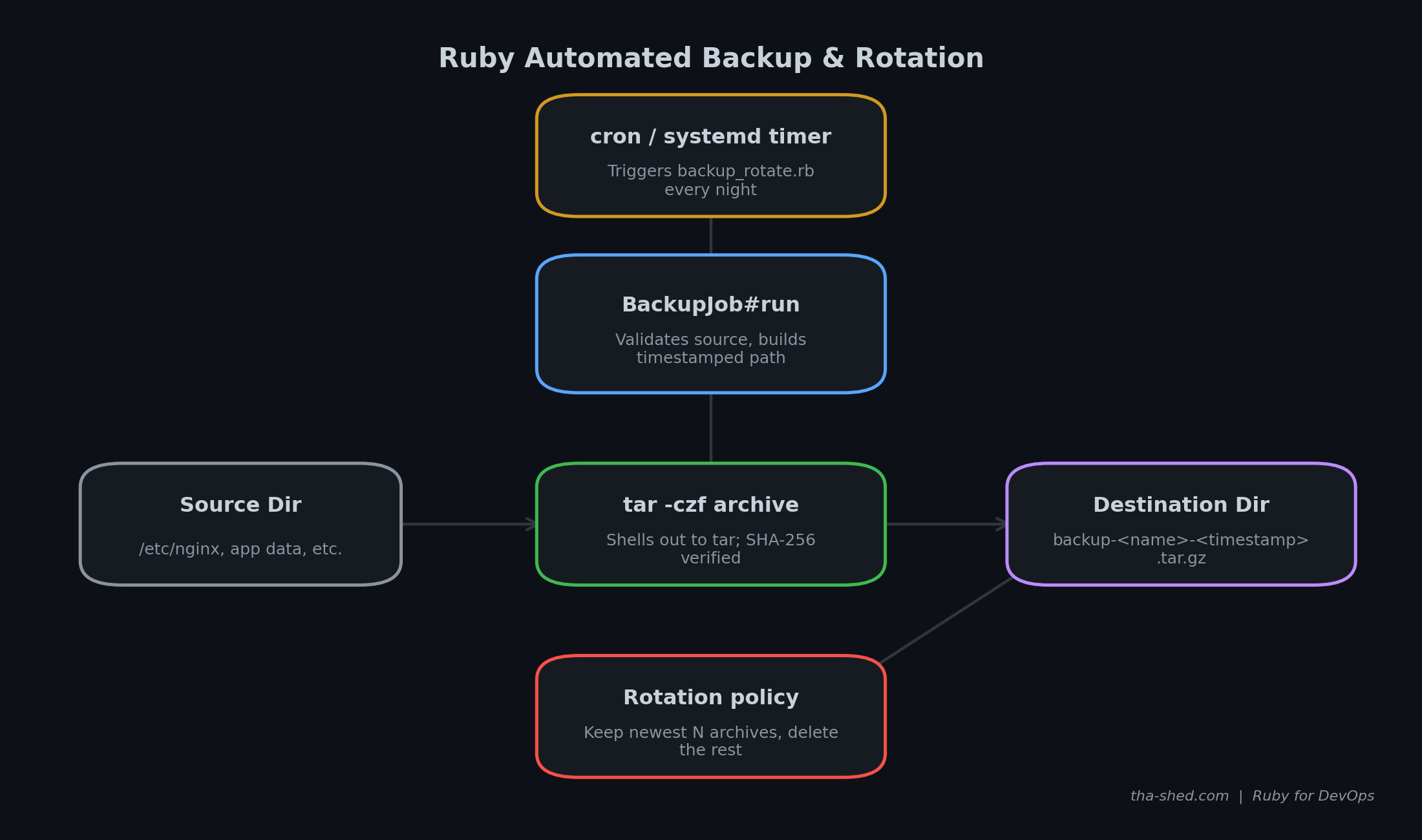
The whole job lives in a single BackupJob class with one public method, run, so it’s easy to drop into any script or Rake task. Internally it does four things in order:
- Validates that the source directory exists and the retention count makes sense.
- Builds a timestamped archive path and shells out to
tar -czfto create the archive. - Verifies the archive by checking it’s non-empty, running
tar -tzfto confirm it’s a readable, uncorrupted archive, and computing a SHA-256 checksum for the log. - Rotates old backups: it lists every archive matching the naming convention in the destination directory, sorts by modification time, and deletes everything past the configured retention count.
The complete code
Save this as backup_rotate.rb.
#!/usr/bin/env ruby
# backup_rotate.rb
#
# Automated directory backup with timestamped tar.gz archives and
# retention-based rotation (keep the last N backups, delete the rest).
#
# Solves the common sysadmin task of backing up config directories,
# small databases, or application state on a schedule (via cron/systemd
# timers) without needing a heavyweight backup tool.
#
# Usage:
#   ruby backup_rotate.rb --source /etc/nginx --dest /var/backups/nginx --keep 7
#   ruby backup_rotate.rb --source /etc/nginx --dest /var/backups/nginx --keep 7 --dry-run
#
# Author: tha-shed.com tutorials

require 'optparse'
require 'fileutils'
require 'time'
require 'digest'
require 'English' # gives us the readable $CHILD_STATUS instead of $?

# ---------------------------------------------------------------------------
# BackupJob: creates one timestamped archive of a source directory and
# enforces a retention policy on older archives in the destination.
# ---------------------------------------------------------------------------
class BackupJob
  ARCHIVE_PREFIX = 'backup'.freeze

  def initialize(source:, dest:, keep: 7, dry_run: false, logger: $stdout)
    @source  = File.expand_path(source)
    @dest    = File.expand_path(dest)
    @keep    = keep
    @dry_run = dry_run
    @logger  = logger
  end

  def run
    validate!
    FileUtils.mkdir_p(@dest) unless @dry_run

    archive_path = build_archive_path
    log "Backing up #{@source} -> #{archive_path}"

    create_archive(archive_path)
    verify_archive(archive_path) unless @dry_run
    rotate_old_backups

    archive_path
  end

  private

  def validate!
    raise ArgumentError, "Source does not exist: #{@source}" unless Dir.exist?(@source)
    raise ArgumentError, '--keep must be >= 1' if @keep < 1
  end

  def build_archive_path
    timestamp = Time.now.strftime('%Y%m%d-%H%M%S')
    base = File.basename(@source)
    File.join(@dest, "#{ARCHIVE_PREFIX}-#{base}-#{timestamp}.tar.gz")
  end

  # Shells out to `tar` rather than reimplementing gzip/tar in pure Ruby.
  # This keeps the script fast and produces archives fully compatible
  # with standard tools for restoring.
  def create_archive(archive_path)
    if @dry_run
      log "[dry-run] Would run: tar -czf #{archive_path} -C #{File.dirname(@source)} #{File.basename(@source)}"
      return
    end

    parent = File.dirname(@source)
    base   = File.basename(@source)
    cmd = ['tar', '-czf', archive_path, '-C', parent, base]
    success = system(*cmd)
    raise "tar command failed (exit #{$CHILD_STATUS.exitstatus})" unless success
  end

  def verify_archive(archive_path)
    raise "Archive was not created: #{archive_path}" unless File.exist?(archive_path)
    raise "Archive is empty: #{archive_path}" if File.size(archive_path).zero?

    # `tar -tzf` lists contents without extracting -- a cheap integrity check.
    ok = system('tar', '-tzf', archive_path, out: File::NULL)
    raise "Archive failed integrity check: #{archive_path}" unless ok

    checksum = Digest::SHA256.file(archive_path).hexdigest
    log "Archive verified OK (sha256: #{checksum[0..15]}...)"
  end

  # Keeps only the @keep most recent archives matching our naming
  # convention in @dest; deletes the rest.
  def rotate_old_backups
    pattern = File.join(@dest, "#{ARCHIVE_PREFIX}-*.tar.gz")
    archives = Dir.glob(pattern).sort_by { |f| File.mtime(f) }.reverse

    to_delete = archives.drop(@keep)
    return if to_delete.empty?

    log "Rotation: keeping #{[archives.size, @keep].min} of #{archives.size} archives, removing #{to_delete.size}"
    to_delete.each do |file|
      if @dry_run
        log "[dry-run] Would delete #{file}"
      else
        File.delete(file)
        log "Deleted old backup: #{file}"
      end
    end
  end

  def log(msg)
    @logger.puts("[#{Time.now.strftime('%Y-%m-%d %H:%M:%S')}] #{msg}")
  end
end

# ---------------------------------------------------------------------------
# CLI entry point
# ---------------------------------------------------------------------------
if __FILE__ == $PROGRAM_NAME
  options = { keep: 7, dry_run: false }
  parser = OptionParser.new do |opts|
    opts.banner = 'Usage: backup_rotate.rb --source DIR --dest DIR [options]'
    opts.on('--source DIR', 'Directory to back up') { |v| options[:source] = v }
    opts.on('--dest DIR', 'Directory to store archives in') { |v| options[:dest] = v }
    opts.on('--keep N', Integer, 'Number of archives to retain (default 7)') { |v| options[:keep] = v }
    opts.on('--dry-run', 'Show what would happen without making changes') { options[:dry_run] = true }
  end
  parser.parse!

  if options[:source].nil? || options[:dest].nil?
    warn parser.banner
    exit 1
  end

  begin
    job = BackupJob.new(
      source: options[:source],
      dest: options[:dest],
      keep: options[:keep],
      dry_run: options[:dry_run]
    )
    archive = job.run
    puts "Done. Latest archive: #{archive}" unless options[:dry_run]
  rescue StandardError => e
    warn "Backup failed: #{e.message}"
    exit 1
  end
end
Step-by-step walkthrough
Why shell out to tar instead of a pure-Ruby gzip library? Ruby’s standard library can create gzip streams, but reimplementing tar’s archive format is unnecessary work and risks subtle incompatibilities. Shelling out to the system’s own tar guarantees the resulting archive is byte-for-byte what any other tool on the system would produce, and that it can be restored on a different machine with a single tar -xzf, no Ruby required.
The verification step is not optional. A backup you haven’t verified is a backup you’re merely hoping works. verify_archive checks three things: the file exists and is non-empty, tar -tzf can list its contents without error (which would fail on a truncated or corrupted archive), and it logs a SHA-256 checksum so you have an audit trail if you ever need to prove a specific archive’s integrity later.
Rotation is based on file count, not age. rotate_old_backups keeps the newest --keep archives regardless of how old they are, rather than deleting anything older than N days. This is deliberate: it means your retention policy behaves predictably even if the job doesn’t run for a few days (say, the server was down over a weekend) — you still end up with exactly N backups once it catches back up, instead of accidentally deleting everything because they’re all “too old.”
The --dry-run flag exists so you can safely test a new backup configuration. It walks through every step and logs exactly what would happen — including which old archives would be deleted — without touching the filesystem. Always run a new cron entry with --dry-run first.
Example output
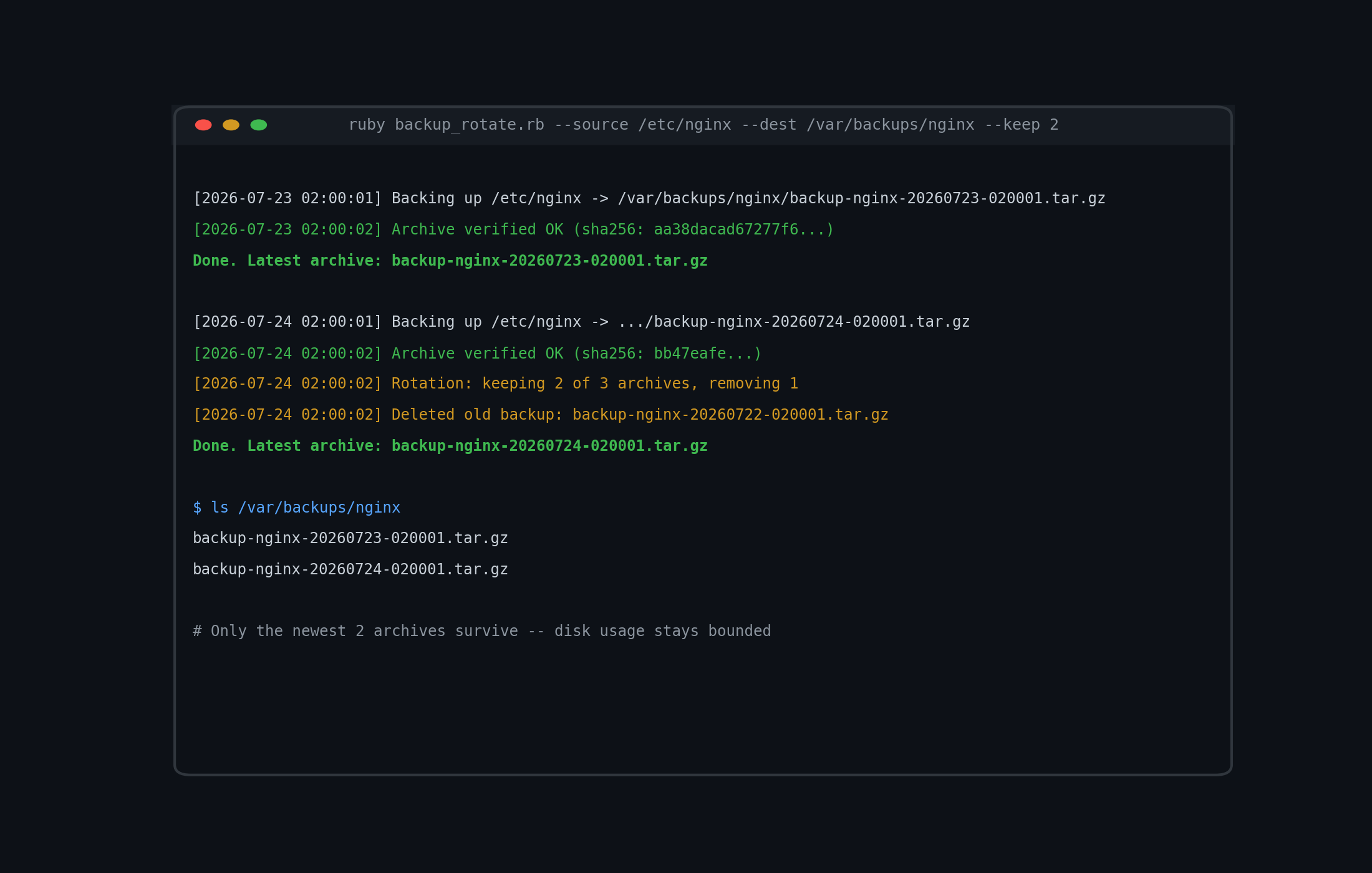
Here’s what a normal night looks like once the retention count of 2 has been reached: a new backup is created and verified, and the oldest existing archive is automatically removed to make room.
Usage
# Back up /etc/nginx, keeping the 7 most recent archives (the default)
ruby backup_rotate.rb --source /etc/nginx --dest /var/backups/nginx

# Keep fewer archives for a large, frequently-changing directory
ruby backup_rotate.rb --source /var/lib/myapp/data --dest /mnt/backups/myapp --keep 3

# Preview what would happen without creating or deleting anything
ruby backup_rotate.rb --source /etc/nginx --dest /var/backups/nginx --keep 7 --dry-run

# A typical crontab entry: back up nightly at 2am, keep two weeks of daily archives
0 2 * * * /usr/bin/ruby /opt/scripts/backup_rotate.rb --source /etc/nginx --dest /var/backups/nginx --keep 14 >> /var/log/backup_rotate.log 2>&1

# A systemd timer + service pair works just as well as cron if your
# distribution has moved away from it -- point the ExecStart at the
# same ruby command above.
Troubleshooting
“tar command failed” with a non-zero exit status. Run the equivalent tar -czf ... command by hand to see tar’s actual error message — the most common causes are insufficient disk space at the destination, or a source path containing files the current user can’t read (tar will still often produce a partial archive and a non-fatal warning in that case, so check exit codes carefully).
“Archive failed integrity check.” This means tar -tzf could not list the archive’s contents, which almost always indicates the archive was truncated mid-write — typically because the destination disk ran out of space during creation. Check available disk space at the destination before investigating further.
Rotation deleted more (or fewer) archives than expected. The rotation logic only considers files matching the exact pattern backup-*.tar.gz in the destination directory. If you have other files or archives from a different tool mixed into the same destination directory, they’re correctly ignored — but if you renamed an archive manually, it may no longer match the pattern and won’t be tracked for rotation. Keep the destination directory dedicated to this script’s output.
Permission denied writing to the destination. The script calls FileUtils.mkdir_p on the destination, but the user running the script still needs write permission on the parent directory the first time it’s created. Run once with elevated privileges to create the directory structure, or pre-create it with the correct ownership.
Extending this script
- Off-site copies. After a successful local archive and verification, shell out to
rsyncoraws s3 cpto push the same archive to a remote host or object storage bucket — the 3-2-1 backup rule needs at least one copy off-site. - Encryption. Pipe the tar output through
gpg --symmetricbefore writing to disk if the source contains sensitive data, and keep the passphrase in a secrets manager rather than the script. - Pre- and post-backup hooks. For databases, add a hook to run
mysqldumporpg_dumpinto a temp directory just before the tar step, so you’re backing up a consistent logical dump instead of raw data files that might be mid-write. - Notifications. Have the script POST a summary (success/failure, archive size, rotation count) to a Slack webhook so backup health is visible without anyone having to check logs.
- Size-based retention. In addition to
--keepby count, add a total-size cap so a destination volume never fills past a configured percentage, regardless of how many individual archives that allows.
Sign in to take Cornell notes on this lesson — they save automatically and stay with your account.