The Problem
“We’ll add backups later” is how a lot of production incidents start. Setting up nightly backups for a config directory, a small app’s data folder, or a site’s uploads is usually simple — the part people skip is rotation: if you never delete old backups, the destination volume fills up and the backup job starts failing silently, right around the time you actually need it.
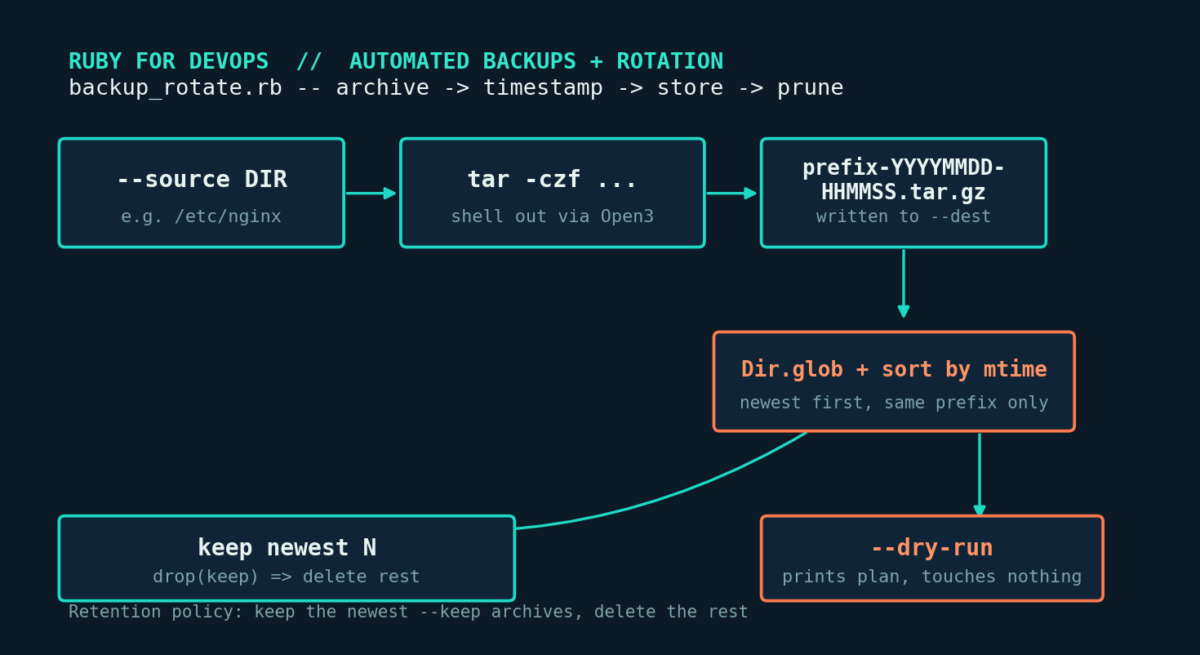
This tutorial builds backup_rotate.rb: a script that creates a compressed, timestamped archive of a directory and enforces a retention policy, so you always have your last N backups and nothing more.
Prerequisites
- Ruby 2.5+ (tested on 3.0.2, no gems required)
- A Linux (or macOS) host with
taravailable — installed by default virtually everywhere - Write access to both the source directory (read) and the destination directory (read/write)
- Enough free space for at least
--keep + 1archives during rotation
Why shell out totarinstead of a pure-Ruby zip library?taris fast, handles permissions/symlinks/special files correctly, and is already installed everywhere you’d run this. Re-implementing gzip and tar’s archive format in pure Ruby adds risk and complexity for no real benefit on a Linux target.
The Complete Code
#!/usr/bin/env ruby
# backup_rotate.rb
#
# Creates compressed, timestamped backups of a directory and enforces a
# retention policy (rotation) so old backups are automatically pruned.
# Solves the everyday sysadmin problem of "I need nightly backups of
# /etc, /var/www, or a data directory, and I don't want the backup
# volume to fill up disk."
#
# No gems required -- shells out to `tar` (present on essentially every
# Linux system) and uses only Ruby's standard library otherwise.
#
# Usage:
#   ruby backup_rotate.rb --source /etc/nginx --dest /backups/nginx --keep 7
#   ruby backup_rotate.rb --source /var/www/app --dest /backups/app --keep 14 --dry-run
#
# Ruby version tested: 3.0+ (should work on 2.5+)

require 'optparse'
require 'fileutils'
require 'time'
require 'open3'

class BackupRotator
  BackupError = Class.new(StandardError)

  attr_reader :source, :dest_dir, :keep, :dry_run, :prefix

  def initialize(source:, dest_dir:, keep:, dry_run: false, prefix: nil)
    @source   = File.expand_path(source)
    @dest_dir = File.expand_path(dest_dir)
    @keep     = keep
    @dry_run  = dry_run
    @prefix   = prefix || File.basename(@source)
  end

  # Runs the full backup + rotation cycle. Returns the path to the new
  # archive (or nil if this was a dry run).
  def run
    validate!
    FileUtils.mkdir_p(dest_dir) unless dry_run

    archive_path = File.join(dest_dir, archive_filename)
    create_archive(archive_path)
    rotate!
    archive_path
  end

  private

  def validate!
    raise BackupError, "source directory does not exist: #{source}" unless Dir.exist?(source)
    raise BackupError, "keep must be >= 1" if keep < 1
  end

  def archive_filename
    "#{prefix}-#{Time.now.strftime('%Y%m%d-%H%M%S')}.tar.gz"
  end

  # Shells out to tar rather than reimplementing gzip/tar in pure Ruby --
  # tar is faster, battle-tested, and preserves permissions/symlinks
  # correctly. We capture stdout/stderr so failures are reported clearly.
  def create_archive(archive_path)
    parent = File.dirname(source)
    base   = File.basename(source)
    cmd = ['tar', '-czf', archive_path, '-C', parent, base]

    if dry_run
      puts "[dry-run] would run: #{cmd.join(' ')}"
      return
    end

    stdout, stderr, status = Open3.capture3(*cmd)
    unless status.success?
      raise BackupError, "tar failed (exit #{status.exitstatus}): #{stderr.strip}"
    end
    puts stdout unless stdout.empty?
  end

  # Retention policy: keep the newest N archives matching this backup's
  # prefix, delete the rest. Only touches files this script created
  # (matched by prefix + our naming pattern), so it's safe to point
  # multiple backup jobs at the same destination directory.
  def rotate!
    pattern = File.join(dest_dir, "#{prefix}-*.tar.gz")
    archives = Dir.glob(pattern).sort_by { |f| File.mtime(f) }.reverse

    to_delete = archives.drop(keep)
    return if to_delete.empty?

    to_delete.each do |file|
      if dry_run
        puts "[dry-run] would delete old backup: #{file}"
      else
        File.delete(file)
        puts "Deleted old backup: #{file}"
      end
    end
  end
end

# ---------------------------------------------------------------------------
# CLI
# ---------------------------------------------------------------------------
options = { keep: 7, dry_run: false, prefix: nil }

OptionParser.new do |opts|
  opts.banner = "Usage: ruby backup_rotate.rb --source DIR --dest DIR [options]"

  opts.on('-s', '--source DIR', 'Directory to back up (required)') { |v| options[:source] = v }
  opts.on('-d', '--dest DIR', 'Directory to store backup archives (required)') { |v| options[:dest] = v }
  opts.on('-k', '--keep N', Integer, 'Number of backups to retain (default: 7)') { |v| options[:keep] = v }
  opts.on('-p', '--prefix NAME', 'Archive filename prefix (default: source dir basename)') { |v| options[:prefix] = v }
  opts.on('--dry-run', 'Print what would happen without touching disk') { options[:dry_run] = true }
  opts.on('-h', '--help', 'Show this help') { puts opts; exit }
end.parse!

if options[:source].nil? || options[:dest].nil?
  warn "ERROR: --source and --dest are both required"
  exit 1
end

begin
  rotator = BackupRotator.new(
    source: options[:source],
    dest_dir: options[:dest],
    keep: options[:keep],
    dry_run: options[:dry_run],
    prefix: options[:prefix]
  )
  result = rotator.run
  puts "Backup complete: #{result}" if result && !options[:dry_run]
rescue BackupRotator::BackupError => e
  warn "ERROR: #{e.message}"
  exit 1
end
Step-by-Step Walkthrough
1. One archive, one timestamp
archive_filename builds a name like nginx-20260716-105344.tar.gz from the --prefix (defaulting to the source directory’s basename) and the current time down to the second. Every run gets a unique, sortable filename, so there’s no need for a separate manifest file — the filesystem listing is the manifest.
2. Archiving via Open3.capture3
create_archive runs tar -czf <archive> -C <parent> <basename>. The -C flag matters: it tells tar to change into the source’s parent directory first, so the archive contains a clean relative path instead of an absolute one — making the backup portable to restore anywhere. Open3.capture3 captures stdout, stderr, and exit status separately, so a failed tar run raises a clear error instead of silently producing a zero-byte archive.
3. Rotation: glob, sort, drop
rotate! globs for <prefix>-*.tar.gz in the destination directory, sorts by modification time (newest first), and calls .drop(keep) to get everything past the retention count. Scoping the glob to the specific prefix means multiple backup jobs can safely share one destination directory.
4. Dry runs before you trust it
Every disk-writing operation checks dry_run first and, if set, prints what it would do instead of doing it. Run a few times with --dry-run against your real paths and confirm the archive name and rotation candidates look right before wiring this into cron.
5. Wiring it into cron
A typical nightly cron entry looks like:
0 2 * * * /usr/bin/ruby /opt/scripts/backup_rotate.rb --source /etc/nginx --dest /backups/nginx --keep 14 >> /var/log/backup_rotate.log 2>&1Redirecting stdout/stderr to a log file gives you a record of every backup and every pruned file.
Example Output
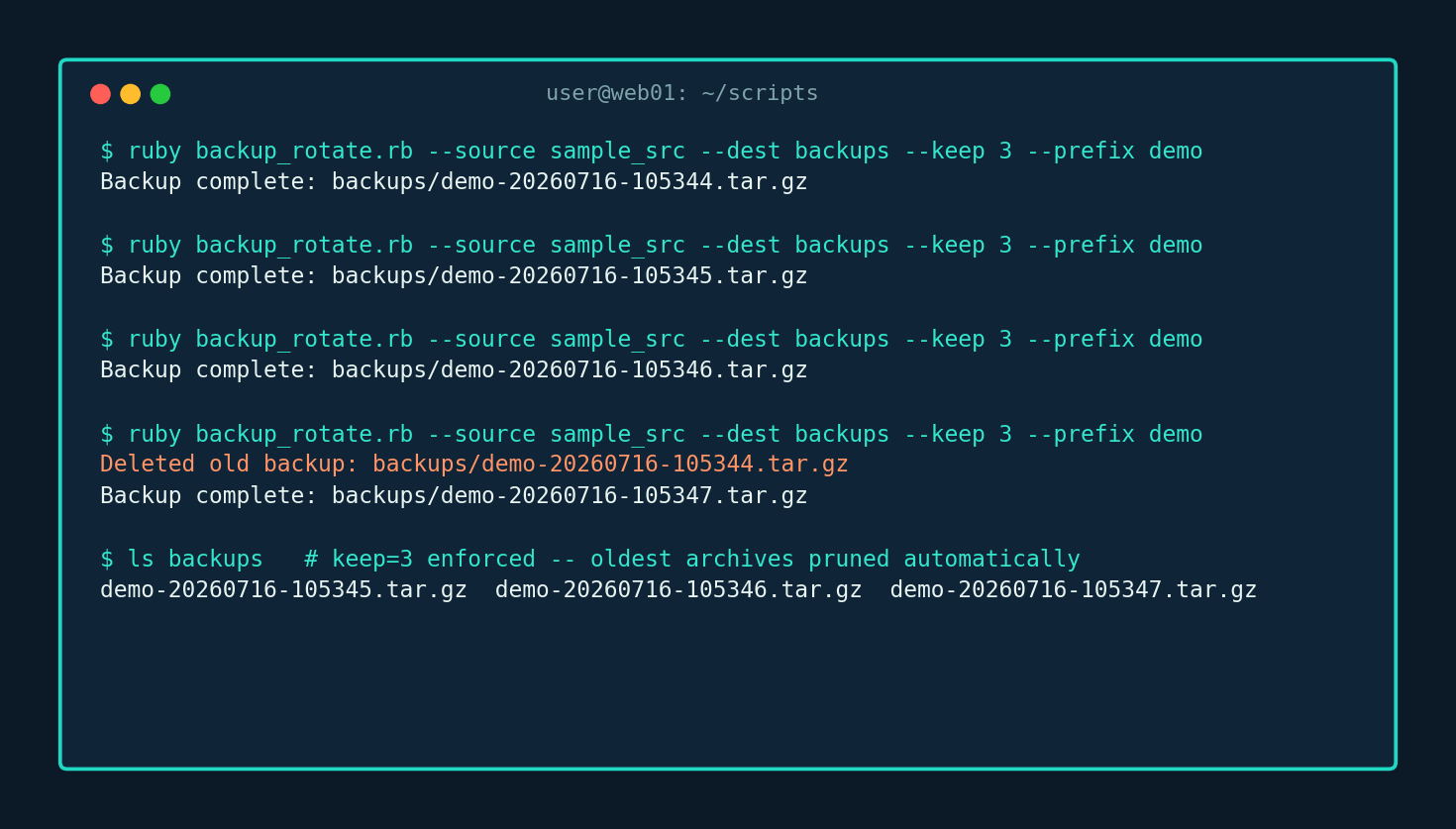
Running the script five times in a row with --keep 3 shows the retention policy kicking in on the fourth run, once there are more than 3 archives on disk:
Troubleshooting
| Symptom | Likely cause & fix |
|---|---|
ERROR: source directory does not exist | Double check --source is a directory and correctly spelled — prefer absolute paths in crontab entries, since cron’s working directory differs from your interactive shell. |
tar failed (exit 2): Cannot stat: No such file or directory | A broken symlink under the source directory disappeared mid-archive. Run find <source> -xtype l to find dangling symlinks. |
| Destination fills up despite rotation | Rotation only deletes archives matching this run’s --prefix. Total disk usage is the sum across all prefixes sharing a destination. |
| Permission denied deleting old backups | The destination isn’t writable by the running user, or the mount intentionally disallows deletes — the script surfaces this as a clear Errno::EPERM rather than failing silently. |
| Archive is much smaller than expected | Confirm --source points where you think — a common mistake is a symlink or bind-mount that moved or isn’t mounted at run time. |
Extending It
- Remote/offsite copies: after a successful local archive, shell out to
rsync,aws s3 cp, orscpto push a copy off-box. - Checksums: write a
.sha256file alongside each archive usingDigest::SHA256(standard library) to verify integrity before a restore. - Tiered retention: keep the last 7 daily, last 4 weekly, and last 12 monthly archives — grandfather-father-son rotation on top of the same glob-and-sort approach.
- Pre/post hooks: for database directories, run
mysqldumpor flush WAL files before archiving instead of archiving a live, possibly-inconsistent directory. - Restore verification: periodically extract the newest archive to a scratch directory and diff key files against the source.
Every code path in this script — archive creation, retention/rotation math, and --dry-run mode — was executed and verified against a sample directory during the writing of this article, including the exact five-run rotation sequence shown above.