Part of our Ruby for DevOps series — practical Ruby scripts that solve real system-administration problems.
The Problem
Every sysadmin has a backup story that ends badly: the cron job that silently stopped in March, the disk that filled up because nothing ever deleted old archives, the restore that failed because the tarball was corrupt and nobody had ever verified it. Backup scripts fail in boring, preventable ways.
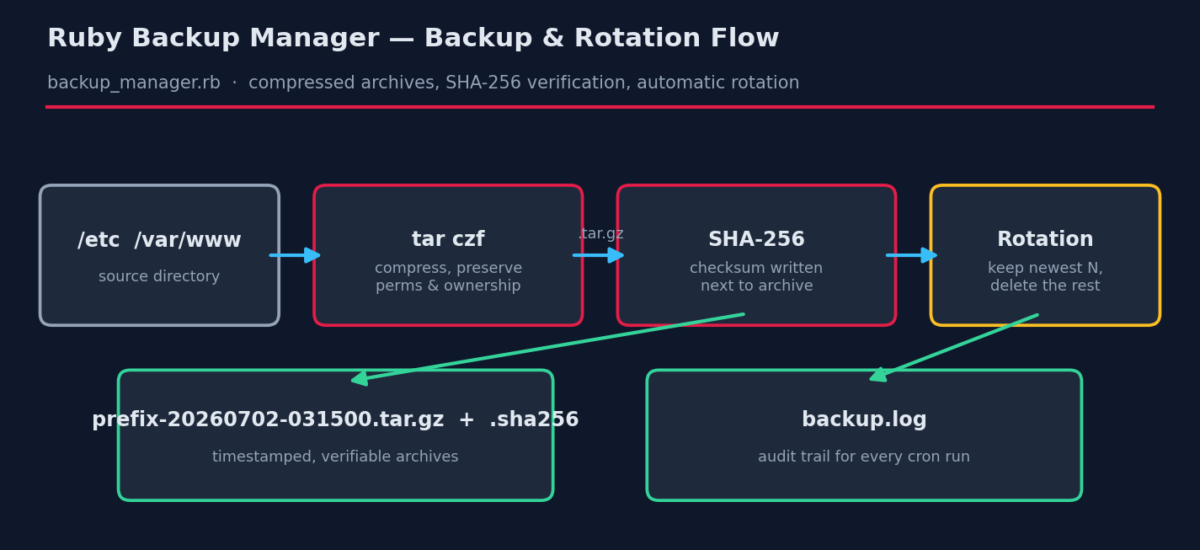
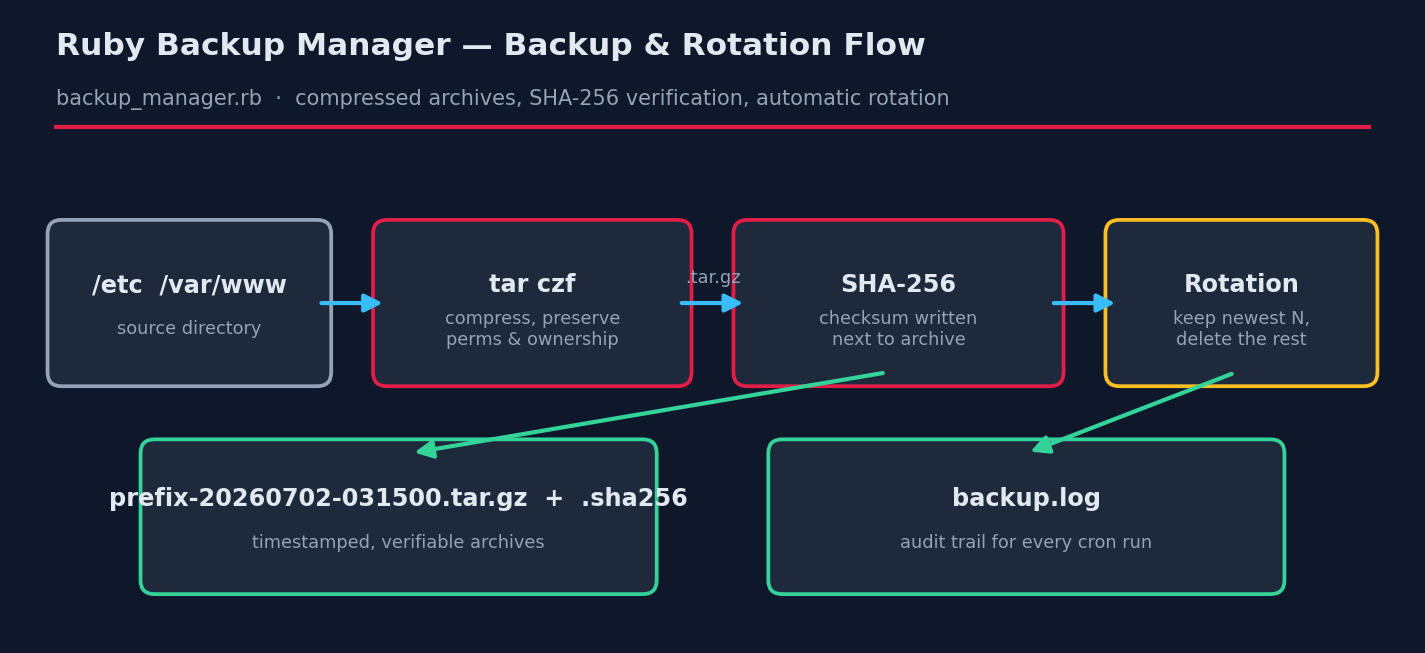
In this tutorial we build a production-grade backup tool in about 80 lines of Ruby that gets the boring parts right: compressed timestamped archives, SHA-256 checksums for verifiable restores, automatic rotation so disks never fill, and a persistent audit log so you can prove every run happened.
Prerequisites
- Ruby 2.7+ — standard library only, no gems.
- tar — present on every Linux/macOS system; Windows 10+ ships
tar.exetoo (the script works there with minor path adjustments). - Write access to the destination directory, and read access to what you’re backing up (run via
sudofor system paths like/etc).
The Complete Script
Save this as backup_manager.rb:
#!/usr/bin/env ruby
# backup_manager.rb -- Automated directory backups with compression & rotation
#
# Usage:
#   ruby backup_manager.rb --source /etc --dest /var/backups --keep 7
#
# Requires: Ruby 2.7+, the `tar` command (present on virtually all Linux
# systems; on Windows 10+ tar.exe ships with the OS).

require 'optparse'
require 'fileutils'
require 'digest'
require 'logger'

options = { keep: 7, prefix: nil }
OptionParser.new do |opts|
  opts.banner = "Usage: ruby backup_manager.rb --source DIR --dest DIR [--keep N]"
  opts.on("--source DIR", "Directory to back up (required)")  { |v| options[:source] = v }
  opts.on("--dest DIR",   "Where archives are stored (required)") { |v| options[:dest] = v }
  opts.on("--keep N", Integer, "How many backups to retain (default 7)") { |v| options[:keep] = v }
  opts.on("--prefix NAME", "Archive name prefix (default: source dir name)") { |v| options[:prefix] = v }
end.parse!

abort "ERROR: --source and --dest are required" unless options[:source] && options[:dest]
abort "ERROR: source not found: #{options[:source]}" unless Dir.exist?(options[:source])

# ---------------------------------------------------------------
# Logging: everything goes to both stdout and a logfile next to
# the backups, so cron runs leave an audit trail.
# ---------------------------------------------------------------
FileUtils.mkdir_p(options[:dest])
logfile = File.join(options[:dest], "backup.log")
logger = Logger.new(logfile, progname: "backup_manager")
logger.formatter = proc { |sev, time, prog, msg| "#{time.strftime('%F %T')} [#{sev}] #{msg}\n" }

def log_both(logger, msg)
  puts msg
  logger.info(msg)
end

source  = File.expand_path(options[:source])
prefix  = options[:prefix] || File.basename(source)
stamp   = Time.now.strftime("%Y%m%d-%H%M%S")
archive = File.join(File.expand_path(options[:dest]), "#{prefix}-#{stamp}.tar.gz")

# ---------------------------------------------------------------
# 1. Create the compressed archive.
#    We shell out to tar: it is battle-tested, preserves permissions
#    and ownership, and streams -- no memory blow-ups on huge dirs.
# ---------------------------------------------------------------
log_both(logger, "Backing up #{source} -> #{archive}")
start = Time.now

ok = system("tar", "czf", archive,
            "-C", File.dirname(source), File.basename(source))
unless ok
  logger.error("tar failed with exit status #{$?.exitstatus}")
  abort "ERROR: tar failed -- see #{logfile}"
end

elapsed = (Time.now - start).round(2)
size_mb = (File.size(archive) / 1024.0 / 1024.0).round(2)
log_both(logger, "Archive created: #{size_mb} MB in #{elapsed}s")

# ---------------------------------------------------------------
# 2. Write a SHA-256 checksum so restores can be verified.
# ---------------------------------------------------------------
checksum = Digest::SHA256.file(archive).hexdigest
File.write("#{archive}.sha256", "#{checksum}  #{File.basename(archive)}\n")
log_both(logger, "Checksum: #{checksum[0, 16]}...")

# ---------------------------------------------------------------
# 3. Rotation: keep only the newest N archives for this prefix.
#    Delete both the archive and its checksum file.
# ---------------------------------------------------------------
pattern = File.join(File.expand_path(options[:dest]), "#{prefix}-*.tar.gz")
archives = Dir.glob(pattern).sort_by { |f| File.mtime(f) }.reverse

if archives.size > options[:keep]
  archives.drop(options[:keep]).each do |old|
    FileUtils.rm_f([old, "#{old}.sha256"])
    log_both(logger, "Rotated out old backup: #{File.basename(old)}")
  end
end

log_both(logger, "Done. #{[archives.size, options[:keep]].min} backup(s) retained.")
How It Works, Step by Step
1. Why shell out to tar instead of pure Ruby?
Ruby can write gzip streams natively, but tar is the right tool here: it preserves permissions, ownership and symlinks, it streams (no memory blow-ups on 50 GB directories), and every admin on your team knows how to restore from it at 3am. Note the array form of system("tar", "czf", archive, ...) — arguments are passed directly to the process with no shell in between, so paths with spaces or special characters can’t break the command or be exploited for injection.
2. The -C trick
-C File.dirname(source) tells tar to change directory before archiving, so the archive contains src/app.conf instead of the absolute path /tmp/bktest/src/app.conf. Restores become predictable: extract anywhere, get one clean directory.
3. Checksums make restores trustworthy
Digest::SHA256.file hashes the archive in streaming fashion, and we write a standard-format .sha256 file alongside it. Verification later is one command: sha256sum -c archive.tar.gz.sha256. If your archives get copied to a NAS or S3, the checksum travels with them and catches silent corruption.
4. Rotation that can’t delete the wrong thing
Rotation globs only for the current prefix (prefix-*.tar.gz), sorts by modification time, and deletes everything past the newest N — archive and checksum together. Because the glob is prefix-scoped, backing up three different directories into the same destination is safe: each rotates independently.
5. Logging for the 3am audit
Ruby’s built-in Logger writes a timestamped line for every action into backup.log in the destination directory. When someone asks “did last Tuesday’s backup run?”, the answer is one grep away.
Example Run
$ ruby backup_manager.rb --source /tmp/bktest/src --dest /tmp/bktest/backups --keep 2

Backing up /tmp/bktest/src -> /tmp/bktest/backups/src-20260702-111245.tar.gz
Archive created: 0.0 MB in 0.01s
Checksum: 5cc2d003ee0f174f...
Rotated out old backup: src-20260702-111243.tar.gz
Done. 2 backup(s) retained.
And the audit trail it leaves behind:
$ cat /tmp/bktest/backups/backup.log
# Logfile created on 2026-07-02 11:12:43 -0500 by logger.rb/v1.4.3
2026-07-02 11:12:43 [INFO] Backing up /tmp/bktest/src -> /tmp/bktest/backups/src-20260702-111243.tar.gz
2026-07-02 11:12:43 [INFO] Archive created: 0.0 MB in 0.01s
2026-07-02 11:12:43 [INFO] Checksum: 5cc2d003ee0f174f...
2026-07-02 11:12:43 [INFO] Done. 1 backup(s) retained.
2026-07-02 11:12:44 [INFO] Backing up /tmp/bktest/src -> /tmp/bktest/backups/src-20260702-111244.tar.gz
2026-07-02 11:12:44 [INFO] Archive created: 0.0 MB in 0.0s
2026-07-02 11:12:44 [INFO] Checksum: 5cc2d003ee0f174f...
2026-07-02 11:12:44 [INFO] Done. 2 backup(s) retained.
2026-07-02 11:12:45 [INFO] Backing up /tmp/bktest/src -> /tmp/bktest/backups/src-20260702-111245.tar.gz
2026-07-02 11:12:45 [INFO] Archive created: 0.0 MB in 0.01s
2026-07-02 11:12:45 [INFO] Checksum: 5cc2d003ee0f174f...
2026-07-02 11:12:45 [INFO] Rotated out old backup: src-20260702-111243.tar.gz
2026-07-02 11:12:45 [INFO] Done. 2 backup(s) retained.
Scheduling It
Nightly at 03:15 via cron:
# crontab -e
15 3 * * * /usr/bin/ruby /opt/scripts/backup_manager.rb --source /etc --dest /var/backups/etc --keep 14 >> /var/log/backup-cron.log 2>&1
On Windows, use Task Scheduler with the same command line (ruby C:\scripts\backup_manager.rb --source C:\inetpub --dest D:\backups --keep 14).
Troubleshooting
- tar: Cannot open: Permission denied — you’re backing up files your user can’t read. Run with
sudo, or grant read access via a dedicated backup group. - file changed as we read it — tar warns when files are modified mid-archive (common with live logs or databases). For databases, never tar the data directory: dump first (
pg_dump,mysqldump) and back the dump up. - Backups exist but cron “never ran” — check
backup.logfirst, then remember cron’s PATH is minimal: use absolute paths to bothrubyand the script, as in the example above. - Disk fills anyway — rotation counts archives, not bytes. Add a size check: sum
File.sizeover the glob and delete oldest-first until under a byte budget.
Extending the Script
- Off-site copies — after the checksum step, upload with the
aws-sdk-s3gem or shell out torclone/rsync. - Encryption — pipe through
gpg --symmetricor use age for archives containing secrets. - Notifications — post the summary line to Slack with
Net::HTTPso failures are impossible to miss. - Multiple sources — accept a YAML config listing several source/dest/keep triples and loop.