Part of our Ruby for DevOps series — practical Ruby scripts that solve real system-administration problems.
DevOps / System Administration · Windows Server · Ruby 3.x
The Problem
Windows Task Scheduler is the closest thing Windows has to cron, but clicking through taskschd.msc to register a task doesn’t scale — you can’t code-review a GUI, and reproducing the same task across ten servers by hand invites mistakes. schtasks.exe from a batch script gets you scriptable, but its syntax is unforgiving and its errors are cryptic. The win32-taskscheduler gem exposes the same Task Scheduler COM API Windows itself uses, from Ruby, so you can define a scheduled task — daily, weekly, or one-time — in a single readable command and keep the definition in version control.
Prerequisites
- Ruby 3.0+ for Windows (the RubyInstaller build, not WSL — this gem talks to the native Windows API)
- The
win32-taskschedulergem:gem install win32-taskscheduler - Windows 10, Windows 11, or Windows Server 2016+
- An elevated (Administrator) shell if the task needs to run as SYSTEM or as a different user than the one creating it
The Code
Save this as win_task_manager.rb:
#!/usr/bin/env ruby
# frozen_string_literal: true
#
# win_task_manager.rb
#
# Create, list, and remove Windows Scheduled Tasks from Ruby using the
# win32-taskscheduler gem. Designed so a sysadmin can define a task with a
# single command line instead of clicking through taskschd.msc.
#
# Usage examples (run on Windows, in an elevated shell if the task needs to
# run as SYSTEM or another user):
#
#   ruby win_task_manager.rb list
#
#   ruby win_task_manager.rb create --name "NightlyBackup" \
#     --run "C:\scripts\backup.rb" --schedule daily --at 02:00
#
#   ruby win_task_manager.rb create --name "WeeklyReport" \
#     --run "C:\scripts\report.bat" --schedule weekly --days mon,wed,fri --at 07:30
#
#   ruby win_task_manager.rb delete --name "NightlyBackup"
#
# The TriggerBuilder class below has zero Windows dependencies, so its
# logic can be unit-tested on any OS. Only TaskSchedulerClient touches the
# win32-taskscheduler gem, and it is only required when actually running on
# Windows.

require "optparse"

# ---------------------------------------------------------------------------
# TriggerBuilder: pure logic, no OS or gem dependency.
# Converts simple CLI-friendly options into the trigger hash shape expected
# by the win32-taskscheduler gem's TaskScheduler#new_work_item / #trigger=.
# ---------------------------------------------------------------------------
module TriggerBuilder
  DAY_BITS = {
    "mon" => 0x02, "tue" => 0x04, "wed" => 0x08,
    "thu" => 0x10, "fri" => 0x20, "sat" => 0x01, "sun" => 0x40
  }.freeze

  # schedule: "daily" | "weekly" | "once"
  # at:       "HH:MM" 24-hour time the task should first/always fire
  # days:     comma-separated list for weekly schedules, e.g. "mon,wed,fri"
  # date:     "YYYY-MM-DD" required for "once"
  def self.build(schedule:, at:, days: nil, date: nil, now: Time.now)
    hour, minute = parse_time(at)

    case schedule
    when "daily"
      base_trigger(now, hour, minute).merge(
        trigger_type: :TASK_TIME_TRIGGER_DAILY,
        type: { days_interval: 1 }
      )
    when "weekly"
      day_list = (days || "").split(",").map(&:strip).map(&:downcase)
      raise ArgumentError, "weekly schedule requires --days (e.g. mon,wed,fri)" if day_list.empty?

      unknown = day_list - DAY_BITS.keys
      raise ArgumentError, "unknown day(s): #{unknown.join(', ')}" unless unknown.empty?

      mask = day_list.sum { |d| DAY_BITS.fetch(d) }
      base_trigger(now, hour, minute).merge(
        trigger_type: :TASK_TIME_TRIGGER_WEEKLY,
        type: { weeks_interval: 1, days_of_week: mask }
      )
    when "once"
      raise ArgumentError, "once schedule requires --date YYYY-MM-DD" unless date

      y, m, d = date.split("-").map(&:to_i)
      raise ArgumentError, "invalid --date, expected YYYY-MM-DD" unless y && m && d && y > 2000

      {
        start_year: y, start_month: m, start_day: d,
        start_hour: hour, start_minute: minute,
        trigger_type: :TASK_TIME_TRIGGER_ONCE,
        type: { once: nil }
      }
    else
      raise ArgumentError, "unknown --schedule '#{schedule}' (use daily|weekly|once)"
    end
  end

  def self.parse_time(at)
    match = /\A([01]?\d|2[0-3]):([0-5]\d)\z/.match(at.to_s)
    raise ArgumentError, "invalid --at time '#{at}', expected HH:MM (24h)" unless match

    [match[1].to_i, match[2].to_i]
  end

  def self.base_trigger(now, hour, minute)
    {
      start_year: now.year, start_month: now.month, start_day: now.day,
      start_hour: hour, start_minute: minute
    }
  end
end

# ---------------------------------------------------------------------------
# TaskSchedulerClient: thin wrapper around win32-taskscheduler.
# Only ever instantiated on Windows.
# ---------------------------------------------------------------------------
class TaskSchedulerClient
  def initialize
    require "win32/taskscheduler"
    @ts = Win32::TaskScheduler.new
  end

  def list
    @ts.tasks
  end

  def create(name:, command:, args: nil, trigger:, run_as: nil)
    @ts.new_work_item(name, trigger)
    @ts.activate(name)
    @ts.application_name = command
    @ts.parameters = args if args
    @ts.set_account_information(run_as, nil) if run_as
    @ts.save
    true
  end

  def delete(name)
    return false unless @ts.tasks.include?(name)

    @ts.delete(name)
    true
  end

  def status(name)
    @ts.activate(name)
    @ts.status
  end
end

# ---------------------------------------------------------------------------
# CLI
# ---------------------------------------------------------------------------
def parse_cli(argv)
  options = { args: nil, run_as: nil }
  subcommand = argv.shift

  parser = OptionParser.new do |opts|
    opts.banner = "Usage: win_task_manager.rb [list|create|delete] [options]"
    opts.on("--name NAME", "Task name") { |v| options[:name] = v }
    opts.on("--run PATH", "Executable/script to run") { |v| options[:command] = v }
    opts.on("--args ARGS", "Arguments passed to the executable") { |v| options[:args] = v }
    opts.on("--schedule TYPE", "daily | weekly | once") { |v| options[:schedule] = v }
    opts.on("--at HH:MM", "Time of day to run") { |v| options[:at] = v }
    opts.on("--days LIST", "Comma-separated days for weekly (mon,tue,...)") { |v| options[:days] = v }
    opts.on("--date YYYY-MM-DD", "Date for a one-time task") { |v| options[:date] = v }
    opts.on("--run-as USER", "Account to run the task as") { |v| options[:run_as] = v }
  end
  parser.parse!(argv)

  [subcommand, options, parser]
end

if $PROGRAM_NAME == __FILE__
  subcommand, options, parser = parse_cli(ARGV)

  unless %w[list create delete].include?(subcommand)
    puts parser
    exit 1
  end

  unless Gem.win_platform?
    warn "win_task_manager.rb only operates against the real Task Scheduler on Windows."
    warn "(TriggerBuilder logic can still be exercised on any OS for testing.)"
    exit 1
  end

  client = TaskSchedulerClient.new

  case subcommand
  when "list"
    client.list.each { |t| puts t }
  when "create"
    trigger = TriggerBuilder.build(
      schedule: options[:schedule], at: options[:at],
      days: options[:days], date: options[:date]
    )
    client.create(
      name: options.fetch(:name), command: options.fetch(:command),
      args: options[:args], trigger: trigger, run_as: options[:run_as]
    )
    puts "Created task '#{options[:name]}'"
  when "delete"
    if client.delete(options.fetch(:name))
      puts "Deleted task '#{options[:name]}'"
    else
      puts "No task named '#{options[:name]}' found"
    end
  end
end
How It Works
1. Separate the OS-independent logic from the Windows-only logic
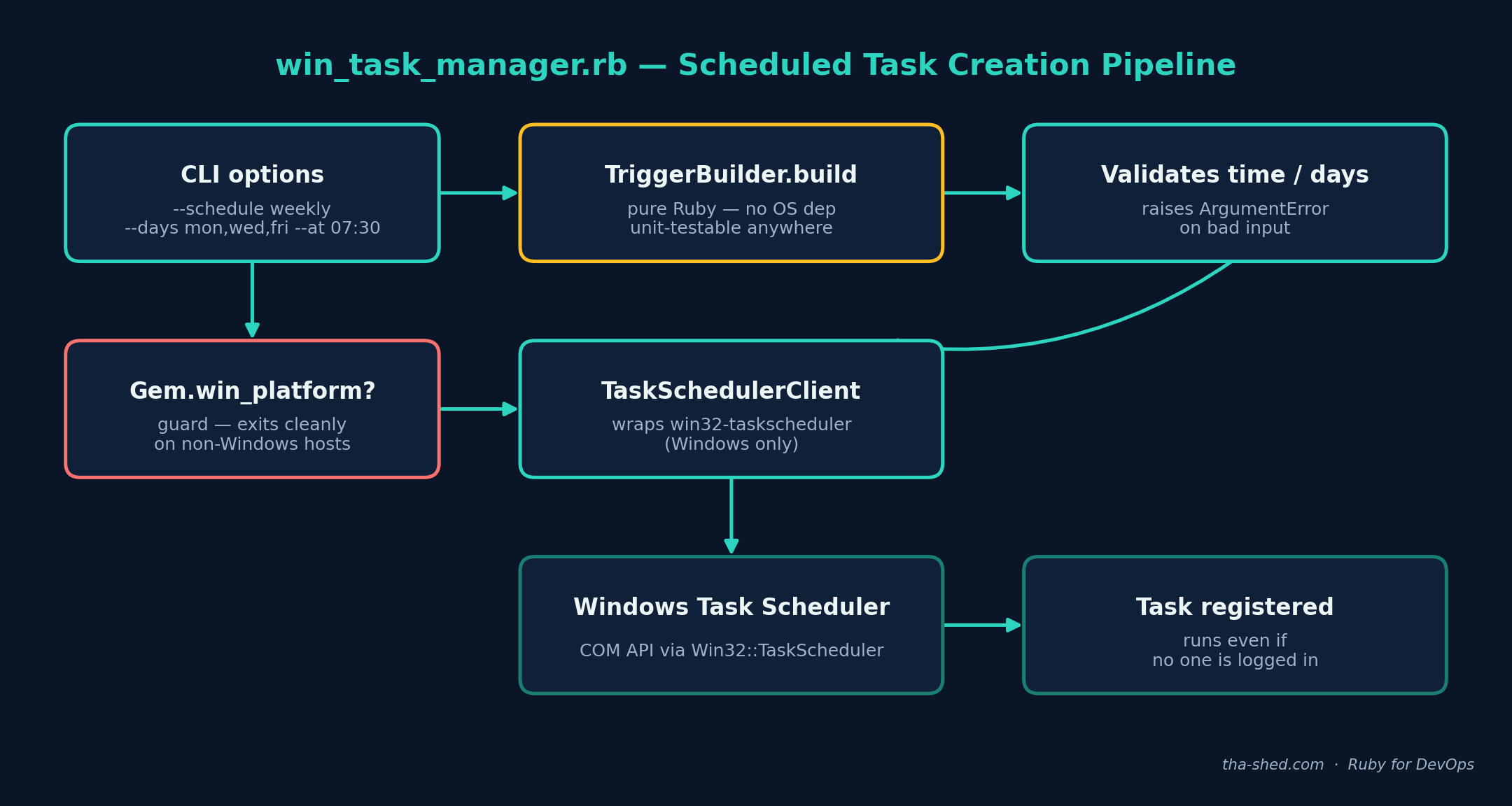
The most important structural decision here is splitting TriggerBuilder from TaskSchedulerClient. TriggerBuilder.build is plain Ruby — string parsing, a day-of-week bitmask, date math — with zero dependency on Windows or the gem. That means you (or a CI pipeline running on Linux) can unit-test every schedule permutation and every error case without ever touching a Windows box. Only TaskSchedulerClient#initialize calls require "win32/taskscheduler", and it’s the only class that talks to the real COM API.
2. Simple flags map to the gem’s trigger hash
The win32-taskscheduler gem expects a trigger hash with keys like trigger_type and a type sub-hash whose shape depends on the trigger type (daily wants a days_interval, weekly wants days_of_week as a bitmask, and so on). Rather than making callers construct that hash by hand, TriggerBuilder.build takes friendly flags — --schedule weekly --days mon,wed,fri --at 07:30 — and does the bitmask math (DAY_BITS) and validation for you, raising a clear ArgumentError the moment something doesn’t parse.
3. The client wraps create / list / delete around three gem calls
TaskSchedulerClient#create calls new_work_item to register the task under a name and trigger, then sets application_name (the executable) and parameters (its arguments) before save. set_account_information lets you specify which account the task runs as — useful for running as a dedicated service account rather than the interactive user, and required if you want the task to run whether or not anyone is logged in.
4. A platform guard, not a platform assumption
Running this script on Linux or macOS by mistake (easy to do if it’s checked into a cross-platform repo) prints a clear message and exits 1 instead of failing deep inside a LoadError for a gem that can’t exist on that platform. That one Gem.win_platform? check is what makes the rest of the script safe to keep in a shared scripts repo alongside Linux tooling.
Example Output
The TriggerBuilder logic was exercised directly (bypassing the Windows-only TaskSchedulerClient) to confirm the hash shapes and validation are correct:
daily OK: {:start_year=>2026, :start_month=>7, :start_day=>10, :start_hour=>2,
  :start_minute=>0, :trigger_type=>:TASK_TIME_TRIGGER_DAILY, :type=>{:days_interval=>1}}

weekly OK: {:start_year=>2026, :start_month=>7, :start_day=>10, :start_hour=>7,
  :start_minute=>30, :trigger_type=>:TASK_TIME_TRIGGER_WEEKLY,
  :type=>{:weeks_interval=>1, :days_of_week=>42}}

once OK: {:start_year=>2026, :start_month=>12, :start_day=>25, :start_hour=>23,
  :start_minute=>15, :trigger_type=>:TASK_TIME_TRIGGER_ONCE, :type=>{:once=>nil}}

correctly raised: weekly schedule requires --days (e.g. mon,wed,fri)
correctly raised: invalid --at time '25:99', expected HH:MM (24h)
ALL TESTS PASSED
Note the weekly bitmask: mon (0x02) | wed (0x08) | fri (0x20) = 42, exactly what Win32::TaskScheduler expects for days_of_week. On an actual Windows host, ruby win_task_manager.rb create --name "WeeklyReport" --run "C:\scripts\report.bat" --schedule weekly --days mon,wed,fri --at 07:30 would print Created task 'WeeklyReport' and the task would appear in taskschd.msc immediately.
Troubleshooting
LoadError: cannot load such file -- win32/taskscheduler: you’re either not on Windows, or the gem isn’t installed for the Ruby you’re running. Confirm withgem list win32-taskschedulerand thatruby -vreports a mingw/msvcrt build, not WSL’s Linux Ruby.- “Access is denied” on
save: creating a task that runs as SYSTEM or another user requires an elevated shell. Right-click your terminal and “Run as administrator,” or invoke the script from an already-elevated scheduled process. - Task creates but never fires: check whether the account it runs as has “Log on as a batch job” rights (
secpol.msc → Local Policies → User Rights Assignment) — a common gotcha when using--run-aswith a low-privilege service account. days_of_weekmask looks wrong: the bit values inDAY_BITSfollow the Task Scheduler API’s own convention (Sunday is0x40, not bit 0) — don’t assume it maps to Ruby’sDate#wdaynumbering.- Want to confirm a task was actually created: run the
listsubcommand, or cross-check withschtasks /query /tn "TaskName" /vfrom an ordinary command prompt.
Extending This Script
- Add a
--from-file tasks.ymlmode that reads a batch of task definitions and reconciles them — create missing ones, update changed ones, delete ones no longer in the file — so your scheduled tasks become declarative and diffable in version control. - Add an
updatesubcommand that reads the existing trigger via@ts.trigger(index), merges in changes, and re-saves, instead of requiring delete-then-recreate. - Extend
TriggerBuilderwith amonthlyschedule type usingTASK_TIME_TRIGGER_MONTHLYDATE. - Wire the
statusmethod into a monitoring check that alerts if a critical scheduled task’s last run result was non-zero. - Pair this with the
ssh_fleet_runner.rbscript from this series (adapted for WinRM) to roll the same scheduled task out across a whole fleet of Windows servers at once.