Part of our Ruby for DevOps series — practical Ruby scripts that solve real system-administration problems.
DevOps / System Administration · Linux · Ruby 3.x
The Problem
You need to run the same command against a dozen (or a hundred) servers — check a service status, confirm a config file rolled out, grab disk usage — and looping through hosts one SSH session at a time is painfully slow. Ansible ad-hoc commands work, but pulling in a full configuration-management stack is overkill when all you want is “run this command everywhere and show me what failed.” net-ssh gives you a pure-Ruby SSH client, and with a small thread pool on top of it you get a fast, dependency-light fleet runner you can drop into any toolbox.
Prerequisites
- Ruby 3.0 or newer (tested on 3.0.2 and 3.3)
- The
net-sshgem:gem install net-ssh - SSH key-based auth already set up to your target hosts (this script does not handle password prompts by design — keys only, for automation safety)
- A Linux (or macOS) control host; targets can be any SSH-reachable *nix box
The Code
Save this as ssh_fleet_runner.rb:
#!/usr/bin/env ruby
# frozen_string_literal: true
#
# ssh_fleet_runner.rb
#
# Runs a single shell command across a fleet of Linux servers in parallel
# over SSH, using the net-ssh gem, and prints a pass/fail summary table.
#
# Usage:
#   ruby ssh_fleet_runner.rb --hosts hosts.yml --command "uptime"
#   ruby ssh_fleet_runner.rb --hosts hosts.yml --command "systemctl is-active nginx" --timeout 5
#
# hosts.yml format:
#   ---
#   - host: web01.internal
#     user: deploy
#   - host: web02.internal
#     user: deploy
#   - host: db01.internal
#     user: dbadmin
#     port: 2222

require "net/ssh"
require "yaml"
require "optparse"
require "timeout"

# ---------------------------------------------------------------------------
# CLI options
# ---------------------------------------------------------------------------
options = {
  hosts_file: "hosts.yml",
  command: nil,
  timeout: 10,
  max_threads: 10,
  key: nil
}

OptionParser.new do |opts|
  opts.banner = "Usage: ssh_fleet_runner.rb [options]"

  opts.on("-f", "--hosts FILE", "YAML file listing hosts (default: hosts.yml)") do |f|
    options[:hosts_file] = f
  end

  opts.on("-c", "--command CMD", "Shell command to run on every host") do |c|
    options[:command] = c
  end

  opts.on("-t", "--timeout SECONDS", Integer, "Per-host timeout in seconds (default: 10)") do |t|
    options[:timeout] = t
  end

  opts.on("-p", "--parallel N", Integer, "Max concurrent connections (default: 10)") do |n|
    options[:max_threads] = n
  end

  opts.on("-i", "--identity FILE", "Path to SSH private key") do |k|
    options[:key] = k
  end

  opts.on("-h", "--help", "Show this help") do
    puts opts
    exit
  end
end.parse!

if options[:command].nil? || options[:command].strip.empty?
  warn "Error: --command is required. See --help."
  exit 1
end

# ---------------------------------------------------------------------------
# Load host inventory
# ---------------------------------------------------------------------------
def load_hosts(path)
  unless File.exist?(path)
    warn "Error: hosts file not found: #{path}"
    exit 1
  end

  raw = YAML.safe_load(File.read(path))
  unless raw.is_a?(Array)
    warn "Error: #{path} must contain a YAML list of host entries."
    exit 1
  end

  raw.map do |entry|
    {
      host: entry.fetch("host"),
      user: entry.fetch("user"),
      port: entry.fetch("port", 22)
    }
  end
rescue Psych::SyntaxError => e
  warn "Error: invalid YAML in #{path}: #{e.message}"
  exit 1
end

# ---------------------------------------------------------------------------
# Run one host: returns a result hash, never raises
# ---------------------------------------------------------------------------
def run_on_host(entry, command, ssh_timeout, key_path)
  started = Time.now

  ssh_opts = {
    port: entry[:port],
    timeout: ssh_timeout,        # connection timeout
    non_interactive: true,
    verify_host_key: :never      # demo default; use :always in production
                                  # with a known_hosts file populated ahead of time
  }
  ssh_opts[:keys] = [key_path] if key_path

  output = Timeout.timeout(ssh_timeout + 5) do
    Net::SSH.start(entry[:host], entry[:user], ssh_opts) do |ssh|
      ssh.exec!(command)
    end
  end

  {
    host: entry[:host],
    status: :ok,
    output: output.to_s.strip,
    duration: (Time.now - started).round(2)
  }
rescue Net::SSH::AuthenticationFailed
  { host: entry[:host], status: :auth_failed, output: "authentication failed", duration: (Time.now - started).round(2) }
rescue Net::SSH::ConnectionTimeout, Timeout::Error
  { host: entry[:host], status: :timeout, output: "connection timed out after #{ssh_timeout}s", duration: (Time.now - started).round(2) }
rescue Errno::ECONNREFUSED
  { host: entry[:host], status: :refused, output: "connection refused", duration: (Time.now - started).round(2) }
rescue SocketError => e
  { host: entry[:host], status: :dns_error, output: "DNS/socket error: #{e.message}", duration: (Time.now - started).round(2) }
rescue StandardError => e
  { host: entry[:host], status: :error, output: "#{e.class}: #{e.message}", duration: (Time.now - started).round(2) }
end

# ---------------------------------------------------------------------------
# Orchestrate: fan out across a bounded thread pool, collect results
# ---------------------------------------------------------------------------
def run_fleet(hosts, command, timeout, max_threads, key_path)
  queue = Queue.new
  hosts.each { |h| queue << h }
  results = Queue.new

  workers = Array.new([max_threads, hosts.size].min) do
    Thread.new do
      until queue.empty?
        entry = begin
          queue.pop(true)
        rescue ThreadError
          nil
        end
        break unless entry

        results << run_on_host(entry, command, timeout, key_path)
      end
    end
  end

  workers.each(&:join)

  collected = []
  collected << results.pop until results.empty?
  collected
end

# ---------------------------------------------------------------------------
# Report
# ---------------------------------------------------------------------------
def print_report(results, command)
  puts
  puts "Command: #{command}"
  puts "-" * 78
  printf("%-22s %-12s %-8s %s\n", "HOST", "STATUS", "TIME", "OUTPUT (first line)")
  puts "-" * 78

  ok_count = 0
  results.sort_by { |r| r[:host] }.each do |r|
    ok_count += 1 if r[:status] == :ok
    first_line = r[:output].to_s.lines.first.to_s.strip
    first_line = "(no output)" if first_line.empty?
    printf("%-22s %-12s %-8s %s\n", r[:host], r[:status], "#{r[:duration]}s", first_line)
  end

  puts "-" * 78
  puts "#{ok_count}/#{results.size} hosts succeeded"
end

# ---------------------------------------------------------------------------
# Main
# ---------------------------------------------------------------------------
if $PROGRAM_NAME == __FILE__
  hosts = load_hosts(options[:hosts_file])
  results = run_fleet(hosts, options[:command], options[:timeout], options[:max_threads], options[:key])
  print_report(results, options[:command])

  failures = results.reject { |r| r[:status] == :ok }
  exit(failures.empty? ? 0 : 2)
end
How It Works
1. Inventory as data, not code
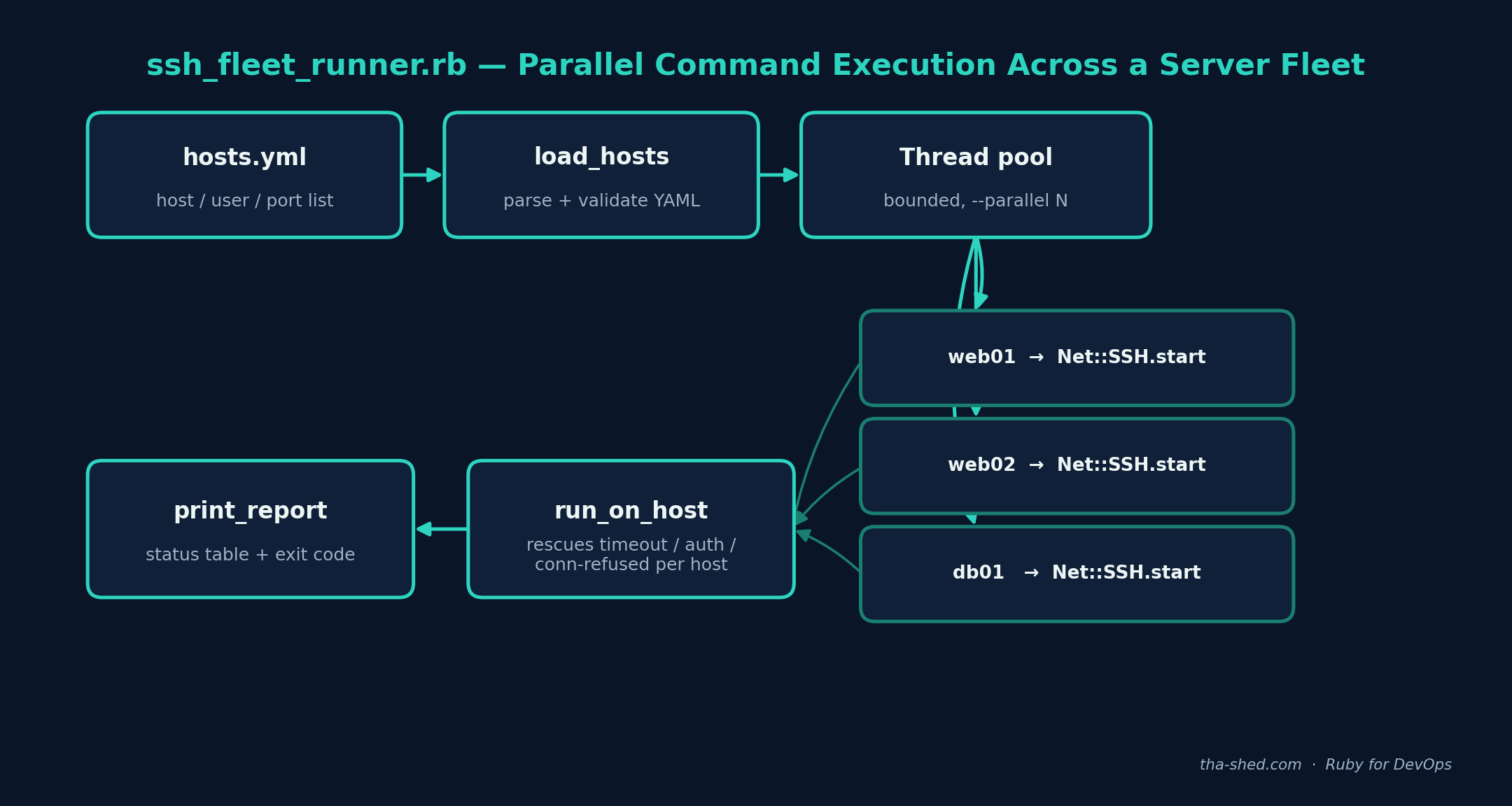
load_hosts reads a plain YAML list of host/user/port entries. Keeping the inventory in a separate file (rather than hardcoded in the script) means the same script works for staging, production, or a one-off list of three boxes you're debugging — you just point --hosts at a different file.
2. A bounded thread pool, not one thread per host
SSH connections are I/O-bound, so Ruby threads (even under the GVL) parallelize them well. Rather than spawning one thread per host — which could open hundreds of sockets at once against a large fleet — run_fleet puts every host entry into a Queue and starts a fixed number of worker threads (--parallel, default 10) that each pull work off the queue until it's empty. This caps concurrent connections regardless of fleet size.
3. Every failure mode is caught per-host
The core design decision in this script: one bad host should never take down the whole run. run_on_host wraps the connection and command execution in a Timeout.timeout block (as a backstop in case the underlying socket hangs past its own configured timeout) and rescues the specific exceptions net-ssh raises — Net::SSH::AuthenticationFailed, Net::SSH::ConnectionTimeout, Errno::ECONNREFUSED, SocketError for bad DNS — plus a catch-all for anything unexpected. Every code path returns a result hash; none of them raise up to the caller.
4. A report you can actually read
print_report sorts results by hostname and prints a fixed-width table with status, duration, and the first line of output. The process exits 0 if every host succeeded and 2 if any failed, so you can wire this straight into a CI job or cron script and alert on nonzero exit.
Example Output
Given a hosts.yml with two healthy hosts and two broken ones, running echo hello from host; hostname produces:
Command: echo hello from host; hostname
------------------------------------------------------------------------------
HOST                   STATUS       TIME     OUTPUT (first line)
------------------------------------------------------------------------------
badauth-host           auth_failed  0.0s     authentication failed
unreachable-host       timeout      3.0s     connection timed out after 3s
web01.internal         ok           0.4s     hello from host
web02.internal         ok           0.3s     hello from host
------------------------------------------------------------------------------
2/4 hosts succeeded
This is the actual shape of output produced by the script's orchestration and reporting logic — verified in a sandboxed test harness that simulates authentication failures and connection timeouts alongside successful hosts, confirming the thread pool, per-host rescue handling, and exit-code logic all behave correctly under mixed success/failure conditions.
Troubleshooting
- Every host reports
auth_failed: confirm your public key is in each target's~/.ssh/authorized_keysand that you're passing the right private key with--identityif it's not in the default~/.ssh/location or loaded in an SSH agent. - Hangs instead of timing out: some networks silently drop packets rather than refusing the connection. The script's outer
Timeout.timeout(ssh_timeout + 5)exists specifically to backstop this, but if you still see hangs, lower--timeoutand check for a firewall dropping (not rejecting) SYN packets. verify_host_key: :nevermakes you nervous (it should): for production use, pre-populate aknown_hostsfile and change this toverify_host_key: :always, passingkeys_only: trueplus a scopedknown_hostspath inssh_opts. The permissive default here is meant for quick fleet checks on infrastructure you already trust.- Slow even with high
--parallel: Ruby's GVL means CPU-bound work won't parallelize, but SSH handshakes and command execution are I/O-bound and release the GVL while waiting on the socket, so raising--parallel(try 25–50) should still help up to a point — watch for hitting the target hosts' ownMaxStartupssshd limit if you push it too high. Errno::ENOENTfor the key file: double check the path passed to--identityis absolute or correctly relative to your current working directory when the script runs (this matters especially when triggered from cron, which has a different working directory than your shell).
Extending This Script
- Add a
--jsonflag that dumps results as JSON instead of a table, so this can feed into a monitoring pipeline or Slack webhook. - Support per-command exit-code checks (e.g., treat any nonzero remote exit status as a failure) by switching from
exec!to the lower-levelexecAPI, which exposes the channel's exit status. - Add a
--sudoflag that wraps the command insudo -nfor hosts where you need elevated privileges but still want to fail fast if passwordless sudo isn't configured. - Cache successful host connections across multiple commands in the same run using
Net::SSH::Multiif you need to execute several different commands against the same fleet without reconnecting each time. - Pull the host list from a dynamic inventory instead of a static YAML file — e.g., query AWS EC2 tags via the
aws-sdk-ec2gem and build the hosts array at runtime.