The Problem
Windows Task Scheduler quietly accumulates cruft. Someone sets up a nightly job running as SYSTEM, leaves the org, and two
years later nobody remembers what it does or whether it still works. A cert-renewal script starts failing silently because Task
Scheduler doesn’t page anyone — it just marks the last run result and moves on. A “temporary” diagnostic task from a incident six months
ago is still enabled, still running daily, still running as an administrator account.
The GUI (taskschd.msc) makes auditing this by hand painful: you click into each task individually to see its last result,
its run-as account, its schedule. schtasks.exe — built into every Windows install — can dump everything as CSV in one call,
but the raw output is not something you want to read row by row on a 200-task server. This tutorial builds
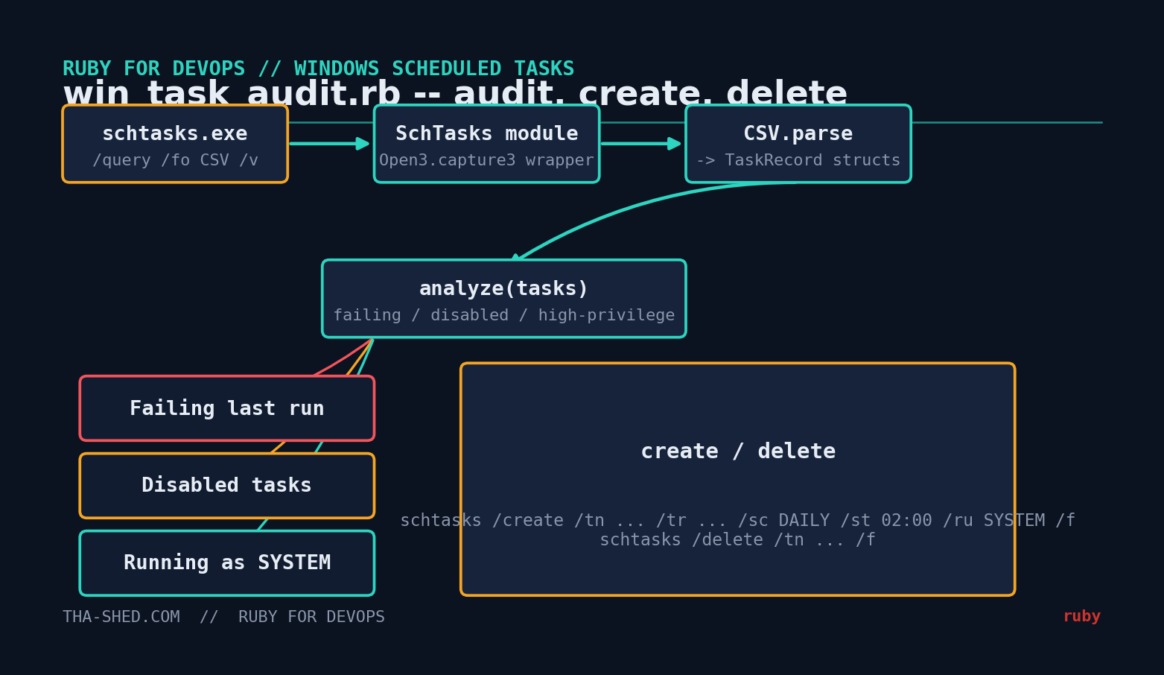
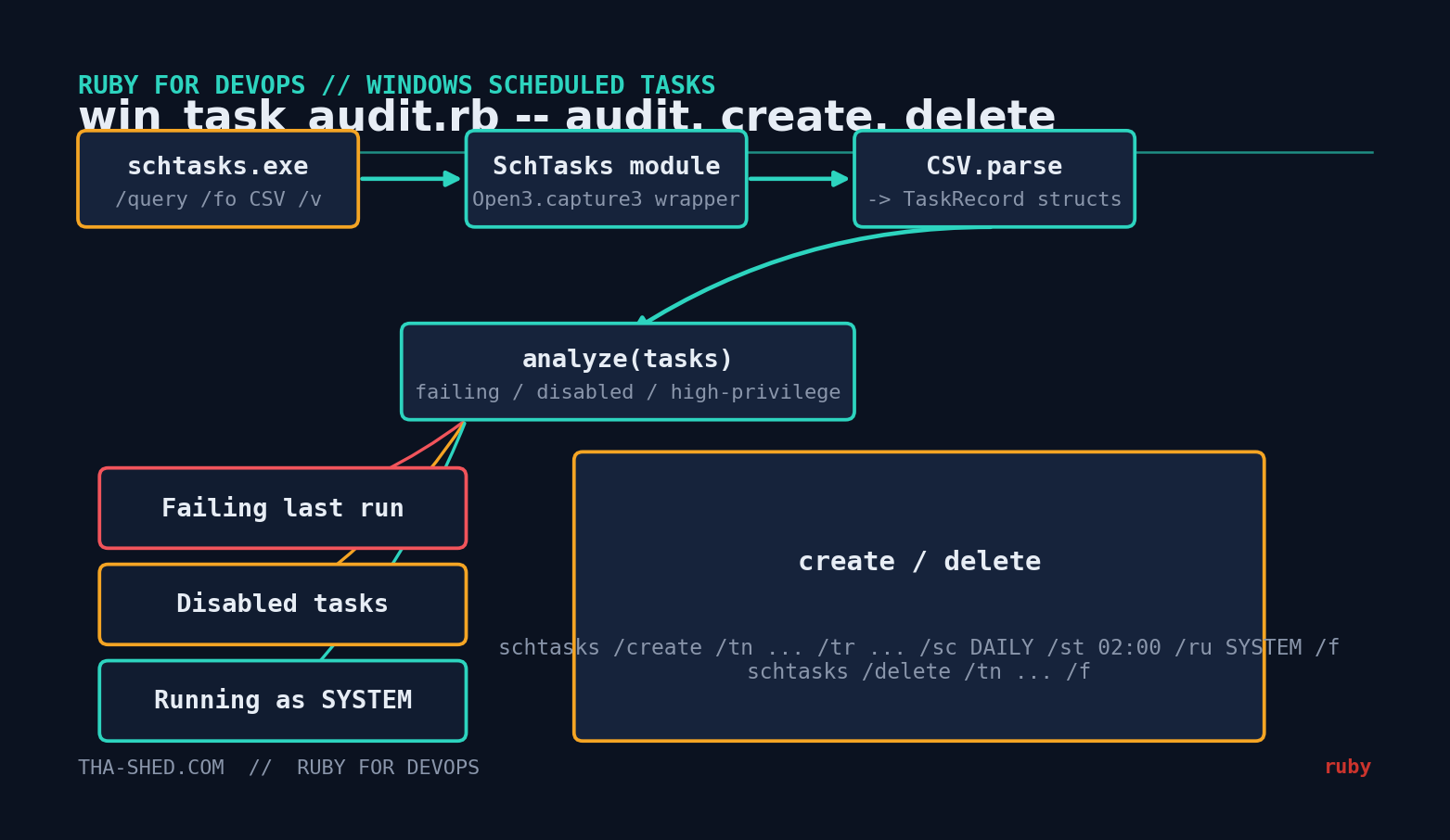
win_task_audit.rb: a script that pulls the full task list, flags the three things that actually matter (tasks failing on
their last run, tasks left disabled, and tasks running with SYSTEM-level privilege), and can also create or remove tasks so the same
tool covers both auditing and provisioning.
Prerequisites
- Ruby 3.x for Windows (via RubyInstaller) — tested against the standard library shipped with Ruby 3.0–3.3
- Windows 10, Windows 11, or Windows Server (2016+) —
schtasks.exeis a stock component, nothing to install - No Ruby gems required. Just
csv,open3,optparse, andjsonfrom the standard library - Run from an elevated (Administrator) prompt to see tasks owned by other users and by
SYSTEM— a non-elevated session only sees tasks the current user owns
This script deliberately does not use thewin32-taskschedulergem, which wraps the native Task Scheduler COM API. That gem gives you finer control (triggers, conditions, XML task definitions) if you need it, butschtasks.execovers the 90% case — query, create, delete — with zero native extensions to compile and zero platform-specific gem installation headaches on a fresh box.
The Complete Code
#!/usr/bin/env ruby
# frozen_string_literal: true
#
# win_task_audit.rb -- Audit, create, and remove Windows Scheduled Tasks
# from Ruby by wrapping the built-in schtasks.exe command-line tool.
#
# No third-party gems required. Must be run on Windows (schtasks.exe is
# part of every Windows install), ideally from an elevated prompt so it
# can see tasks owned by SYSTEM and other users.
#
# Usage:
#   ruby win_task_audit.rb audit
#   ruby win_task_audit.rb audit --csv tasks_snapshot.csv   # re-analyze a saved snapshot
#   ruby win_task_audit.rb create --name "NightlyBackup" --run "C:\Scripts\backup.rb" ^
#        --schedule DAILY --start-time 02:00 --run-as SYSTEM
#   ruby win_task_audit.rb delete --name "NightlyBackup"
#
require 'csv'
require 'open3'
require 'optparse'
require 'json'

TaskRecord = Struct.new(:host, :name, :status, :last_run_time, :last_result,
                         :run_as_user, :schedule_type, :start_time, keyword_init: true) do
  # schtasks reports success as decimal 0 (sometimes literal "0", sometimes "0x0").
  def last_run_succeeded?
    last_result.to_s.strip =~ /\A0(x0+)?\z/i ? true : false
  end

  def disabled?
    status.to_s.strip.casecmp('disabled').zero?
  end

  # Windows Task Scheduler treats these as unusually privileged run-as accounts.
  def high_privilege?
    %w[SYSTEM LOCAL SERVICE NETWORK SERVICE].any? { |acct| run_as_user.to_s.upcase.include?(acct) }
  end
end

# ---------------------------------------------------------------------------
# Talks to schtasks.exe. Kept tiny and separate from parsing/analysis so
# the rest of the script can be unit-tested on any OS by feeding it
# pre-captured CSV text instead of shelling out for real.
# ---------------------------------------------------------------------------
module SchTasks
  module_function

  def query_csv
    stdout, stderr, status = Open3.capture3('schtasks', '/query', '/fo', 'CSV', '/v')
    raise "schtasks /query failed: #{stderr}" unless status.success?

    stdout
  end

  def create(name:, run:, schedule:, start_time:, run_as: nil, force: true)
    args = ['schtasks', '/create', '/tn', name, '/tr', run, '/sc', schedule, '/st', start_time]
    args += ['/ru', run_as] if run_as
    args << '/f' if force
    stdout, stderr, status = Open3.capture3(*args)
    raise "schtasks /create failed: #{stderr}" unless status.success?

    stdout
  end

  def delete(name:, force: true)
    args = ['schtasks', '/delete', '/tn', name]
    args << '/f' if force
    stdout, stderr, status = Open3.capture3(*args)
    raise "schtasks /delete failed: #{stderr}" unless status.success?

    stdout
  end
end

# ---------------------------------------------------------------------------
# Parses the verbose CSV that `schtasks /query /fo CSV /v` prints (one row
# per task, first row of a fresh dump is a header). Ruby's CSV handles the
# quoting Microsoft uses for embedded commas without any extra work.
# ---------------------------------------------------------------------------
def parse_tasks(csv_text)
  rows = CSV.parse(csv_text, headers: true)
  rows.reject { |r| r['TaskName'].nil? || r['TaskName'] == 'TaskName' }.map do |r|
    TaskRecord.new(
      host: r['HostName'],
      name: r['TaskName'],
      status: r['Status'],
      last_run_time: r['Last Run Time'],
      last_result: r['Last Result'],
      run_as_user: r['Run As User'],
      schedule_type: r['Schedule Type'],
      start_time: r['Start Time']
    )
  end
end

# ---------------------------------------------------------------------------
# Flags the things a DevOps engineer actually cares about during an audit:
# scheduled tasks that are silently failing, disabled tasks nobody cleaned
# up, and tasks running with SYSTEM-level privilege that deserve a second
# look before someone treats them as "just another task".
# ---------------------------------------------------------------------------
def analyze(tasks)
  {
    failing: tasks.reject { |t| t.last_run_succeeded? || t.last_run_time.to_s.strip == 'N/A' },
    disabled: tasks.select(&:disabled?),
    high_privilege: tasks.select(&:high_privilege?)
  }
end

def print_report(tasks)
  findings = analyze(tasks)

  puts "Scanned #{tasks.size} scheduled task(s) on #{tasks.first&.host || 'this host'}"
  puts

  puts "== Failing on last run (#{findings[:failing].size}) =="
  if findings[:failing].empty?
    puts '  none'
  else
    findings[:failing].each { |t| puts "  #{t.name}  (last_result=#{t.last_result}, last_run=#{t.last_run_time})" }
  end
  puts

  puts "== Disabled tasks (#{findings[:disabled].size}) =="
  if findings[:disabled].empty?
    puts '  none'
  else
    findings[:disabled].each { |t| puts "  #{t.name}" }
  end
  puts

  puts "== Running as SYSTEM / high-privilege account (#{findings[:high_privilege].size}) =="
  if findings[:high_privilege].empty?
    puts '  none'
  else
    findings[:high_privilege].each { |t| puts "  #{t.name}  (run_as=#{t.run_as_user})" }
  end
end

if $PROGRAM_NAME == __FILE__
  command = ARGV.shift

  case command
  when 'audit'
    options = {}
    OptionParser.new do |opts|
      opts.on('--csv PATH', 'Analyze a previously saved schtasks CSV export instead of querying live') { |v| options[:csv] = v }
      opts.on('--json', 'Emit JSON instead of a text report') { options[:json] = true }
    end.parse!(ARGV)

    csv_text = options[:csv] ? File.read(options[:csv]) : SchTasks.query_csv
    tasks = parse_tasks(csv_text)

    if options[:json]
      puts JSON.pretty_generate(analyze(tasks).transform_values { |list| list.map(&:to_h) })
    else
      print_report(tasks)
    end

  when 'create'
    options = { force: true }
    OptionParser.new do |opts|
      opts.on('--name NAME') { |v| options[:name] = v }
      opts.on('--run CMD') { |v| options[:run] = v }
      opts.on('--schedule TYPE', 'ONCE, MINUTE, HOURLY, DAILY, WEEKLY, MONTHLY') { |v| options[:schedule] = v }
      opts.on('--start-time HH:MM') { |v| options[:start_time] = v }
      opts.on('--run-as ACCOUNT') { |v| options[:run_as] = v }
    end.parse!(ARGV)

    puts SchTasks.create(name: options[:name], run: options[:run], schedule: options[:schedule],
                          start_time: options[:start_time], run_as: options[:run_as])

  when 'delete'
    options = {}
    OptionParser.new { |opts| opts.on('--name NAME') { |v| options[:name] = v } }.parse!(ARGV)
    puts SchTasks.delete(name: options[:name])

  else
    warn 'Usage: win_task_audit.rb [audit|create|delete] [options]'
    exit 1
  end
end
Step-by-Step Walkthrough
1. Why the CSV wrapper is a separate module
SchTasks.query_csv does exactly one thing: run schtasks /query /fo CSV /v and return the raw text, raising if the
command fails. Everything else — parsing, analysis, reporting — is plain Ruby that doesn’t touch the OS at all. That separation is what
lets audit --csv tasks_snapshot.csv exist: you can capture a snapshot on a server you’re not allowed to run arbitrary Ruby on
(schtasks /query /fo CSV /v > snapshot.csv from an admin, no Ruby needed), then analyze it anywhere, including on Linux or
macOS during development. It’s also exactly how this script’s logic was verified before publishing — by feeding it a realistic captured
CSV sample rather than requiring a live Windows box for every test run.
2. Parsing the CSV
schtasks /fo CSV /v outputs one header row followed by one row per task, with fields double-quoted and commas inside values
(task descriptions, command lines) properly escaped. Ruby’s built-in CSV.parse(text, headers: true) handles that quoting for
free — no regex-splitting required — and gives you rows you can index by column name, which keeps the script readable even though the real
output has 28 columns and we only care about eight of them.
3. Interpreting Last Result
This is the field that trips people up. Task Scheduler stores the exit code of the last run, but schtasks can print it as a
plain decimal (0 for success) or, for certain failure codes, as a large decimal representing a signed 32-bit HRESULT
(2147942402 is 0x80070522 — “a required privilege is not held by the client,” a classic sign a task’s run-as
account got downgraded). last_run_succeeded? checks for exactly 0 and treats everything else as a failure worth
flagging — including those large HRESULT-style codes.
4. The three audit buckets
analyze returns three lists, each answering one operational question:
- failing — tasks whose last run did not return success, excluding tasks that have literally never run (
Last Run TimeofN/A, typical for on-demand-only tasks) so you’re not chasing false positives - disabled — tasks sitting in
Disabledstate; often forgotten rather than intentionally retired - high_privilege — anything running as
SYSTEM,LOCAL SERVICE, orNETWORK SERVICE, worth a second look during any security review since a compromised script here has the run of the box
5. Creating and deleting tasks
SchTasks.create wraps schtasks /create with the flags you use in practice: /tn (task name),
/tr (the command to run), /sc (schedule type — DAILY, WEEKLY, HOURLY, etc.),
/st (start time), and optionally /ru to set the run-as account. /f forces overwrite of an
existing task with the same name, matching how you’d want deploy scripts to behave (idempotent re-application, not “fail because it
already exists”). delete is the same pattern in reverse.
Example Output
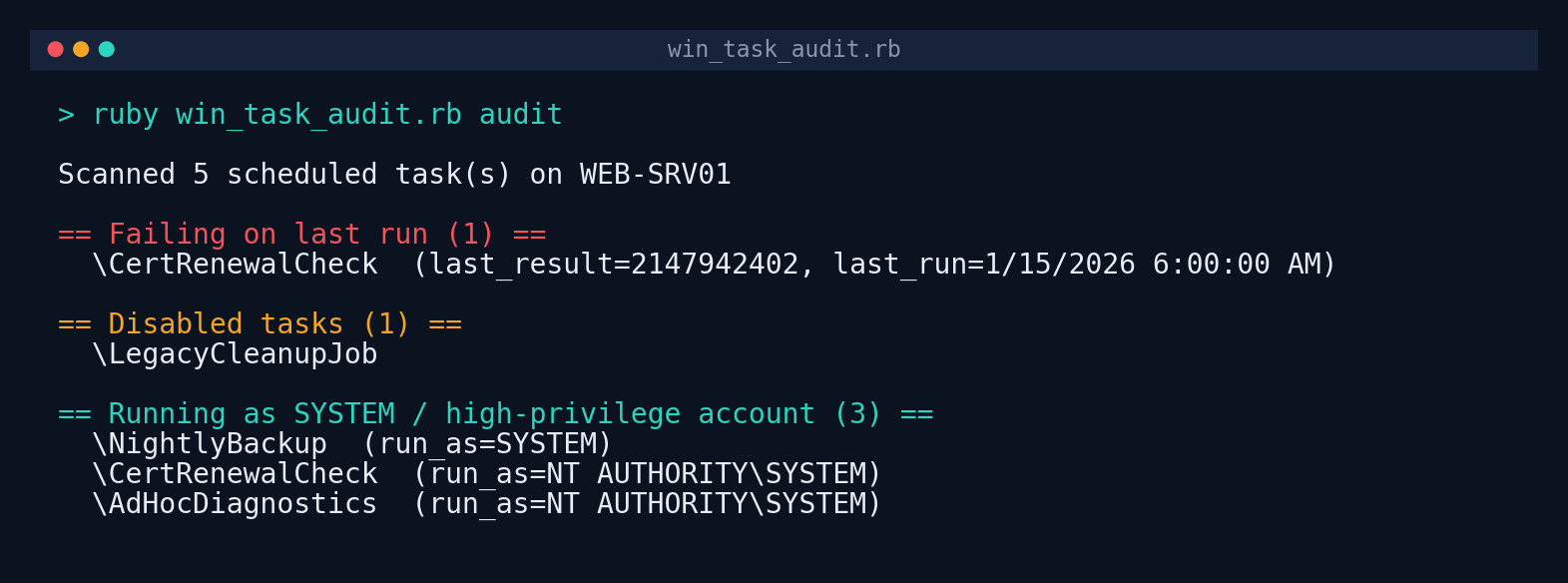
Verified against a realistic captured schtasks /query /fo CSV /v sample (five tasks, including one with a non-zero
Last Result, one disabled, and three running under SYSTEM-level accounts) using audit --csv sample_tasks.csv:
Troubleshooting
| Symptom | Likely cause / fix |
|---|---|
| Audit only shows a handful of tasks you know exist | You’re not running from an elevated prompt. Non-admin sessions only see tasks owned by the current user; re-run as Administrator. |
schtasks /query failed: with an “Access is denied” message | Same as above, or the account lacks the SeBatchLogonRight/scheduler-related privilege on that host. Confirm with the same command run directly in an elevated cmd.exe. |
| A task shows as failing but you know it ran fine manually | Some legitimate operations (a script that calls exit(1) on “nothing to do”) return non-zero by design. Treat the audit as a starting point for investigation, not an automatic incident. |
CSV.parse raises a malformed-CSV error | Locale settings can change the CSV delimiter schtasks emits on some systems. Capture a sample with schtasks /query /fo CSV /v > out.csv and inspect the raw file before assuming the Ruby code is at fault. |
create succeeds but the task doesn’t appear to run | Check the account passed to --run-as has “Log on as a batch job” rights, and that the --start-time format matches your system locale (HH:MM, 24-hour, is safest). |
Extending This Script
- Stale task detection: parse
Next Run Timeand flag tasks with no future run scheduled but still enabled — often a sign the trigger configuration silently broke. - Config-driven provisioning: read a YAML list of desired tasks and reconcile against the live audit — create missing ones, flag drift on existing ones — the same declarative pattern configuration management tools use.
- Multi-host rollup: combine this with the SSH fleet automation script in this series (adapted for WinRM or PsExec) to audit scheduled tasks across an entire Windows fleet in one pass.
- Export to a ticketing system: feed the
--jsonoutput into your ticketing or CMDB API to auto-file a ticket for every task found running as SYSTEM without documented ownership. - Event Log correlation: cross-reference
failingtasks against the Task Scheduler operational log (Event ID 201/202) viawevtutilfor the actual error detail, not just the exit code.