The Problem
You manage more than one Linux box. Maybe it’s four web servers behind a load balancer, maybe it’s forty. Sooner or later you need to run the same command everywhere at once: check disk space before a release, confirm a config file rolled out correctly, grab uptime after a patch window, or restart a service across the fleet. Doing this by hand — SSH into box one, run the command, SSH into box two, repeat — does not scale and does not leave you with a record of what happened where.
Configuration management tools like Ansible solve this properly for large fleets, but pulling in a whole CM stack is overkill when what you
actually need is “run this one command on these twelve hosts and tell me which ones failed.” That’s a 200-line Ruby script, not a new
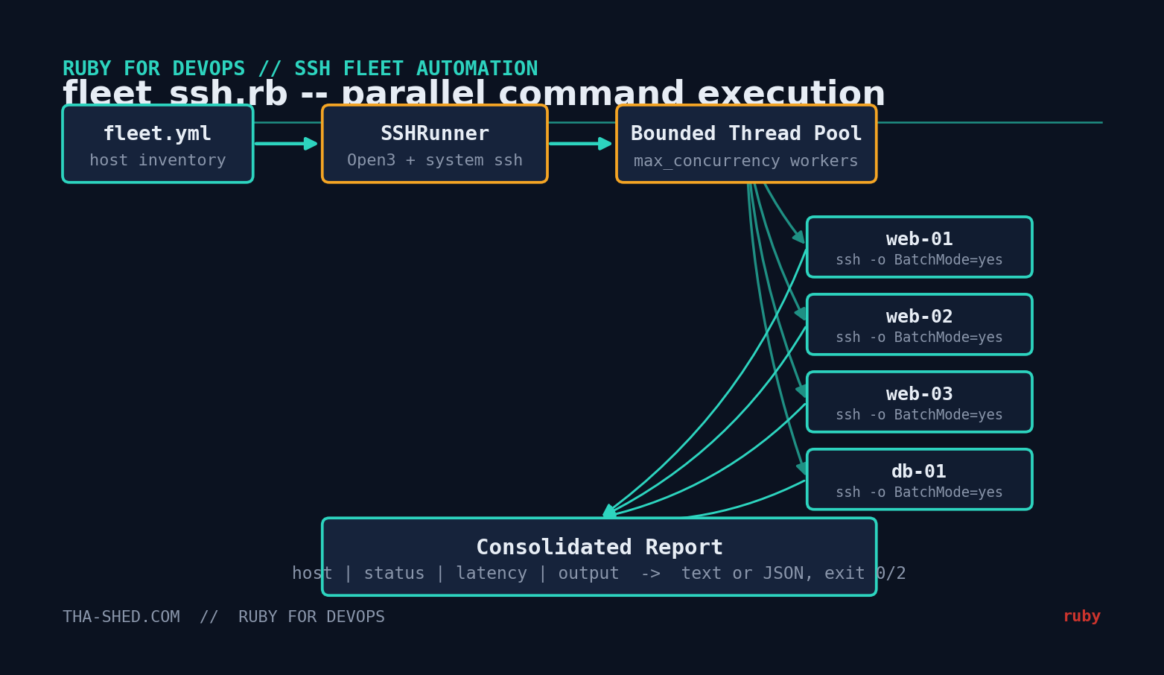
platform dependency. This tutorial builds fleet_ssh.rb: a small, dependency-free tool that reads a YAML inventory, runs a
command across every host in parallel, and prints a pass/fail report you can act on immediately — or feed into a monitoring pipeline as JSON.
Prerequisites
- Ruby 3.x (tested on 3.0.2, works unmodified on 3.1–3.3)
- The OpenSSH client (
ssh) installed and onPATH— present on essentially every Linux distro and macOS by default - No Ruby gems required. Everything here comes from the standard library:
optparse,open3,timeout,yaml,json - SSH key-based (passwordless) access to the target hosts — this script deliberately refuses to prompt for a password (
BatchMode=yes), which is what you want for automation
Why shell out tosshinstead of using the popularnet-sshgem? Two reasons: it keeps this script runnable on any box with zerogem installstep (handy for jump boxes and minimal containers), and it automatically inherits whatever SSH config, agent forwarding, andknown_hostsbehavior you’ve already set up system-wide. If you’re building something more elaborate — interactive sessions, SFTP, port forwarding —net-sshandnet-ssh-multiare the right tools; for “run a command everywhere and collect the output,” shelling out is simpler and just as reliable.
The Complete Code
#!/usr/bin/env ruby
# frozen_string_literal: true
#
# fleet_ssh.rb -- Run a command across a fleet of Linux servers over SSH,
# in parallel, and print a consolidated pass/fail report.
#
# No third-party gems required: this shells out to the system `ssh`
# binary via Open3 instead of using the net-ssh gem, so it works on any
# box that already has OpenSSH installed (which is effectively all of them).
#
# Usage:
#   ruby fleet_ssh.rb -c fleet.yml -- "uptime"
#   ruby fleet_ssh.rb -c fleet.yml --json -- "df -h /"
#
require 'optparse'
require 'open3'
require 'timeout'
require 'yaml'
require 'json'

# ---------------------------------------------------------------------------
# A single host entry loaded from the YAML inventory file.
# ---------------------------------------------------------------------------
Host = Struct.new(:name, :hostname, :port, :user, :identity, keyword_init: true) do
  def to_s
    "#{name} (#{user}@#{hostname}:#{port})"
  end
end

# ---------------------------------------------------------------------------
# Runs one command on one host via the system ssh client and captures
# everything we need for a report: exit status, timing, stdout, stderr.
# ---------------------------------------------------------------------------
class SSHRunner
  Result = Struct.new(:host, :ok, :duration, :stdout, :stderr, :error, keyword_init: true)

  def initialize(command, connect_timeout: 5, command_timeout: 15)
    @command = command
    @connect_timeout = connect_timeout
    @command_timeout = command_timeout
  end

  def run(host)
    start = Time.now
    ssh_args = build_ssh_args(host)

    stdout, stderr, status = nil, nil, nil
    begin
      Timeout.timeout(@command_timeout) do
        stdout, stderr, status = Open3.capture3(*ssh_args)
      end
    rescue Timeout::Error
      duration = Time.now - start
      return Result.new(host: host, ok: false, duration: duration,
                         stdout: '', stderr: '', error: "timed out after #{@command_timeout}s")
    end

    duration = Time.now - start
    Result.new(
      host: host,
      ok: status.success?,
      duration: duration,
      stdout: stdout.to_s.strip,
      stderr: stderr.to_s.strip,
      error: status.success? ? nil : "ssh exited #{status.exitstatus}"
    )
  end

  private

  def build_ssh_args(host)
    args = %w[ssh -o BatchMode=yes -o StrictHostKeyChecking=accept-new]
    args += ['-o', "ConnectTimeout=#{@connect_timeout}"]
    args += ['-p', host.port.to_s]
    args += ['-i', host.identity] if host.identity
    args << "#{host.user}@#{host.hostname}"
    args << @command
    args
  end
end

# ---------------------------------------------------------------------------
# Loads hosts from a YAML inventory file, e.g.:
#
#   default_user: deploy
#   default_identity: ~/.ssh/id_ed25519
#   hosts:
#     - name: web-01
#       hostname: 10.0.1.11
#     - name: web-02
#       hostname: 10.0.1.12
#       port: 2222
# ---------------------------------------------------------------------------
def load_inventory(path)
  data = YAML.safe_load(File.read(path))
  default_user = data['default_user'] || ENV['USER']
  default_identity = data['default_identity']
  default_port = data['default_port'] || 22

  (data['hosts'] || []).map do |h|
    Host.new(
      name: h['name'] || h['hostname'],
      hostname: h['hostname'],
      port: h['port'] || default_port,
      user: h['user'] || default_user,
      identity: h['identity'] || default_identity
    )
  end
end

# ---------------------------------------------------------------------------
# Runs the command on every host concurrently (bounded thread pool) and
# returns the results in the same order the hosts were given.
# ---------------------------------------------------------------------------
def run_fleet(hosts, command, max_concurrency: 10, **runner_opts)
  runner = SSHRunner.new(command, **runner_opts)
  results = Array.new(hosts.size)
  queue = Queue.new
  hosts.each_with_index { |h, i| queue << [h, i] }

  workers = Array.new([max_concurrency, hosts.size].min) do
    Thread.new do
      loop do
        host, index = begin
          queue.pop(true)
        rescue ThreadError
          break
        end
        results[index] = runner.run(host)
      end
    end
  end
  workers.each(&:join)
  results
end

def print_report(results)
  name_width = results.map { |r| r.host.name.length }.max || 10
  puts
  puts format("%-#{name_width}s  %-6s  %8s  %s", 'HOST', 'STATUS', 'TIME', 'OUTPUT / ERROR')
  puts '-' * (name_width + 55)

  results.each do |r|
    status = r.ok ? 'OK' : 'FAIL'
    first_line = r.ok ? r.stdout.lines.first&.strip.to_s : (r.error || r.stderr.lines.first&.strip.to_s)
    puts format("%-#{name_width}s  %-6s  %6.2fs  %s", r.host.name, status, r.duration, first_line)
  end

  puts
  ok_count = results.count(&:ok)
  puts "#{ok_count}/#{results.size} hosts succeeded"
end

# ---------------------------------------------------------------------------
# CLI entry point
# ---------------------------------------------------------------------------
if $PROGRAM_NAME == __FILE__
  options = { concurrency: 10, connect_timeout: 5, command_timeout: 15, json: false }

  parser = OptionParser.new do |opts|
    opts.banner = 'Usage: fleet_ssh.rb -c fleet.yml [options] -- "command"'
    opts.on('-c', '--config PATH', 'YAML inventory file (required)') { |v| options[:config] = v }
    opts.on('--concurrency N', Integer, 'Max parallel SSH connections (default 10)') { |v| options[:concurrency] = v }
    opts.on('--connect-timeout N', Integer, 'SSH connect timeout in seconds (default 5)') { |v| options[:connect_timeout] = v }
    opts.on('--command-timeout N', Integer, 'Max seconds to wait for the remote command (default 15)') { |v| options[:command_timeout] = v }
    opts.on('--json', 'Emit machine-readable JSON instead of a text report') { options[:json] = true }
    opts.on('-h', '--help', 'Show this help') { puts opts; exit }
  end
  parser.parse!

  command = ARGV.join(' ')
  if options[:config].nil? || command.empty?
    warn parser
    exit 1
  end

  hosts = load_inventory(options[:config])
  if hosts.empty?
    warn "No hosts found in #{options[:config]}"
    exit 1
  end

  results = run_fleet(
    hosts, command,
    max_concurrency: options[:concurrency],
    connect_timeout: options[:connect_timeout],
    command_timeout: options[:command_timeout]
  )

  if options[:json]
    puts JSON.pretty_generate(results.map do |r|
      { host: r.host.name, hostname: r.host.hostname, ok: r.ok, duration: r.duration.round(3),
        stdout: r.stdout, stderr: r.stderr, error: r.error }
    end)
  else
    print_report(results)
  end

  exit(results.all?(&:ok) ? 0 : 2)
end
Step-by-Step Walkthrough
1. The inventory file
Hosts live in a plain YAML file, not hardcoded in the script. That’s the difference between a one-off hack and something you’ll actually
keep using — you edit fleet.yml when your infrastructure changes, never the Ruby:
# fleet.yml
default_user: deploy
default_identity: ~/.ssh/id_ed25519
hosts:
  - name: web-01
    hostname: 10.0.1.11
  - name: web-02
    hostname: 10.0.1.12
  - name: db-01
    hostname: 10.0.2.20
    user: dba          # per-host override
    port: 2222
load_inventory reads this once and builds an array of Host structs, applying the default_* values
to any host that doesn’t override them.
2. Building the SSH command safely
SSHRunner#build_ssh_args constructs the ssh invocation as an array of arguments, not a single
interpolated string. This matters: Open3.capture3(*args) executes the array form directly via execve, without
going through a shell, so there’s no shell-injection risk even if a hostname or command contains special characters. The three flags doing
the real work are:
BatchMode=yes— never prompt for a password or passphrase; fail fast instead of hangingStrictHostKeyChecking=accept-new— auto-accept a host key we haven’t seen before (fine for known internal fleets), but still reject if a known host’s key changes, which is the classic man-in-the-middle warning you don’t want to silently ignoreConnectTimeout— how long to wait for the TCP+SSH handshake before giving up on an unreachable host
3. Timing out a hung command
A connect timeout doesn’t protect you from a remote command that hangs after the SSH session is established (an interactive prompt it’s
waiting on, a stuck process). That’s what the outer Timeout.timeout(@command_timeout) is for — it wraps the whole
Open3.capture3 call and raises after the configured number of seconds, which we catch and turn into a normal failed
Result instead of letting the script hang forever.
4. Parallel execution with a bounded thread pool
run_fleet pushes every host onto a thread-safe Queue, then spins up a fixed number of worker threads
(max_concurrency, capped at the host count) that each pull jobs off the queue until it’s empty. This is a classic
producer/consumer pattern and it matters for two reasons: SSH connections are I/O-bound, so Ruby’s Global VM Lock doesn’t stop you from
getting real concurrency here, and capping concurrency prevents a 200-host inventory from opening 200 simultaneous SSH connections and
hammering your bastion host or triggering connection-rate limits.
5. The report
Results are written back into the results array at the same index the host was read from, so output order matches your
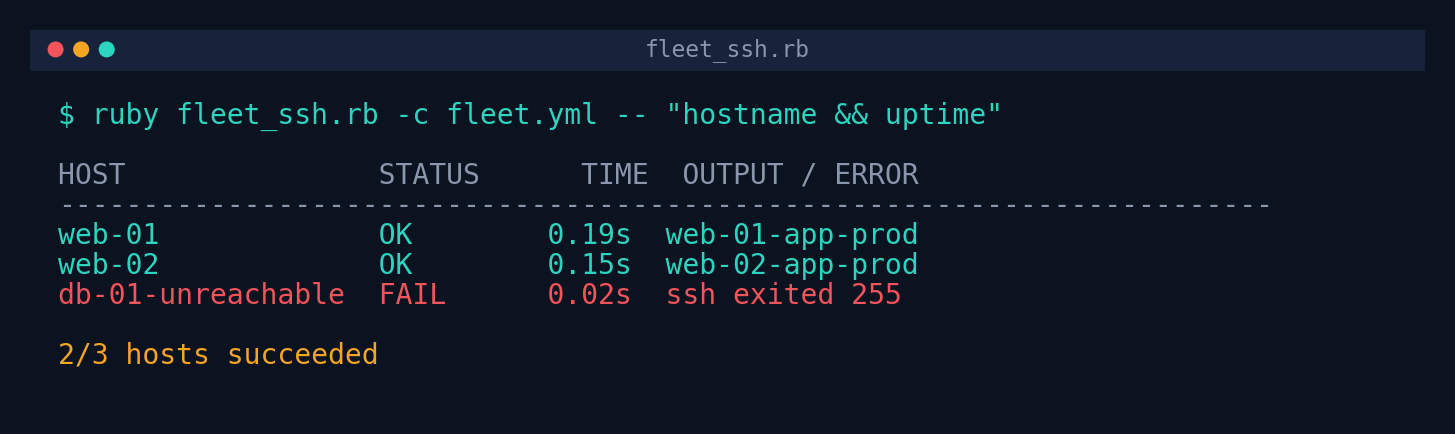
inventory file regardless of which thread finished first. print_report formats a simple aligned table; --json
gives you the same data as structured JSON for feeding into a dashboard, a Slack notifier, or a CI pipeline step. The script’s exit code is
0 only if every host succeeded, 2 otherwise — so you can use it directly as a CI/cron gate.
Example Output
Tested against a local OpenSSH server with three configured hosts (one deliberately pointed at a closed port to demonstrate failure handling):
And the same run with --json:
[
  {
    "host": "web-01",
    "hostname": "127.0.0.1",
    "ok": true,
    "duration": 0.147,
    "stdout": "/dev/sda1       9.6G  5.8G  3.8G  61% /",
    "stderr": "",
    "error": null
  },
  {
    "host": "db-01-unreachable",
    "hostname": "127.0.0.1",
    "ok": false,
    "duration": 0.013,
    "stdout": "",
    "stderr": "ssh: connect to host 127.0.0.1 port 2223: Connection refused",
    "error": "ssh exited 255"
  }
]
Troubleshooting
| Symptom | Likely cause / fix |
|---|---|
Permission denied (publickey) on every host | The user running the script doesn’t have its public key in the target’s ~/.ssh/authorized_keys, or identity in fleet.yml points to the wrong private key. Test manually: ssh -i <identity> user@host. |
Every host reports timed out after Ns | Usually a network path or security-group issue, not the script. Confirm with nc -zv host 22 from the same machine the script runs on. |
| Script hangs instead of failing fast | Check that BatchMode=yes is actually reaching ssh — if you’re running as a user with an interactive terminal and a broken key, some setups still show a prompt on the console even with BatchMode; run inside </dev/null redirection in cron to be extra safe. |
StrictHostKeyChecking rejects a host you expect to work | The host’s key changed (reimage, IP reuse). Verify intentionally, then remove the stale entry from known_hosts — don’t blanket-disable strict checking in production. |
| High concurrency causes some connections to fail under load | Lower --concurrency; many SSH daemons cap MaxStartups (unauthenticated connections in flight) well below what you’d expect. |
Extending This Script
- Per-host commands: add a
commandfield to each host entry in the YAML and fall back to the CLI argument as a default, so you can run different diagnostics on web vs. db tiers in one pass. - Retry logic: wrap
SSHRunner#runin a small retry loop with backoff for flaky links, same pattern used in the companion API health-check tutorial in this series. - Streaming output: swap
Open3.capture3forOpen3.popen3to stream stdout live for long-running commands instead of waiting for completion. - Slack/webhook alerts: POST the JSON report to a webhook when the exit code is non-zero, so failures show up in chat instead of requiring someone to run the script manually.
- Idempotent file pushes: combine this with
scporrsync(also shelled out via Open3) to distribute a config file fleet-wide and then run a validation command in the same pass.